Skip to content

Microsoft Dynamics 365 Business Central Functional Consultant

Here you have the best Microsoft MB-800 practice exam questions

  • Preview the first 5 of 307 questions for free
  • These questions were last updated on May 23, 2026
  • This site is not affiliated with or endorsed by Microsoft.
Question 1 of 307

DRAG DROP -

A company adds a user to Microsoft 365.

Existing user groups do not have the required permission sets for newly added users.

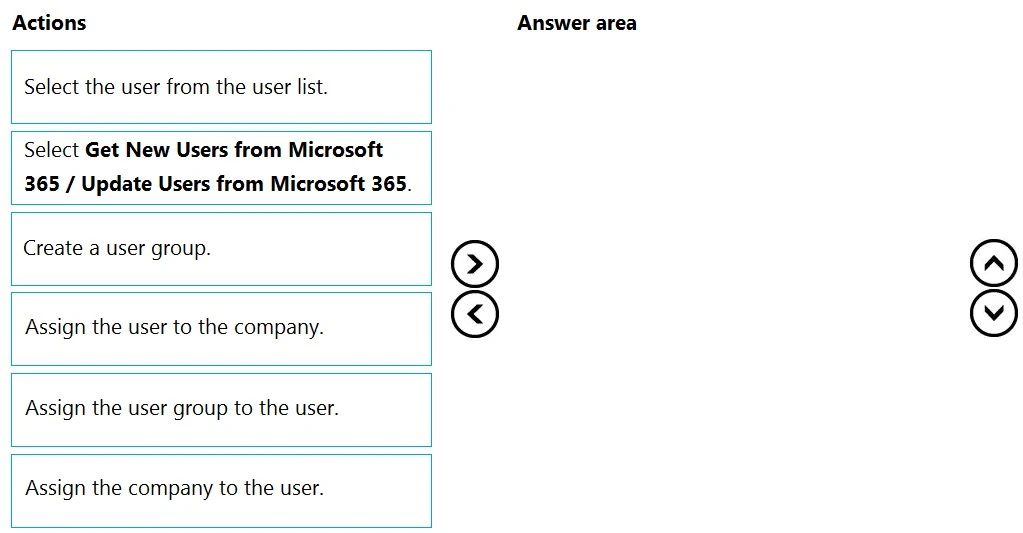
You need to assign a Dynamics 365 Business Central user group and permissions to the user and the company.

Which five actions should you perform in sequence? To answer, move the appropriate actions from the list of actions to the answer area and arrange them in the correct order.

NOTE: More than one order of answer choices is correct. You will receive credit for any of the correct orders you select.

Select and Place:

Exam MB-800: Question 1 - Image 1
Answer

Suggested Answer

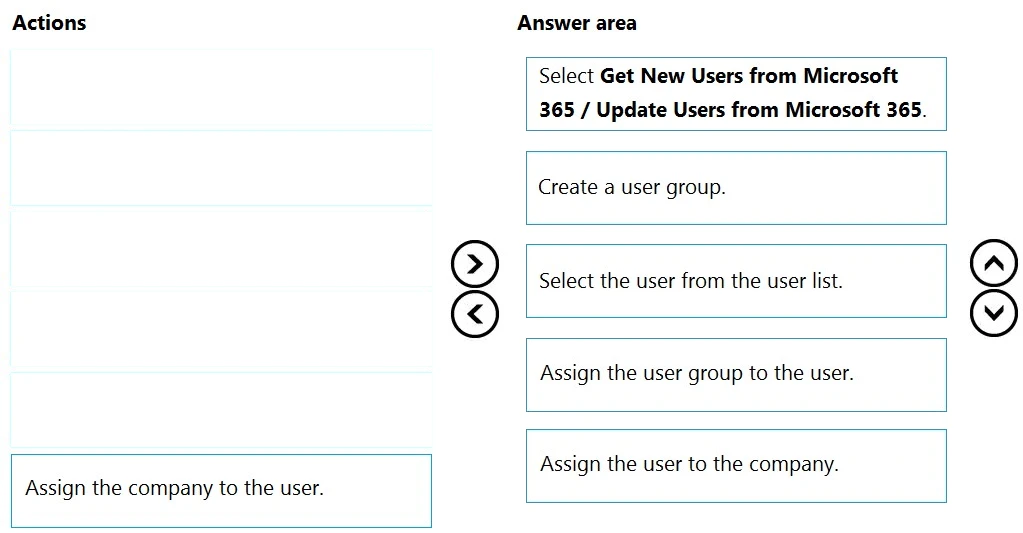
Step 1: Select Get New Users from Microsoft 365/ Update Users from Microsoft 365
After you add users or change user information in the Microsoft 365 Admin Center, you can quickly import the user information to Business Central.
Sign in to Business Central using an administrator account.
Choose the Lightbulb that opens the Tell Me feature. icon, enter Users, and then choose the related link.
Choose Update Users from Microsoft 365.
Step 2: Create a user group.
When you create users in Business Central you can assign specific permissions to them through permission sets and organize users in user groups. User groups make it easier to manage permissions for multiple users at the same time.
Step 3: Select the user from the user list.
Step 4: Assign the user group to the user.
In Business Central you can add users to user groups. This makes it easier to assign the same permission sets to multiple users.
Step 5: Assign the company to the user.
We add the user to the Company role.
Note: After you create users, you must assign security roles for them to use. In the Manage User Roles dialog box, select the security role or roles you want for the user or users, and then choose OK.
Reference:
https://docs.microsoft.com/en-us/dynamics365/business-central/ui-how-users-permissions https://business-central.to-increase.com/md/en-US/ui-how-users-permissions Exam MB-800: Question 1 - Image 2
Question 2 of 307

A company uses Dynamics 365 Business Central.

When users create sales documents, the system MUST display an alert that shows the customer's remaining credit.

The alert MUST also notify the user if the customer has any overdue payments.

You need to configure a credit limit and overdue payment warning.

What should you do?

Answer

Suggested Answer

The suggested answer is C.

In Dynamics 365 Business Central, to display alerts for a customer's remaining credit and overdue payments when creating sales documents, you should configure the system to show both warnings. To achieve this, you need to select 'Both Warnings' in the Credit Warnings field within the Sales & Receivables Setup. This setting ensures that notifications for both credit limits and overdue balances are displayed, meeting the requirement of providing comprehensive credit-related alerts for users.

Community Votes7 votes
CSuggested
100%
Question 3 of 307

You configure a cloud-based printer in Dynamics 365 Business Central.

Purchase orders printed by users must automatically print to the cloud-based printer.

You need to create a setup record for the user, report, and printer combination.

On which page should you create the setup record?

Answer

Suggested Answer

The suggested answer is A.

In Dynamics 365 Business Central, the Printer Selections page is used to create a setup record for the user, report, and printer combination. This page allows you to specify the User ID, Report ID, and Printer Name to control where specific reports are printed automatically.

Community Votes13 votes
ASuggested
100%
Question 4 of 307

You are implementing Dynamics 365 Business Central Online.

Users must be added to Business Central for the first time.

You need to add the users.

Which action should you use?

Answer

Suggested Answer

The suggested answer is C.

To add users to Dynamics 365 Business Central Online for the first time, the correct action is to use 'Update Users from Microsoft 365'. This action allows the import of user information, including license assignments, from the Microsoft 365 Admin Center into Business Central.

Community Votes31 votes
CSuggested
97%
A
3%
Question 5 of 307

DRAG DROP -

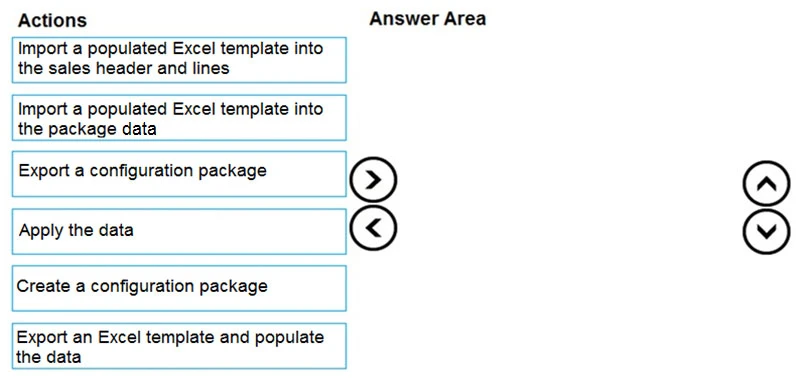
You set up a new company for a customer.

The customer provides you with a Microsoft Excel file that contains master data.

You need to import the master data by using configuration packages.

Which four actions should you perform in sequence? To answer, move the appropriate actions from the list of actions to the answer area and arrange them in the correct order.

Select and Place:

Exam MB-800: Question 5 - Image 1
Answer

Suggested Answer

Reference:
https://docs.microsoft.com/en-gb/dynamics365/business-central/admin-how-to-prepare-a-configuration-package https://docs.microsoft.com/en-gb/dynamics365/business-central/admin-how-to-configure-new-companies Exam MB-800: Question 5 - Image 2

302 more questions await

Unlock the full Microsoft MB-800 question bank

5 of 307 completed2%

Choose your plan

One-time payment · No subscription · No hidden fees

Standard

Quick preparation

$25

30 days access

30 day access to all questions
Instant free updates
Highest passing rate in industry
Printable PDF download
No money-back guarantee
Best Value

Premium

Guaranteed success

$60$35

90 days access

PDF

Printable PDF download

New

Save every question as a PDF for offline study or printing.

90 day access to all questions
Instant free updates
Highest passing rate in industry
Pass guaranteed or money back

100% Money-Back Guarantee

Don't pass? Full refund.

4.9/5

Based on 5,468+ reviews

Trusted by thousands of professionals

Join certified professionals who passed their exams with Examice

Examice helped me pass my AWS certification on the first try! The questions were incredibly similar to the real exam. Comments helped me understand answers I was struggling with.
S
Sarah C.
Cloud Engineer
Great results in a short prep time. Passed on my first attempt.
D
David K.
Network Engineer
I needed to pass an exam for work, and this website delivered. The quality for the price is outstanding, and the support is really good. I passed without issues.
M
Michael R.
Security Analyst
Skeptical at first, but impressed. Every question included clear, detailed explanations.
L
Lisa M.
Solutions Architect
The guarantee gave me confidence to invest in the premium package. Turns out I didn't need it. Passed comfortably. The explanations for each answer were incredibly detailed and helped me grasp security concepts that I'd been struggling with for months.
R
Robert H.
Cybersecurity Consultant
Used Examice for my PMP certification. The questions were well structured and covered all exam domains thoroughly.
J
James T.
IT Manager
After failing my first attempt with other study materials, I switched to Examice and passed confidently on my second attempt.
A
Anna W.
Data Engineer
The premium package was worth it. 90 days of access gave me the flexibility to study when it worked for me, without feeling rushed.
E
Emily J.
DevOps Engineer
Straightforward questions that matched the real exam perfectly. Studied for two weeks and passed with a great score.
K
Karen P.
Systems Administrator

Frequently Asked Questions

Everything you need to know. Contact us for more.

Our Microsoft MB-800 questions are based on real exam experiences and are continuously updated to match the current exam format. We maintain a +99% pass rate because our questions closely mirror what you'll see on the actual exam.

With our Premium package, you get a 100% money-back guarantee. If you don't pass your exam after studying with our materials, simply contact us with your exam results and we'll refund your purchase. Terms and conditions apply, read our full refund policy to learn more.

Our question bank is updated regularly based on feedback from recent exam takers. We typically review and update our content every week with reports about new questions or changes to the exam format.

Standard package access cannot be extended. However, Premium package gives you 90 days which is typically more than enough time to prepare thoroughly. If you need additional time, you can purchase a new package at any time.

This is a one-time payment with no recurring charges. Once you purchase, you get full access to all exam questions for the duration of your package (30 days for Standard, 90 days for Premium). No hidden fees or automatic renewals.

Pass on your first try

All 307questions · Detailed explanations · Printable PDF · 90 days access

Money-back guaranteeSecure checkout
$35

one-time payment