Endpoint Administrator
Here you have the best Microsoft MD-102 practice exam questions
- Preview the first 5 of 409 questions for free
- These questions were last updated on May 3, 2026
- This site is not affiliated with or endorsed by Microsoft.
Here you have the best Microsoft MD-102 practice exam questions
HOTSPOT -
Case study -
Overview -
ADatum Corporation is a consulting company that has a main office in Montreal and branch offices in Seattle and New York.
ADatum has a Microsoft 365 E5 subscription.
Environment -
Network Environment -
The network contains an on-premises Active Directory domain named adatum.com. The domain contains the servers shown in the following table.

ADatum has a hybrid Azure AD tenant named adatum.com.
Users and Groups -
The adatum.com tenant contains the users shown in the following table.

All users are assigned a Microsoft Office 365 license and an Enterprise Mobility + Security E3 license.
Enterprise State Roaming is enabled for Group1 and GroupA.
Group1 and Group2 have a Membership type of Assigned.
Devices -
ADatum has the Windows 10 devices shown in the following table.
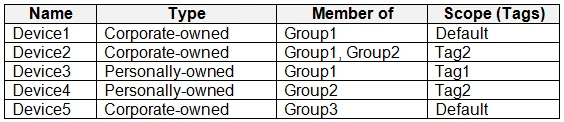
The Windows 10 devices are joined to Azure AD and enrolled in Microsoft Intune.
The Windows 10 devices are configured as shown in the following table.
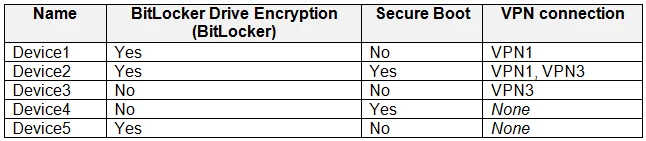
All the Azure AD joined devices have an executable file named C:\AppA.exe and a folder named D:\Folder1.
Microsoft Intune Configuration -
Microsoft Intune has the compliance policies shown in the following table.

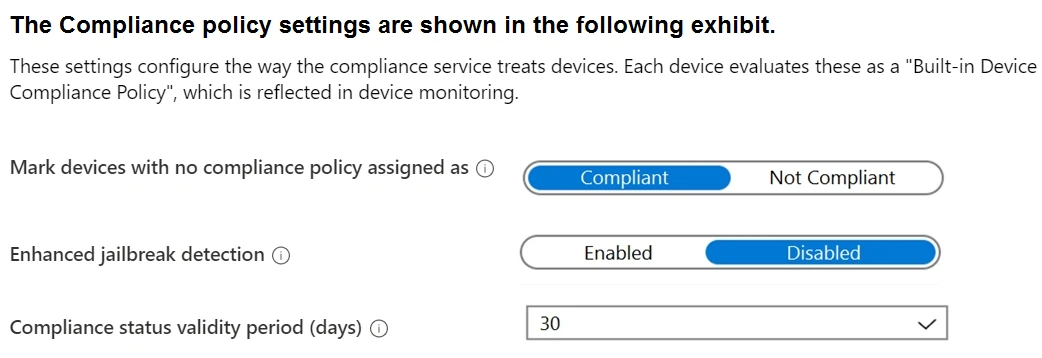
The Automatic Enrollment settings have the following configurations:
MDM user scope: GroupA -
MAM user scope: GroupB -
You have an Endpoint protection configuration profile that has the following Controlled folder access settings:
Name: Protection1 -
Folder protection: Enable -
List of apps that have access to protected folders: C:\*\AppA.exe
List of additional folders that need to be protected: D:\Folder1
Assignments:
Included groups: Group2, GroupB -
Windows Autopilot Configuration -
ADatum has a Windows Autopilot deployment profile configured as shown in the following exhibit.
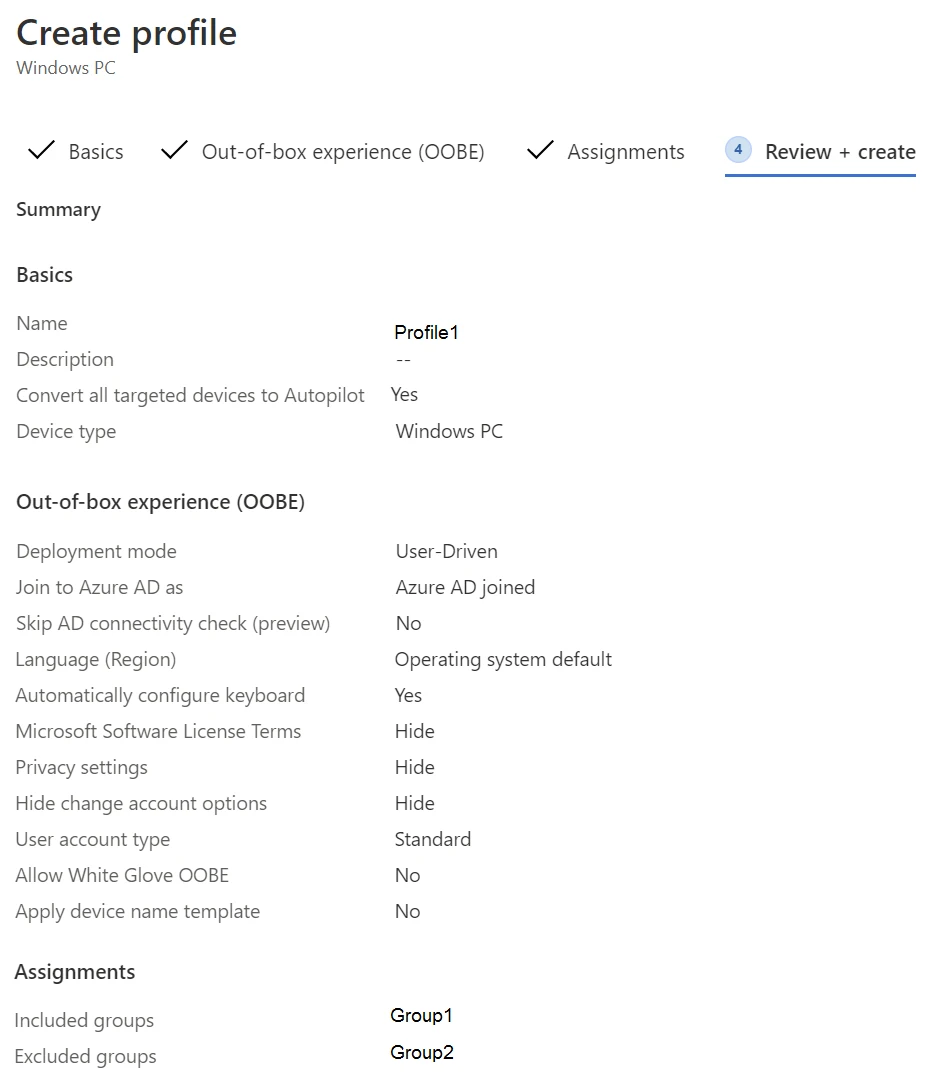
Currently, there are no devices deployed by using Windows Autopilot.
The Intune connector for Active Directory is installed on Server1.
Requirements -
Planned Changes -
ADatum plans to implement the following changes:
Purchase a new Windows 10 device named Device6 and enroll the device in Intune
New computers will be deployed by using Windows Autopilot and will be hybrid Azure AD joined.
Deployed a network boundary configuration profile that will have the following settings:
Name: Boundary1 -
Network boundary: 192.168.1.0/24
Scope tags: Tag1 -
Assignments:
Included groups: Group1, Group2 -
Deploy two VPN configuration profiles named Connection1 and Connection2 that will have the following settings:
Name: Connection1 -
Connection name: VPN1 -
Connection type: L2TP -
Assignments:
Included groups: Group1, Group2, GroupA
Excluded groups: --
Name: Connection2 -
Connection name: VPN2 -
Connection type: IKEv2 -
Assignments:
Included groups: GroupA -
Excluded groups: GroupB -
Technical Requirements -
ADatum must meet the following technical requirements:
Users in GroupA must be able to deploy new computers.
Administrative effort must be minimized.
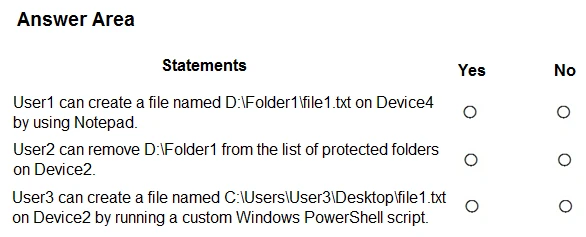
For each of the following statements, select Yes if the statement is true. Otherwise, select No.
NOTE: Each correct selection is worth one point.

Case study -
Overview -
ADatum Corporation is a consulting company that has a main office in Montreal and branch offices in Seattle and New York.
ADatum has a Microsoft 365 E5 subscription.
Environment -
Network Environment -
The network contains an on-premises Active Directory domain named adatum.com. The domain contains the servers shown in the following table.

ADatum has a hybrid Azure AD tenant named adatum.com.
Users and Groups -
The adatum.com tenant contains the users shown in the following table.

All users are assigned a Microsoft Office 365 license and an Enterprise Mobility + Security E3 license.
Enterprise State Roaming is enabled for Group1 and GroupA.
Group1 and Group2 have a Membership type of Assigned.
Devices -
ADatum has the Windows 10 devices shown in the following table.

The Windows 10 devices are joined to Azure AD and enrolled in Microsoft Intune.
The Windows 10 devices are configured as shown in the following table.

All the Azure AD joined devices have an executable file named C:\AppA.exe and a folder named D:\Folder1.
Microsoft Intune Configuration -
Microsoft Intune has the compliance policies shown in the following table.


The Automatic Enrollment settings have the following configurations:
MDM user scope: GroupA -
MAM user scope: GroupB -
You have an Endpoint protection configuration profile that has the following Controlled folder access settings:
Name: Protection1 -
Folder protection: Enable -
List of apps that have access to protected folders: C:\*\AppA.exe
List of additional folders that need to be protected: D:\Folder1
Assignments:
Included groups: Group2, GroupB -
Windows Autopilot Configuration -
ADatum has a Windows Autopilot deployment profile configured as shown in the following exhibit.

Currently, there are no devices deployed by using Windows Autopilot.
The Intune connector for Active Directory is installed on Server1.
Requirements -
Planned Changes -
ADatum plans to implement the following changes:
Purchase a new Windows 10 device named Device6 and enroll the device in Intune
New computers will be deployed by using Windows Autopilot and will be hybrid Azure AD joined.
Deployed a network boundary configuration profile that will have the following settings:
Name: Boundary1 -
Network boundary: 192.168.1.0/24
Scope tags: Tag1 -
Assignments:
Included groups: Group1, Group2 -
Deploy two VPN configuration profiles named Connection1 and Connection2 that will have the following settings:
Name: Connection1 -
Connection name: VPN1 -
Connection type: L2TP -
Assignments:
Included groups: Group1, Group2, GroupA -
Excluded groups: --
Name: Connection2 -
Connection name: VPN2 -
Connection type: IKEv2 -
Assignments:
Included groups: GroupA -
Excluded groups: GroupB -
Technical Requirements -
ADatum must meet the following technical requirements:
Users in GroupA must be able to deploy new computers.
Administrative effort must be minimized.
Which devices are registered by using the Windows Autopilot deployment service?
HOTSPOT -
Case study -
Overview -
ADatum Corporation is a consulting company that has a main office in Montreal and branch offices in Seattle and New York.
ADatum has a Microsoft 365 E5 subscription.
Environment -
Network Environment -
The network contains an on-premises Active Directory domain named adatum.com. The domain contains the servers shown in the following table.

ADatum has a hybrid Azure AD tenant named adatum.com.
Users and Groups -
The adatum.com tenant contains the users shown in the following table.

All users are assigned a Microsoft Office 365 license and an Enterprise Mobility + Security E3 license.
Enterprise State Roaming is enabled for Group1 and GroupA.
Group1 and Group2 have a Membership type of Assigned.
Devices -
ADatum has the Windows 10 devices shown in the following table.

The Windows 10 devices are joined to Azure AD and enrolled in Microsoft Intune.
The Windows 10 devices are configured as shown in the following table.

All the Azure AD joined devices have an executable file named C:\AppA.exe and a folder named D:\Folder1.
Microsoft Intune Configuration -
Microsoft Intune has the compliance policies shown in the following table.


The Automatic Enrollment settings have the following configurations:
MDM user scope: GroupA -
MAM user scope: GroupB -
You have an Endpoint protection configuration profile that has the following Controlled folder access settings:
Name: Protection1 -
Folder protection: Enable -
List of apps that have access to protected folders: C:\*\AppA.exe
List of additional folders that need to be protected: D:\Folder1
Assignments:
Included groups: Group2, GroupB -
Windows Autopilot Configuration -
ADatum has a Windows Autopilot deployment profile configured as shown in the following exhibit.

Currently, there are no devices deployed by using Windows Autopilot.
The Intune connector for Active Directory is installed on Server1.
Requirements -
Planned Changes -
ADatum plans to implement the following changes:
Purchase a new Windows 10 device named Device6 and enroll the device in Intune
New computers will be deployed by using Windows Autopilot and will be hybrid Azure AD joined.
Deployed a network boundary configuration profile that will have the following settings:
Name: Boundary1 -
Network boundary: 192.168.1.0/24
Scope tags: Tag1 -
Assignments:
Included groups: Group1, Group2 -
Deploy two VPN configuration profiles named Connection1 and Connection2 that will have the following settings:
Name: Connection1 -
Connection name: VPN1 -
Connection type: L2TP -
Assignments:
Included groups: Group1, Group2, GroupA
Excluded groups: --
Name: Connection2 -
Connection name: VPN2 -
Connection type: IKEv2 -
Assignments:
Included groups: GroupA -
Excluded groups: GroupB -
Technical Requirements -
ADatum must meet the following technical requirements:
Users in GroupA must be able to deploy new computers.
Administrative effort must be minimized.
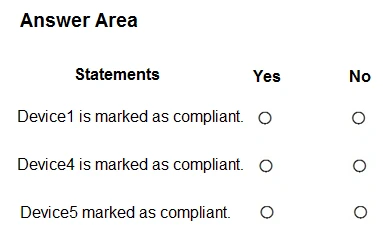
For each of the following statements, select Yes if the statement is true. Otherwise, select No.
NOTE: Each correct selection is worth one point.
Case study -
Overview -
ADatum Corporation is a consulting company that has a main office in Montreal and branch offices in Seattle and New York.
ADatum has a Microsoft 365 E5 subscription.
Environment -
Network Environment -
The network contains an on-premises Active Directory domain named adatum.com. The domain contains the servers shown in the following table.

ADatum has a hybrid Azure AD tenant named adatum.com.
Users and Groups -
The adatum.com tenant contains the users shown in the following table.

All users are assigned a Microsoft Office 365 license and an Enterprise Mobility + Security E3 license.
Enterprise State Roaming is enabled for Group1 and GroupA.
Group1 and Group2 have a Membership type of Assigned.
Devices -
ADatum has the Windows 10 devices shown in the following table.

The Windows 10 devices are joined to Azure AD and enrolled in Microsoft Intune.
The Windows 10 devices are configured as shown in the following table.

All the Azure AD joined devices have an executable file named C:\AppA.exe and a folder named D:\Folder1.
Microsoft Intune Configuration -
Microsoft Intune has the compliance policies shown in the following table.


The Automatic Enrollment settings have the following configurations:
MDM user scope: GroupA -
MAM user scope: GroupB -
You have an Endpoint protection configuration profile that has the following Controlled folder access settings:
Name: Protection1 -
Folder protection: Enable -
List of apps that have access to protected folders: C:\*\AppA.exe
List of additional folders that need to be protected: D:\Folder1
Assignments:
Included groups: Group2, GroupB -
Windows Autopilot Configuration -
ADatum has a Windows Autopilot deployment profile configured as shown in the following exhibit.

Currently, there are no devices deployed by using Windows Autopilot.
The Intune connector for Active Directory is installed on Server1.
Requirements -
Planned Changes -
ADatum plans to implement the following changes:
Purchase a new Windows 10 device named Device6 and enroll the device in Intune
New computers will be deployed by using Windows Autopilot and will be hybrid Azure AD joined.
Deployed a network boundary configuration profile that will have the following settings:
Name: Boundary1 -
Network boundary: 192.168.1.0/24
Scope tags: Tag1 -
Assignments:
Included groups: Group1, Group2 -
Deploy two VPN configuration profiles named Connection1 and Connection2 that will have the following settings:
Name: Connection1 -
Connection name: VPN1 -
Connection type: L2TP -
Assignments:
Included groups: Group1, Group2, GroupA
Excluded groups: --
Name: Connection2 -
Connection name: VPN2 -
Connection type: IKEv2 -
Assignments:
Included groups: GroupA -
Excluded groups: GroupB -
Technical Requirements -
ADatum must meet the following technical requirements:
Users in GroupA must be able to deploy new computers.
Administrative effort must be minimized.
You implement Boundary1 based on the planned changes.
Which devices have a network boundary of 192.168.1.0/24 applied?
HOTSPOT -
You have a Microsoft 365 subscription.
You use Microsoft Intune Suite to manage devices.
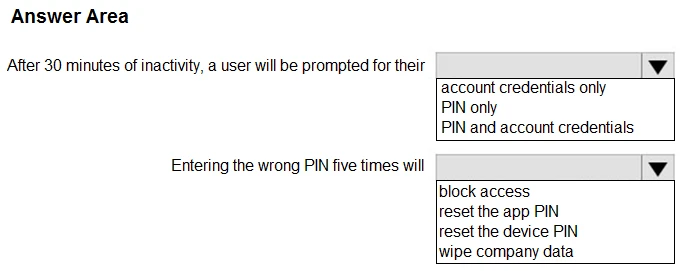
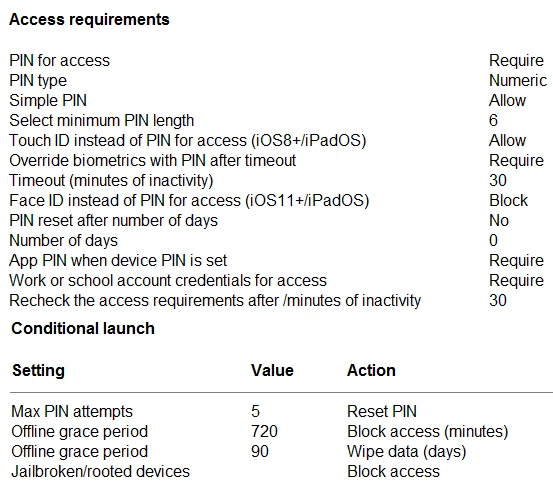
You have the iOS app protection policy shown in the following exhibit.

Use the drop-down menus to select the answer choice that completes each statement based on the information presented in the graphic.
NOTE: Each correct selection is worth one point.
Unlock the full Microsoft MD-102 question bank
One-time payment · No subscription · No hidden fees
Standard
Quick preparation
30 days access
Premium
Guaranteed success
90 days access
Printable PDF download
NewSave every question as a PDF for offline study or printing.
100% Money-Back Guarantee
Don't pass? Full refund.
Based on 4,420+ reviews
Join certified professionals who passed their exams with Examice
Examice helped me pass my AWS certification on the first try! The questions were incredibly similar to the real exam. Comments helped me understand answers I was struggling with.
Great results in a short prep time. Passed on my first attempt.
I needed to pass an exam for work, and this website delivered. The quality for the price is outstanding, and the support is really good. I passed without issues.
Skeptical at first, but impressed. Every question included clear, detailed explanations.
The guarantee gave me confidence to invest in the premium package. Turns out I didn't need it. Passed comfortably. The explanations for each answer were incredibly detailed and helped me grasp security concepts that I'd been struggling with for months.
Used Examice for my PMP certification. The questions were well structured and covered all exam domains thoroughly.
After failing my first attempt with other study materials, I switched to Examice and passed confidently on my second attempt.
The premium package was worth it. 90 days of access gave me the flexibility to study when it worked for me, without feeling rushed.
Straightforward questions that matched the real exam perfectly. Studied for two weeks and passed with a great score.
Everything you need to know. Contact us for more.
Our Microsoft MD-102 questions are based on real exam experiences and are continuously updated to match the current exam format. We maintain a +99% pass rate because our questions closely mirror what you'll see on the actual exam.
With our Premium package, you get a 100% money-back guarantee. If you don't pass your exam after studying with our materials, simply contact us with your exam results and we'll refund your purchase. Terms and conditions apply, read our full refund policy to learn more.
Our question bank is updated regularly based on feedback from recent exam takers. We typically review and update our content every week with reports about new questions or changes to the exam format.
Standard package access cannot be extended. However, Premium package gives you 90 days which is typically more than enough time to prepare thoroughly. If you need additional time, you can purchase a new package at any time.
This is a one-time payment with no recurring charges. Once you purchase, you get full access to all exam questions for the duration of your package (30 days for Standard, 90 days for Premium). No hidden fees or automatic renewals.
All 409questions · Detailed explanations · Printable PDF · 90 days access
one-time payment