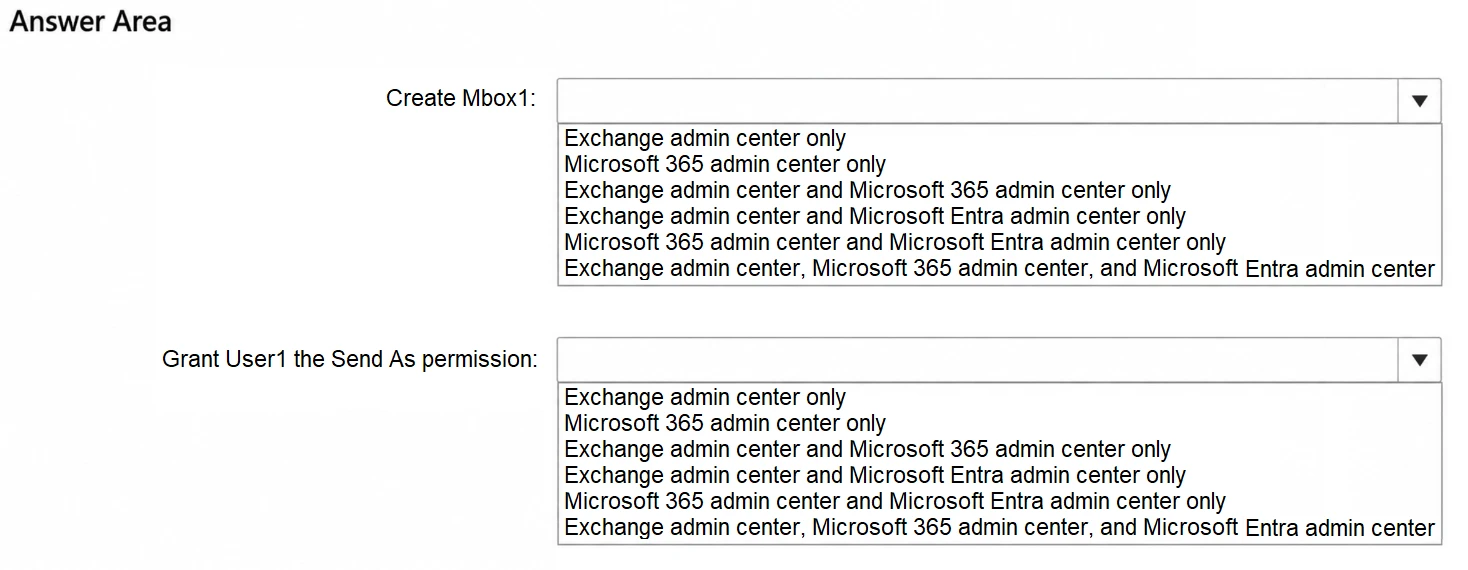
HOTSPOT -
This is a case study. Case studies are not timed separately from other exam sections. You can use as much exam time as you would like to complete each case study. However, there might be additional case studies or other exam sections. Manage your time to ensure that you can complete all the exam sections in the time provided. Pay attention to the Exam Progress at the top of the screen so you have sufficient time to complete any exam sections that follow this case study.
To answer the case study questions, you will need to reference information that is provided in the case. Case studies and associated questions might contain exhibits or other resources that provide more information about the scenario described in the case. Information provided in an individual question does not apply to the other questions in the case study.
A Review Screen will appear at the end of this case study. From the Review Screen, you can review and change your answers before you move to the next exam section. After you leave this case study, you will NOT be able to return to it.
To start the case study -
To display the first question in this case study, select the “Next” button. To the left of the question, a menu provides links to information such as business requirements, the existing environment, and problem statements. Please read through all this information before answering any questions. When you are ready to answer a question, select the “Question” button to return to the question.
Contoso, Ltd. is a consulting company that has a main office in San Francisco and a branch office in Dallas.
Existing Environment -
Microsoft Entra configuration -
Contoso has an Azure subscription.
Contoso has a Microsoft 365 E5 subscription.
Contoso has a Microsoft Entra tenant named contoso.com. The tenant has an administrative unit named AU1 that contains the following membership rule.
(device.deviceTrustType –eq “Workplace”) and (device.deviceOSType –in [“Windows”, “Android”])
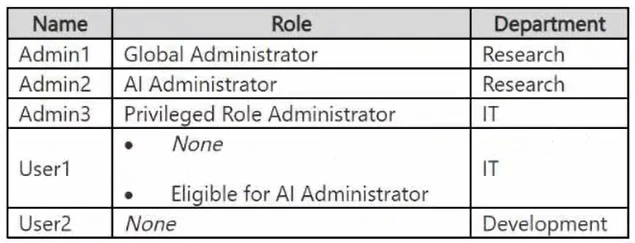
The tenant contains the cloud-only users shown in the following table.
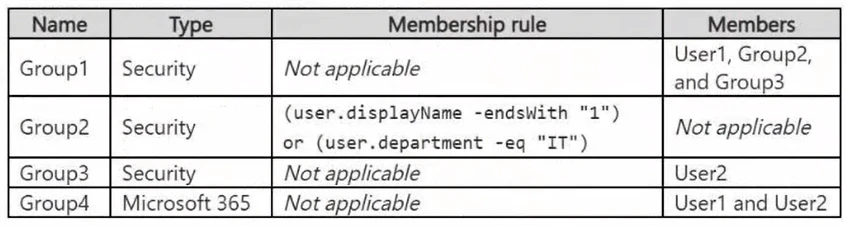
The tenant contains the groups shown in the following table.
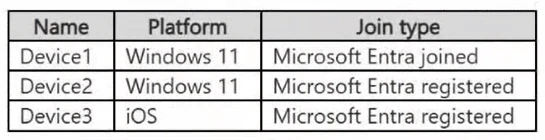
The tenant contains the devices shown in the following table.
All the devices are managed by using Microsoft Intune.
Microsoft Entra authentication methods
Contoso contains an Authentication methods policy for Microsoft Authenticator that has the following settings:
Include: Group1 -
Exclude: Group3 -
Authentication mode: Passwordless
Privileged Identity Management (PIM) configuration
Privileged roles are managed by using Privileged Identity Management (PIM).
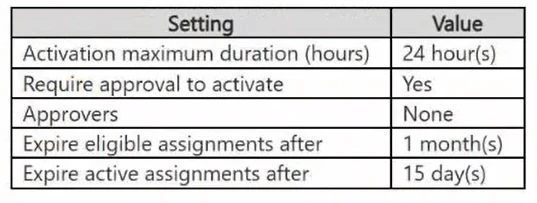
The PIM settings for the AI Administrator role are configured as shown in the following table.
Email configuration -
Each user has a Microsoft Exchange mailbox.
Contoso contains an anti-spam outbound policy named Antispam1 that has the following configurations:
Included groups: Group4 -
Excluded users: User2 -
Set an external message limit: 3
Set an internal message limit: 5
Set a daily message limit: 13 -
Restriction placed on users who reach the message limit: Restrict the user from sending mail
Microsoft SharePoint configuration
Contoso has a Microsoft SharePoint site named Site1 that stores the following types of content and various other documents:
Project documents: All the documents have a project code that includes the letters PR, followed by a dash and nine digits (for example PR-123456789).
Proposal documents: All the documents have a customer ID that includes seven to 10 alphanumerical characters. All the customer IDs are recorded in a Microsoft Excel workbook.
Feedback forms: All the documents were created by using the same template.
Microsoft AI services -
Contoso implements the following Microsoft AI services:
Microsoft 365 Copilot for selected users
Microsoft Foundry agents, including an agent named Agent1
Requirements -
Planned changes -
Contoso plans to implement the following changes:
Issue new Android devices to the Group1 users.
Assign Microsoft 365 Copilot licenses to the users in Group1.
Add an additional email address alias for the users in Group4.
Create a Conditional Access policy named CAPolicy1 for Group3.
Disable web search for Microsoft 365 Copilot and Microsoft 365 Copilot Chat.
Create classifiers to identify project documents and proposal documents stored on Site1.
Technical requirements -
Contoso identifies the following technical requirements:
The users in Group3 that access Microsoft 365 resources from anonymous IP addresses must complete multifactor authentication (MFA).
Microsoft 365 Copilot responses must NOT use content from the project documents stored on Site1.
Microsoft 365 Copilot responses must use content from only Microsoft 365 locations.
The total costs of Agent1 must be monitored and evaluated monthly.
All the Android devices must be registered in Microsoft Entra.
Administrative effort must be minimized.
Administrative costs must be minimized.
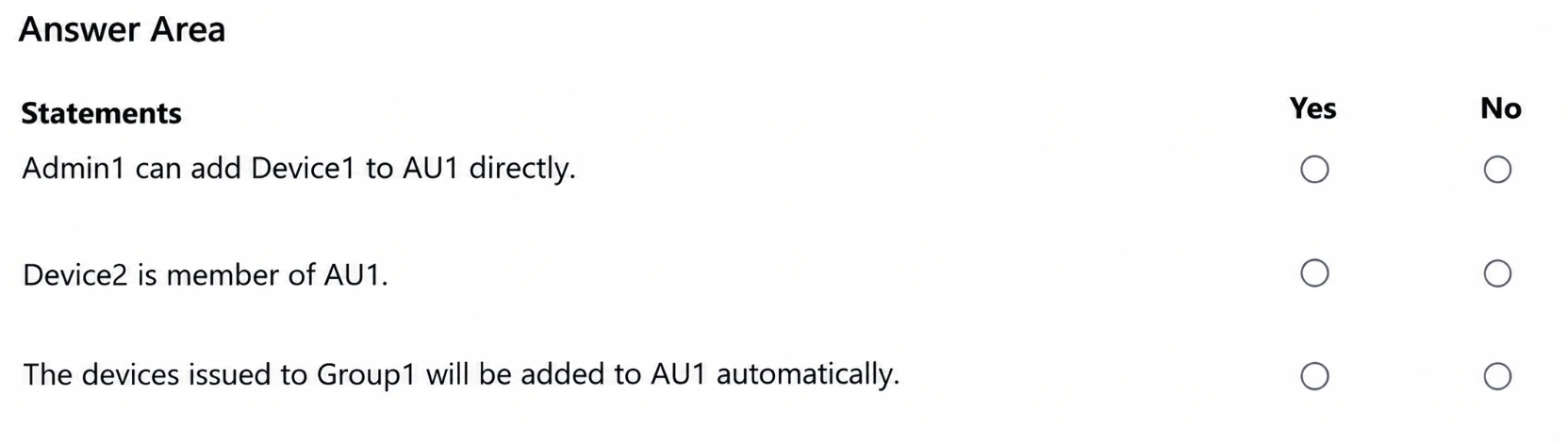
You need to evaluate the configuration of AU1.
For each of the following statements, select Yes if the statement is true. Otherwise, select No.
NOTE: Each correct selection is worth one point.