Cloud Fundamentals

Here you have the best Microsoft 98-369 practice exam questions

  • You have 39 total questions across 8 pages (5 per page)
  • These questions were last updated on February 20, 2026
  • This site is not affiliated with or endorsed by Microsoft.
Question 1 of 39

HOTSPOT -
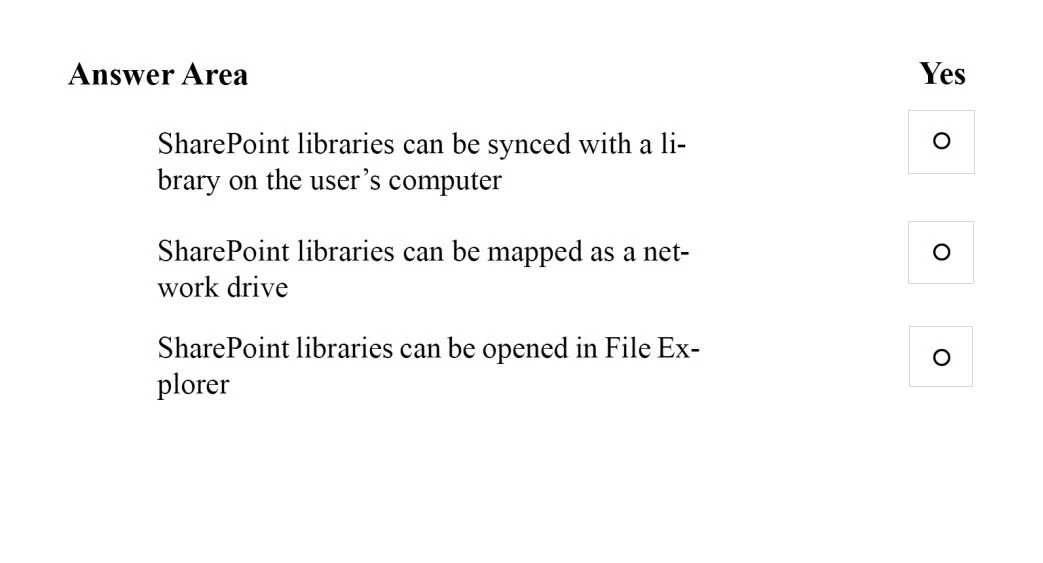
You are doing contract work for Contoso, Ltd. Company employees want to be able to view all Microsoft SharePoint libraries outside of their web browser without any additional software.
Instructions: For each of the following statements, select yes if the statement is true. Otherwise, select No. Each correct selection is worth one point.
Hot Area:
Exam 98-369: Question 1 - Image 1
Answer

Suggested Answer

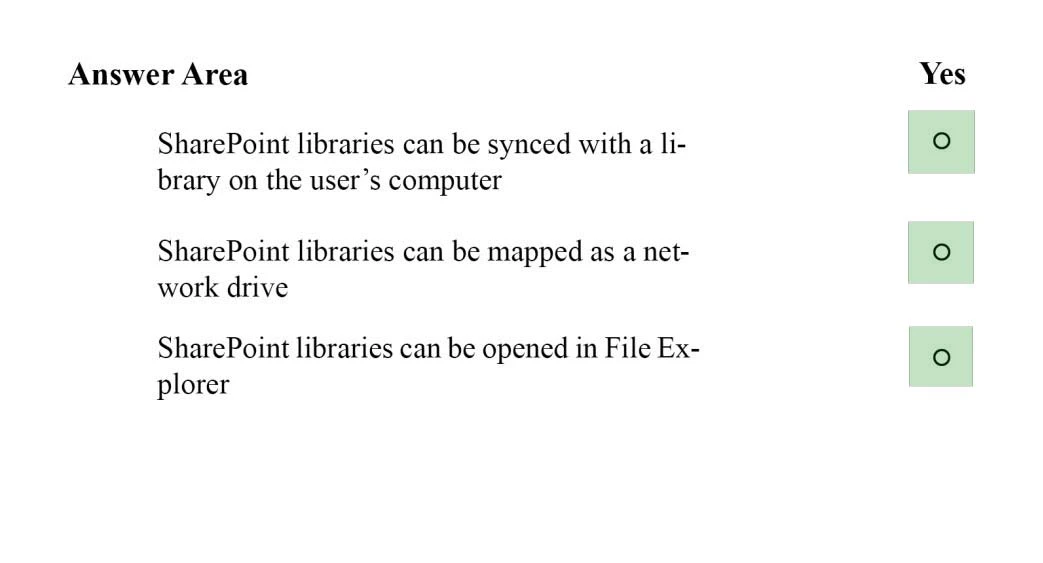
* You can synchronize a SharePoint library to your computer, and make the documents available to you when you are offline.
1. Make sure that the

OneDrive for Business client -
is installed on your machine.
2. Navigate to the library you want to synchronize.
Exam 98-369: Question 1 - Image 3
3. Click the Synchronize the current document library icon (
).
4. Click Sync Now.
* To map a network drive to a SharePoint Online library, follow these steps:
1. Sign in to the SharePoint Online site by using your Office 365 work or school account credentials. Make sure that you click to select the Keep me signed in check box.
2. Browse to the library that you want to map the drive for.
3. Click the LIBRARY tab on the ribbon, and then click Open with Explorer.
4. Click in an empty area of the Explorer window address bar, and then copy the URL of the library.
5. Right-click the Computer icon from the Desktop, or within Windows Explorer, and then click Map Network Drive.
6. Click the Connect to a Web site that you can store your documents and pictures link, and then click Next two times.
7. Paste the URL that you copied in step 4, click Next, and then follow the instructions in the wizard.
* Opening a SharePoint Library in a traditional "Explorer View" can make it easier to work with a number of files or folder maintenance tasks.
If it is a once-off requirement you could simply open the Library in Explorer view from the SharePoint Library toolbar or you may also Map a drive from Windows explorer for ongoing access to the Library.
Reference: How to configure and to troubleshoot mapped network drives that connect to SharePoint Online sites in Office 365 Exam 98-369: Question 1 - Image 2
Question 2 of 39

What is the minimum version of Internet Explorer needed to ensure that Microsoft Office 365 web-based applications have full functionality?
Answer

Suggested Answer

The suggested answer is C.

Community Votes

No votes yet

Join the discussion to cast yours

Question 3 of 39

You are an IT intern for a retail company.
The staff is not receiving inbound messages, and clients are not receiving the staffs outbound messages.
Which two features of Microsoft Exchange Online should you use to diagnose the issue? Choose two.
Answer

Suggested Answer

The suggested answer is A, D.

D: Office 365 Small Business admins can troubleshoot email delivery problems by using the Exchange Online message trace tool. The tool helps admins track specific messages sent in the past 90 days.
A: Office 365 users and admins can also use delivery reports in Outlook Web App to check the delivery status of messages theyve sent or received. If you sent a message to five people, for example, you can check the status of the delivery of that message to each person.
Go to Delivery reports settings:
1. Sign in to Outlook Web App.
2. At the top of the page, select Outlook (or Mail). Or, select the App launcher , and then select Outlook.
Exam 98-369: Question 3 - Image 1
Exam 98-369: Question 3 - Image 2
3. At the top of the page, select Settings
> Options.
4. In Options, select Organize email > Delivery reports. Or, in Options, under MAIL > Layout, select Delivery reports.
Reference: Troubleshoot email delivery using the Exchange Online message trace tool https://support.office.com/en-au/article/Troubleshoot-email-delivery-using-the-Exchange-Online-message-trace-tool-e7758b99-1896-41db-bf39-51e2dba21de6
Reference:
https://support.office.com/en-sg/article/Delivery-reports-6556a1d7-e988-4428-88de-48a4ae58555f AD
Community Votes

No votes yet

Join the discussion to cast yours

Question 4 of 39

You are the Microsoft Lync administrator for your company.
An employee needs to use Lync Online to call two external Skype contacts simultaneously. The employee can only call one contact at a time.
What should you advise the employee to do?
Answer

Suggested Answer

The suggested answer is D.

Community Votes

No votes yet

Join the discussion to cast yours

Question 5 of 39

You are the Microsoft Lync Online administrator for your company. A customer has reported an issue when signing in to the companys Lync Online Service.
When the customer attempts to sign in, the following error message is returned:
"The server is temporarily unavailable".
The server is up, and other customers are connected to it.
What is likely causing the connection issue?
Answer

Suggested Answer

The suggested answer is D.

Community Votes

No votes yet

Join the discussion to cast yours

About the Microsoft 98-369 Certification Exam

About the Exam

The Microsoft 98-369 (Cloud Fundamentals) validates your knowledge and skills. Passing demonstrates proficiency and can boost your career prospects in the field.

How to Prepare

Work through all 39 practice questions across 8 pages. Focus on understanding the reasoning behind each answer rather than memorizing responses to be ready for any variation on the real exam.

Why Practice Exams?

Practice exams help you familiarize yourself with the question format, manage your time, and reduce anxiety on the test day. Our 98-369 questions are regularly updated to reflect the latest exam objectives.