Windows 7 Enterprise Desktop Support Technician

Here you have the best Microsoft 70-685 practice exam questions

  • You have 118 total questions to study from
  • Each page has 5 questions, making a total of 24 pages
  • You can navigate through the pages using the buttons at the bottom
  • This questions were last updated on December 17, 2025
  • This site is not affiliated with or endorsed by Microsoft.
Question 1 of 118
All client computers on your company network run Windows 7 and are members of a Windows Server 2008 R2 domain. The R&D department staff are local administrators on their computers and are members of the R&D global security group.
A new version of a business software application is available on the network.
You plan to apply an AppLocker security policy to the R&D group.
You need to ensure that members of the R&D group are not allowed to upgrade the software.
What should you do?
Correct Answer: C
Exam 70-685: Question 1 - Image 1 http://technet.microsoft.com/en-us/library/ee619725(WS.10).aspx http://sourcedaddy.com/windows-7/applocker-rule-types.html C
Question 2 of 118
All client computers on your company network run Windows 7 and are members of an Active Directory Domain Services domain.
AppLocker is configured to allow only approved applications to run.
Employees with standard user account permissions are able to run applications that install into the user profile folder.
You need to prevent standard users from running unauthorized applications.
What should you do?
Correct Answer: A

Question 3 of 118
All client computers on your company network were recently upgraded from Windows Vista to Windows 7.
Several employees use a scanner to import document images into a database. They install a new scanning application on their computers. The application updates the device driver for the scanners as part of the installation process.
Employees report that the application can no longer connect to the scanner.
You need to ensure that the employees can use the scanner.
What should you do?
Correct Answer: A
Chapter 1 Lesson 1 p 17 -

Appendix C p 485 / 486 -

Chapter 5 p 275 / 276 -
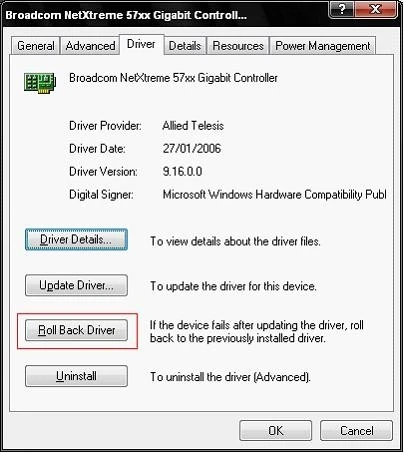
Exam 70-685: Question 3 - Image 1
How to Roll Back to the Previous Version of a Device Driver:
Device Driver Roll Back reinstalls the driver you were using previously and restores any driver settings that were changed when you added the new driver. To roll back a device driver to a previous version:
Log on to the computer by using an account with administrative privileges.
Click Start, and then click Control Panel.
Under Pick a category, click Performance and Maintenance.
Under or pick a Control Panel icon, click System.
On the Hardware tab, click Device Manager.
In the device list, expand the device type branch that you want to work with. For example, Display adapters.
Right-click the device that you want to work with, and then click Properties.
On the Driver tab, click Roll Back Driver. Click Yes when you receive the following message:
Are you sure you would like to roll back to the previous driver?
The previous device driver is restored. Click Close.
10. Quit Device Manager, and then click OK.
Note: that you cannot restore printer drivers with Device Driver Roll Back.
Driver Roll Back only allows you to roll back a driver once. In other words, Windows 7 only keeps a copy of the very last driver installed. It does not keep an archive of all previously installed drivers for the device. http://pcsupport.about.com/od/windows7/ht/roll-back-driver-windows-7.htm A

Question 4 of 118
All client computers on your company network run Windows 7. A standard Windows 7 image is loaded on all new computers on the network.
A department in your company purchases several tablet computers. Employees report that the pen interface does not work on the tablet computers.
You need to ensure that employees can use the pen interface.
What should you do?
Correct Answer: B
Chapter 6 p 296 -298 -
Start > Control Panel > Programs > Programs and Features > Turn Windows features on or off
Exam 70-685: Question 4 - Image 1
To turn a Windows feature on, select the check box next to the feature. Click OK.
To turn a Windows feature off, clear the check box. Click OK. B
Question 5 of 118
All client computers on your company network run Windows 7.
The preview displayed in the Content view of Windows Explorer and the Search box is considered a security risk by your company.
You need to ensure that documents cannot be previewed in the Content view.
What should you do?
Correct Answer: C