Administering Windows Server 2012

Here you have the best Microsoft 70-411 practice exam questions

  • You have 300 total questions to study from
  • Each page has 5 questions, making a total of 60 pages
  • You can navigate through the pages using the buttons at the bottom
  • This questions were last updated on December 10, 2025
  • This site is not affiliated with or endorsed by Microsoft.
Question 1 of 300
DRAG DROP -
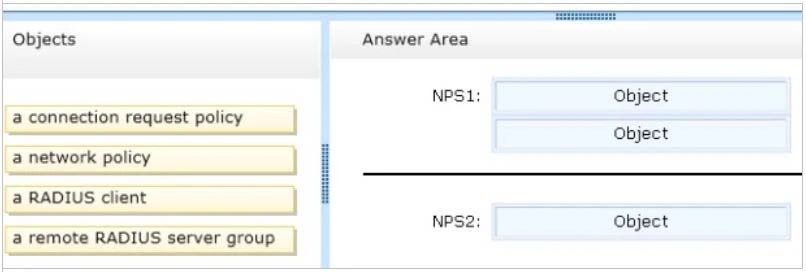
Your network contains an Active Directory forest named contoso.com. The forest contains a Network Policy Server (NPS) server named NPS1 and a VPN server named VPN1. VPN1 forwards all authentication requests to NPS1.
A partner company has an Active Directory forest named adatum.com. The adatum.com forest contains an NPS server named NPS2.
You plan to grant users from adatum.com VPN access to your network.
You need to authenticate the users from adatum.com on VPN1.
What should you create on each NPS server?
To answer, drag the appropriate objects to the correct NPS servers. Each object may be used once, more than once, or not at all. You may need to drag the split bar between panes or scroll to view content.
Select and Place:
Exam 70-411: Question 1 - Image 1
Correct Answer:
Exam 70-411: Question 1 - Image 2
Question 2 of 300
HOTSPOT -
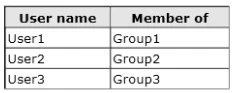
Your network contains an Active Directory domain named contoso.com. The domain contains the users shown in the following table.
Exam 70-411: Question 2 - Image 1
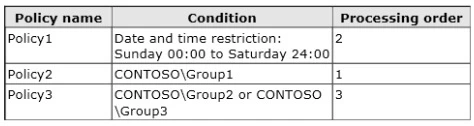
You have a Network Policy Server (NPS) server that has the network policies shown in the following table.
Exam 70-411: Question 2 - Image 2
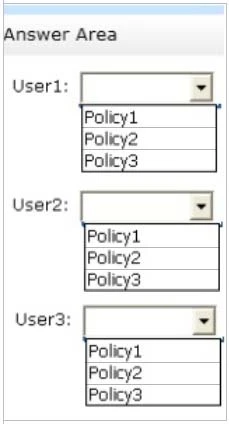
User1, User2, and User3 plan to connect to the network by using a VPN. You need to identify which network policy will apply to each user.
What should you identify?
To answer, select the appropriate policy for each user in the answer area.
Hot Area:
Exam 70-411: Question 2 - Image 3
Correct Answer:
Exam 70-411: Question 2 - Image 4
Question 3 of 300
Your network contains an Active Directory domain named contoso.com. The domain contains a server named Server1 that runs Windows Server 2012 R2.
Server1 has the following role services installed:
✑ DirectAccess and VPN (RRAS)

Network Policy Server -
Exam 70-411: Question 3 - Image 1
Remote users have client computers that run either Windows XP, Windows 7, or Windows 8.
You need to ensure that only the client computers that run Windows 7 or Windows 8 can establish VPN connections to Server1.
What should you configure on Server1?
Correct Answer: A

Question 4 of 300
HOTSPOT -
Your network contains an Active Directory domain named contoso.com. The domain contains two servers named Server1 and Server2. Server1 has the Network
Policy Server server role installed. Server2 has the DHCP Server server role installed. Both servers run Windows Server 2012 R2.
You are configuring Network Access Protection (NAP) to use DHCP enforcement.
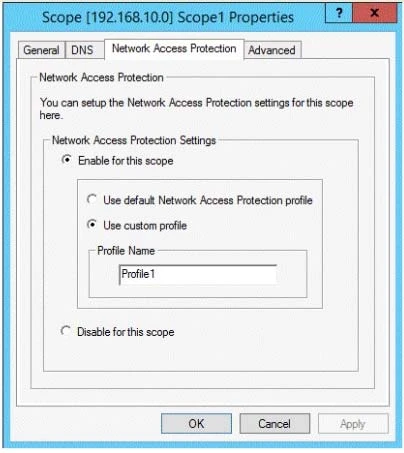
You configure a DHCP scope as shown in the exhibit. (Click the Exhibit button.)
Exam 70-411: Question 4 - Image 1
You need to ensure that non-compliant NAP clients receive different DHCP options than compliant NAP clients.
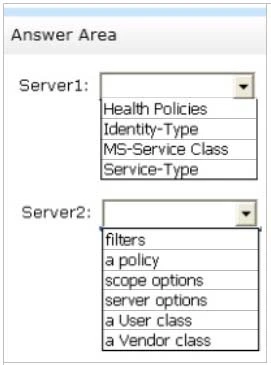
What should you configure on each server? To answer, select the appropriate options for each server in the answer area.
Hot Area:
Exam 70-411: Question 4 - Image 2
Correct Answer:
Health Policies -

Server Options -
* Health policy on the NAP server.
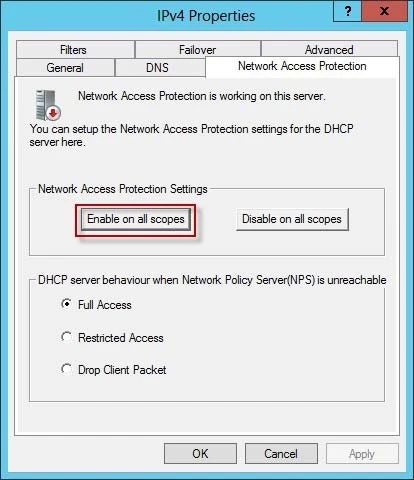
* The DHCP server must be NAP enabled.
Note: With DHCP enforcement, a computer must be compliant to obtain an unlimited access IP address configuration from a DHCP server. For noncompliant computers, network access is limited by an IP address configuration that allows access only to the restricted network. DHCP enforcement enforces health policy requirements every time a DHCP client attempts to lease or renew an IP address configuration. DHCP enforcement also actively monitors the health status of the
NAP client and renews the IPv4 address configuration for access only to the restricted network if the client becomes noncompliant. Exam 70-411: Question 4 - Image 3
Question 5 of 300
You are a network administrator of an Active Directory domain named contoso.com.
You have a server named Server1 that runs Windows Server 2012 R2. Server1 has the DHCP Server server role and the Network Policy Server role service installed.
You enable Network Access Protection (NAP) on all of the DHCP scopes on Server1. You need to create a DHCP policy that will apply to all of the NAP non- compliant DHCP clients.
Which criteria should you specify when you create the DHCP policy?
Correct Answer: B
Exam 70-411: Question 5 - Image 1
To configure a NAP-enabled DHCP server
1. On the DHCP server, click Start, click Run, in Open, type dhcpmgmt. smc, and then press ENTER.
2. In the DHCP console, open <servername>\IPv4.
3. Right-click the name of the DHCP scope that you will use for NAP client computers, and then click Properties.
4. On the Network Access Protection tab, under Network Access Protection Settings, choose Enable for this scope, verify that Use default Network Access
Protection profile is selected, and then click OK.
5. In the DHCP console tree, under the DHCP scope that you have selected, right-click Scope Options, and then click Configure Options.
6. On the Advanced tab, verify that Default User Class is selected next to User class.
7. Select the 003 Router check box, and in IP Address, under Data entry, type the IP address for the default gateway used by compliant NAP client computers, and then click Add.
8. Select the 006 DNS Servers check box, and in IP Address, under Data entry, type the IP address for each router to be used by compliant NAP client computers, and then click Add.
9. Select the 015 DNS Domain Name check box, and in String value, under Data entry, type your organization's domain name (for example, woodgrovebank. local), and then click Apply. This domain is a full-access network assigned to compliant NAP clients. 10.On the Advanced tab, next to User class, choose Default
Network Access Protection Class. 11.Select the 003 Router check box, and in IP Address, under Data entry, type the IP address for the default gateway used by noncompliant NAP client computers, and then click Add. This can be the same default gateway that is used by compliant NAP clients. 12.Select the 006 DNS
Servers check box, and in IP Address, under Data entry, type the IP address for each DNS server to be used by noncompliant NAP client computers, and then click Add. These can be the same DNS servers used by compliant NAP clients. 13.Select the 015 DNS Domain Name check box, and in String value, under Data entry, type a name to identify the restricted domain (for example, restricted. Woodgrovebank. local), and then click OK. This domain is a restricted-access network assigned to noncompliant NAP clients.
14.Click OK to close the Scope Options dialog box.
15.Close the DHCP console.
Reference: http: //technet.microsoft.com/en-us/library/dd296905%28v=ws.10%29.aspx B