Switch Stack Offline Configuration
(to supply a configuration to) a new switch before it joins the switch stack. You can configure in advance the stack member number, the switch type, and the interfaces associated with a switch that is not currently part of the stack. The configuration that you create on
.
global configuration command. The provisioned
configuration is automatically created when a switch is added to a switch stack and when no provisioned configuration exists.
When you configure the interfaces associated with a provisioned switch (for example, as part of a VLAN), the switch stack accepts the configuration, and the information appears in the running configuration. The interface associated with the provisioned switch is not active, operates as if it is administratively shut down, and the no shutdown interface configuration command does not return it to active service. The interface associated with the provisioned switch does not appear in the display of the specific feature; for example, it does not appear in the show vlan user EXEC command output.
The switch stack retains the provisioned configuration in the running configuration whether or not the provisioned switch is part of the stack. You can save the provisioned configuration to the startup configuration file by entering the copy running-config startup-config privileged EXEC command. The startup configuration file ensures that the switch stack can reload and can use the saved information whether or not the provisioned switch is part of the switch stack.
Effects of Adding a Provisioned Switch to a Switch Stack
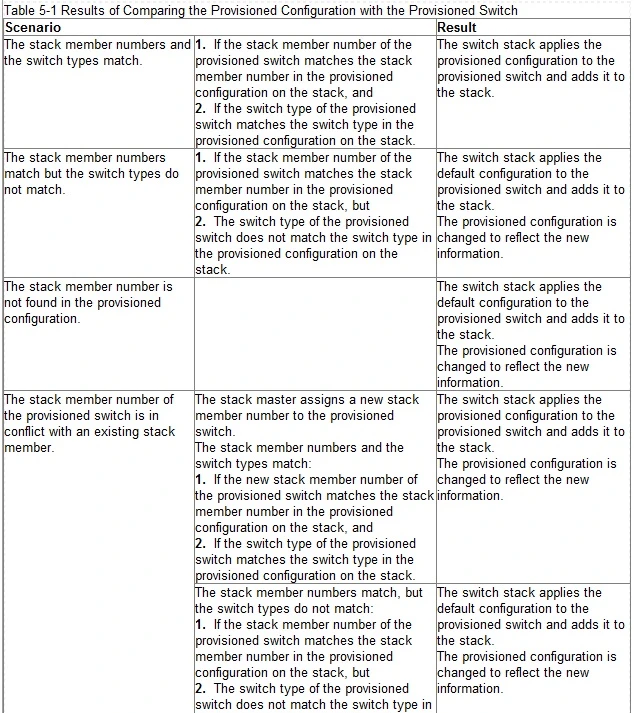
When you add a provisioned switch to the switch stack, the stack applies either the provisioned configuration or the default configuration.
Table 5-1 -
lists the events
that occur when the switch stack compares the provisioned configuration with the provisioned switch.
Reference: http://www.cisco.com/c/en/us/td/docs/switches/lan/catalyst3750x_3560x/software/release/12-2_55_se/configuration/guide/3750xscg/swstack.html
A