Skip to content

Red Hat Certified Engineer (RHCE)

Here you have the best RedHat EX300 practice exam questions

  • Preview the first 5 of 124 questions for free
  • These questions were last updated on May 15, 2026
  • This site is not affiliated with or endorsed by RedHat.
Question 1 of 124

SIMULATION -

RHCE Test Configuration Instructions

Information for the two systems you will use in test is the following: system1.group3.example.com: is one of the main sever. system2.group3.example.com: mainly used as a client.

Password for both of the two systems is atenorth

System's IP is provided by DHCP, you can regard it as normal, or you can reset to Static IP in accordance with the following requirements: system1.group3.example.com: 172.24.3.5 system2.group3.example.com: 172.24.3.10

The subnet mask is 255.255.255.0

Your system is a member of DNS domain group3.example.com. All systems in DNS domain group3.example.com are all in subnet 172.24.3.0/255.255.255.0, the same all systems in this subnet are also in group3.example.com, unless specialized, all network services required to be configured can be accessed by systems of domain group3. host.group3.example.com provides a centralized authentication service domain

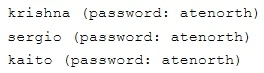
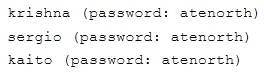
GROUP3.EXAMPLE.COM, both system1 and system2 have already been pre-configured to be the client for this domain, this domain provides the following user account:

Exam EX300: Question 1 - Image 1

Firewall is enabled by default, you can turn it off when deemed appropriate, other settings about firewall may be in separate requirements.

Your system will be restarted before scoring, so please ensure that all modifications and service configurations you made still can be operated after the restart without manual intervention, virtual machine instances of all examinations must be able to enter the correct multi-user level after restart without manual assistance, it will be scored zero if the test using virtual machine system cannot be restarted or be properly restarted.

Corresponding distribution packages for the testing using operating system Red Hat Enterprise Linux version can be found in the following link: http://server1.group3.example.com/rhel

Part of the requirements include host security, ensure your host security limit does not prevent the request to allow the host and network, although you correctly configured the network service but would have to allow the host or network is blocked, this also does not score.

You will notice that some requirements which clearly do not allow services be accessed by service domain my133t.org, systems of this domain are in subnet

172.25.1.0/252.255.255.0, and systems of these subnets also belong to my 133t.org domain.

PS: Notice that some test questions may depend on other exam questions, for example, you might be asked to perform a series of restrictions on a user, but this user creation may be required in other questions. For convenient identification, each exam question has some radio buttons to help you identify which questions you have already completed or not completed. Certainly, you do not need to care these buttons if you don't need them.

Configure SELINUX -

Modify the state of selinux to Enforcing mode.

Use VIM /etc/selinux -

Answer

Suggested Answer

Exam EX300: Question 1 - Image 2 Please see explanation
Question 2 of 124

SIMULATION -

RHCE Test Configuration Instructions

Information for the two systems you will use in test is the following: system1.group3.example.com: is one of the main sever. system2.group3.example.com: mainly used as a client.

Password for both of the two systems is atenorth

System's IP is provided by DHCP, you can regard it as normal, or you can reset to Static IP in accordance with the following requirements: system1.group3.example.com: 172.24.3.5 system2.group3.example.com: 172.24.3.10

The subnet mask is 255.255.255.0

Your system is a member of DNS domain group3.example.com. All systems in DNS domain group3.example.com are all in subnet 172.24.3.0/255.255.255.0, the same all systems in this subnet are also in group3.example.com, unless specialized, all network services required to be configured can be accessed by systems of domain group3. host.group3.example.com provides a centralized authentication service domain

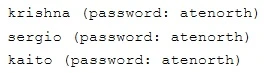
GROUP3.EXAMPLE.COM, both system1 and system2 have already been pre-configured to be the client for this domain, this domain provides the following user account:

  • Exam EX300: Question 2 - Image 1

Firewall is enabled by default, you can turn it off when deemed appropriate, other settings about firewall may be in separate requirements.

Your system will be restarted before scoring, so please ensure that all modifications and service configurations you made still can be operated after the restart without manual intervention, virtual machine instances of all examinations must be able to enter the correct multi-user level after restart without manual assistance, it will be scored zero if the test using virtual machine system cannot be restarted or be properly restarted.

Corresponding distribution packages for the testing using operating system Red Hat Enterprise Linux version can be found in the following link: http://server1.group3.example.com/rhel

Part of the requirements include host security, ensure your host security limit does not prevent the request to allow the host and network, although you correctly configured the network service but would have to allow the host or network is blocked, this also does not score.

You will notice that some requirements which clearly do not allow services be accessed by service domain my133t.org, systems of this domain are in subnet

172.25.1.0/252.255.255.0, and systems of these subnets also belong to my 133t.org domain.

PS: Notice that some test questions may depend on other exam questions, for example, you might be asked to perform a series of restrictions on a user, but this user creation may be required in other questions. For convenient identification, each exam question has some radio buttons to help you identify which questions you have already completed or not completed. Certainly, you do not need to care these buttons if you don't need them.

Configure the SSH Access as required:

Users can visit your two virtual machine systems via clients of domain group3.example.com through SSH remote.

Answer

Suggested Answer

Solution 1:

Modify file /etc/hosts.allow -
Add a line: sshd: 172.24.11.

Modify file /etc/hosts.deny -
Add a line: sshd: 172.25.0.
Both of them need to be configured.
Solution 2:

Add a firewall -
firewall-cmd ""zone=block --add-source=172.25.11.0/24 --permanent firewall-cmd ""reload
Both of them need to be configured
Question 3 of 124

SIMULATION -

RHCE Test Configuration InstructionsInformation for the two systems you will use in test is the following: system1.group3.example.com: is one of the main sever. system2.group3.example.com: mainly used as a client.

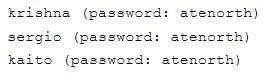
Password for both of the two systems is atenorthSystem's IP is provided by DHCP, you can regard it as normal, or you can reset to Static IP in accordance with the following requirements: system1.group3.example.com: 172.24.3.5 system2.group3.example.com: 172.24.3.10The subnet mask is 255.255.255.0Your system is a member of DNS domain group3.example.com. All systems in DNS domain group3.example.com are all in subnet 172.24.3.0/255.255.255.0, the same all systems in this subnet are also in group3.example.com, unless specialized, all network services required to be configured can be accessed by systems of domain group3. host.group3.example.com provides a centralized authentication service domainGROUP3.EXAMPLE.COM, both system1 and system2 have already been pre-configured to be the client for this domain, this domain provides the following user account:

Exam EX300: Question 3 - Image 1

Firewall is enabled by default, you can turn it off when deemed appropriate, other settings about firewall may be in separate requirements.Your system will be restarted before scoring, so please ensure that all modifications and service configurations you made still can be operated after the restart without manual intervention, virtual machine instances of all examinations must be able to enter the correct multi-user level after restart without manual assistance, it will be scored zero if the test using virtual machine system cannot be restarted or be properly restarted.Corresponding distribution packages for the testing using operating system Red Hat Enterprise Linux version can be found in the following link: http://server1.group3.example.com/rhelPart of the requirements include host security, ensure your host security limit does not prevent the request to allow the host and network, although you correctly configured the network service but would have to allow the host or network is blocked, this also does not score.You will notice that some requirements which clearly do not allow services be accessed by service domain my133t.org, systems of this domain are in subnet172.25.1.0/252.255.255.0, and systems of these subnets also belong to my 133t.org domain.PS: Notice that some test questions may depend on other exam questions, for example, you might be asked to perform a series of restrictions on a user, but this user creation may be required in other questions. For convenient identification, each exam question has some radio buttons to help you identify which questions you have already completed or not completed. Certainly, you do not need to care these buttons if you don't need them.

Customize the User Environment -Create a custom command on system1 and system2 named as qstat, and this custom command will execute the following command:/bin/ps - Ao pid,tt,user,fname,rszThis command is valid for all users in the system.

Answer

Suggested Answer

Exam EX300: Question 3 - Image 2
// You need to configure that on both two systems - Please see explanation
Question 4 of 124

SIMULATION -

RHCE Test Configuration Instructions

Information for the two systems you will use in test is the following: system1.group3.example.com: is one of the main sever. system2.group3.example.com: mainly used as a client.

Password for both of the two systems is atenorth

System's IP is provided by DHCP, you can regard it as normal, or you can reset to Static IP in accordance with the following requirements: system1.group3.example.com: 172.24.3.5 system2.group3.example.com: 172.24.3.10

The subnet mask is 255.255.255.0

Your system is a member of DNS domain group3.example.com. All systems in DNS domain group3.example.com are all in subnet 172.24.3.0/255.255.255.0, the same all systems in this subnet are also in group3.example.com, unless specialized, all network services required to be configured can be accessed by systems of domain group3. host.group3.example.com provides a centralized authentication service domain

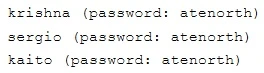
GROUP3.EXAMPLE.COM, both system1 and system2 have already been pre-configured to be the client for this domain, this domain provides the following user account:

  • Exam EX300: Question 4 - Image 1

Firewall is enabled by default, you can turn it off when deemed appropriate, other settings about firewall may be in separate requirements.

Your system will be restarted before scoring, so please ensure that all modifications and service configurations you made still can be operated after the restart without manual intervention, virtual machine instances of all examinations must be able to enter the correct multi-user level after restart without manual assistance, it will be scored zero if the test using virtual machine system cannot be restarted or be properly restarted.

Corresponding distribution packages for the testing using operating system Red Hat Enterprise Linux version can be found in the following link: http://server1.group3.example.com/rhel

Part of the requirements include host security, ensure your host security limit does not prevent the request to allow the host and network, although you correctly configured the network service but would have to allow the host or network is blocked, this also does not score.

You will notice that some requirements which clearly do not allow services be accessed by service domain my133t.org, systems of this domain are in subnet

172.25.1.0/252.255.255.0, and systems of these subnets also belong to my 133t.org domain.

PS: Notice that some test questions may depend on other exam questions, for example, you might be asked to perform a series of restrictions on a user, but this user creation may be required in other questions. For convenient identification, each exam question has some radio buttons to help you identify which questions you have already completed or not completed. Certainly, you do not need to care these buttons if you don't need them.

Configure port forwarding on the system1, as required:

  1. The systems in the network 172.24.11.0/24, local port 5423 for accessing system1 will be forwarded to 80
  2. This setting must be permanent
Answer

Suggested Answer

Use Graphical interface to configure
Use firewall-config to open the Graphical interface in CLI
Adjust the configuration: drop-down menu to permanent
Add a strategy to the public area of the "Port Forwarding"
Exam EX300: Question 4 - Image 2 systemctl restart firewalld.service // Reload the firewall strategy Please see explanation
Question 5 of 124

SIMULATION -

RHCE Test Configuration Instructions

Information for the two systems you will use in test is the following: system1.group3.example.com: is one of the main sever. system2.group3.example.com: mainly used as a client.

Password for both of the two systems is atenorth

System's IP is provided by DHCP, you can regard it as normal, or you can reset to Static IP in accordance with the following requirements: system1.group3.example.com: 172.24.3.5 system2.group3.example.com: 172.24.3.10

The subnet mask is 255.255.255.0

Your system is a member of DNS domain group3.example.com. All systems in DNS domain group3.example.com are all in subnet 172.24.3.0/255.255.255.0, the same all systems in this subnet are also in group3.example.com, unless specialized, all network services required to be configured can be accessed by systems of domain group3. host.group3.example.com provides a centralized authentication service domain

GROUP3.EXAMPLE.COM, both system1 and system2 have already been pre-configured to be the client for this domain, this domain provides the following user account:

Exam EX300: Question 5 - Image 1

Firewall is enabled by default, you can turn it off when deemed appropriate, other settings about firewall may be in separate requirements.

Your system will be restarted before scoring, so please ensure that all modifications and service configurations you made still can be operated after the restart without manual intervention, virtual machine instances of all examinations must be able to enter the correct multi-user level after restart without manual assistance, it will be scored zero if the test using virtual machine system cannot be restarted or be properly restarted.

Corresponding distribution packages for the testing using operating system Red Hat Enterprise Linux version can be found in the following link: http://server1.group3.example.com/rhel

Part of the requirements include host security, ensure your host security limit does not prevent the request to allow the host and network, although you correctly configured the network service but would have to allow the host or network is blocked, this also does not score.

You will notice that some requirements which clearly do not allow services be accessed by service domain my133t.org, systems of this domain are in subnet

172.25.1.0/252.255.255.0, and systems of these subnets also belong to my 133t.org domain.

PS: Notice that some test questions may depend on other exam questions, for example, you might be asked to perform a series of restrictions on a user, but this user creation may be required in other questions. For convenient identification, each exam question has some radio buttons to help you identify which questions you have already completed or not completed. Certainly, you do not need to care these buttons if you don't need them.

Configure Link Aggregation -

Configure a link between systeml.group3.example.com and system2. group3.example.com as required:

  • This link uses interfaces eth1 and eth2
  • This link still can work when one interface failes
  • This link uses the following address 172.16.3.20/255.255.255.0 on systeml
  • This link uses the following address 172.16.3.25/255.255.255.0 on system2
  • This link remains normal after the system is restarted
Answer

Suggested Answer

If you forget how to write the name, you can search examples in /var/share/doc/team-1.9/example_configs/
Exam EX300: Question 5 - Image 2 Please see explanation

119 more questions await

Unlock the full RedHat EX300 question bank

5 of 124 completed4%

Choose your plan

One-time payment · No subscription · No hidden fees

Standard

Quick preparation

$25

30 days access

30 day access to all questions
Instant free updates
Highest passing rate in industry
Printable PDF download
No money-back guarantee
Best Value

Premium

Guaranteed success

$60$35

90 days access

PDF

Printable PDF download

New

Save every question as a PDF for offline study or printing.

90 day access to all questions
Instant free updates
Highest passing rate in industry
Pass guaranteed or money back

100% Money-Back Guarantee

Don't pass? Full refund.

4.9/5

Based on 5,228+ reviews

Trusted by thousands of professionals

Join certified professionals who passed their exams with Examice

Examice helped me pass my AWS certification on the first try! The questions were incredibly similar to the real exam. Comments helped me understand answers I was struggling with.
S
Sarah C.
Cloud Engineer
Great results in a short prep time. Passed on my first attempt.
D
David K.
Network Engineer
I needed to pass an exam for work, and this website delivered. The quality for the price is outstanding, and the support is really good. I passed without issues.
M
Michael R.
Security Analyst
Skeptical at first, but impressed. Every question included clear, detailed explanations.
L
Lisa M.
Solutions Architect
The guarantee gave me confidence to invest in the premium package. Turns out I didn't need it. Passed comfortably. The explanations for each answer were incredibly detailed and helped me grasp security concepts that I'd been struggling with for months.
R
Robert H.
Cybersecurity Consultant
Used Examice for my PMP certification. The questions were well structured and covered all exam domains thoroughly.
J
James T.
IT Manager
After failing my first attempt with other study materials, I switched to Examice and passed confidently on my second attempt.
A
Anna W.
Data Engineer
The premium package was worth it. 90 days of access gave me the flexibility to study when it worked for me, without feeling rushed.
E
Emily J.
DevOps Engineer
Straightforward questions that matched the real exam perfectly. Studied for two weeks and passed with a great score.
K
Karen P.
Systems Administrator

Frequently Asked Questions

Everything you need to know. Contact us for more.

Our RedHat EX300 questions are based on real exam experiences and are continuously updated to match the current exam format. We maintain a +99% pass rate because our questions closely mirror what you'll see on the actual exam.

With our Premium package, you get a 100% money-back guarantee. If you don't pass your exam after studying with our materials, simply contact us with your exam results and we'll refund your purchase. Terms and conditions apply, read our full refund policy to learn more.

Our question bank is updated regularly based on feedback from recent exam takers. We typically review and update our content every week with reports about new questions or changes to the exam format.

Standard package access cannot be extended. However, Premium package gives you 90 days which is typically more than enough time to prepare thoroughly. If you need additional time, you can purchase a new package at any time.

This is a one-time payment with no recurring charges. Once you purchase, you get full access to all exam questions for the duration of your package (30 days for Standard, 90 days for Premium). No hidden fees or automatic renewals.

Pass on your first try

All 124questions · Detailed explanations · Printable PDF · 90 days access

Money-back guaranteeSecure checkout
$35

one-time payment