Skip to content

Microsoft Power BI Data Analyst

Here you have the best Microsoft PL-300 practice exam questions

  • Preview the first 5 of 397 questions for free
  • These questions were last updated on June 8, 2026
  • This site is not affiliated with or endorsed by Microsoft.
Question 1 of 397

HOTSPOT -

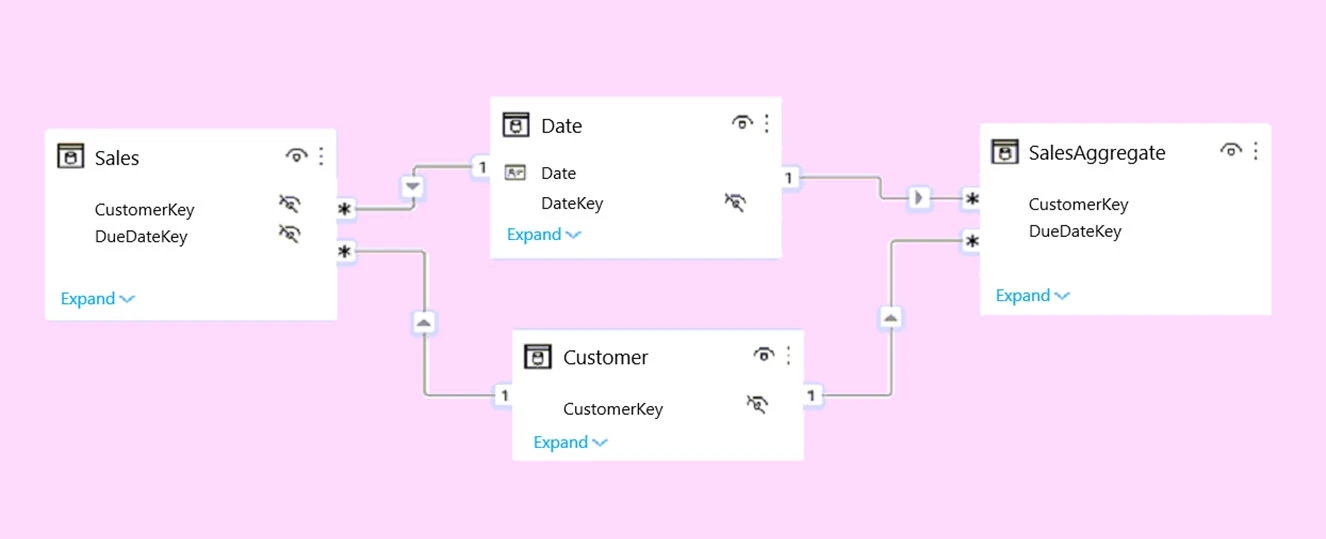
You plan to create the Power BI model shown in the exhibit. (Click the Exhibit tab.)
Exam PL-300: Question 1 - Image 1

The data has the following refresh requirements:

  • Customer must be refreshed daily.
  • Date must be refreshed once every three years.
  • Sales must be refreshed in near real time.
  • SalesAggregate must be refreshed once per week.

You need to select the storage modes for the tables. The solution must meet the following requirements:

  • Minimize the load times of visuals.
  • Ensure that the data is loaded to the model based on the refresh requirements.

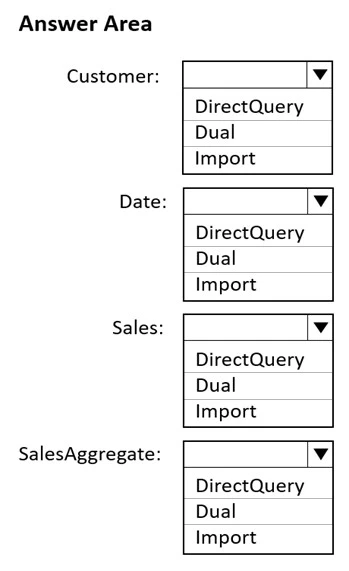
Which storage mode should you select for each table? To answer, select the appropriate options in the answer area.

NOTE: Each correct selection is worth one point.

Hot Area:
Exam PL-300: Question 1 - Image 2
Answer

Suggested Answer

Box 1: Dual -
Customer should use the dual storage mode.
Dual: Tables with this setting can act as either cached or not cached, depending on the context of the query that's submitted to the Power BI dataset. In some cases, you fulfill queries from cached data. In other cases, you fulfill queries by executing an on-demand query to the data source.
Note: You set the Storage mode property to one of these three values: Import, DirectQuery, and Dual.

Box 2: Dual -
You can set the dimension tables (Customer, Geography, and Date) to Dual to reduce the number of limited relationships in the dataset, and improve performance.

Box 3: DirectQuery -
Sales should use the DirectQuery storage mode.
DirectQuery: Tables with this setting aren't cached. Queries that you submit to the Power BI datasetג€"for example, DAX queriesג€"and that return data from
DirectQuery tables can be fulfilled only by executing on-demand queries to the data source. Queries that you submit to the data source use the query language for that data source, for example, SQL.

Box 4: Import -
Import: Imported tables with this setting are cached. Queries submitted to the Power BI dataset that return data from Import tables can be fulfilled only from cached data.
Reference:
https://docs.microsoft.com/en-us/power-bi/transform-model/desktop-storage-mode Exam PL-300: Question 1 - Image 3
Question 2 of 397

You have a project management app that is fully hosted in Microsoft Teams. The app was developed by using Microsoft Power Apps.

You need to create a Power BI report that connects to the project management app.

Which connector should you select?

Answer

Suggested Answer

The suggested answer is C.

In a Microsoft Teams environment where the project management app is developed using Microsoft Power Apps, the most appropriate connector to create a Power BI report would be 'Dataverse'. Microsoft Dataverse is a secure and scalable data service and app platform integrated with Power Apps and commonly used for storing application data in environments like Microsoft Teams. Therefore, connecting Power BI to Dataverse will allow for efficient and streamlined data integration from the project management app.

Community Votes69 votes
CSuggested
97%
A
3%
Question 3 of 397

For the sales department at your company, you publish a Power BI report that imports data from a Microsoft Excel file located in a Microsoft SharePoint folder.

The data model contains several measures.

You need to create a Power BI report from the existing data. The solution must minimize development effort.

Which type of data source should you use?

Answer

Suggested Answer

The suggested answer is A.

The most efficient way to create a new Power BI report from the existing data, considering the data model already contains several measures, is to use the Power BI dataset. By connecting to the Power BI dataset from the previously published report, you can reuse all existing measures and data modeling work. This minimizes the development effort because you won't need to redefine measures or data transformations that have already been established.

Community Votes146 votes
ASuggested
71%
B
27%
C
1%
D
1%
Question 4 of 397

You import two Microsoft Excel tables named Customer and Address into Power Query. Customer contains the following columns:

  • Customer ID
  • Customer Name
  • Phone
  • Email Address
  • Address ID

Address contains the following columns:

  • Address ID
  • Address Line 1
  • Address Line 2
  • City
  • State/Region
  • Country
  • Postal Code

Each Customer ID represents a unique customer in the Customer table. Each Address ID represents a unique address in the Address table.

You need to create a query that has one row per customer. Each row must contain City, State/Region, and Country for each customer.

What should you do?

Answer

Suggested Answer

The suggested answer is A.

To create a query that has one row per customer and includes the City, State/Region, and Country for each customer, you should merge the Customer and Address tables. By merging, you combine data from both tables based on a common column, in this case, the Address ID. This will allow you to bring together the relevant address information corresponding to each customer.

Community Votes65 votes
ASuggested
100%
Question 5 of 397

HOTSPOT -

You have two Azure SQL databases that contain the same tables and columns.

For each database, you create a query that retrieves data from a table named Customer.

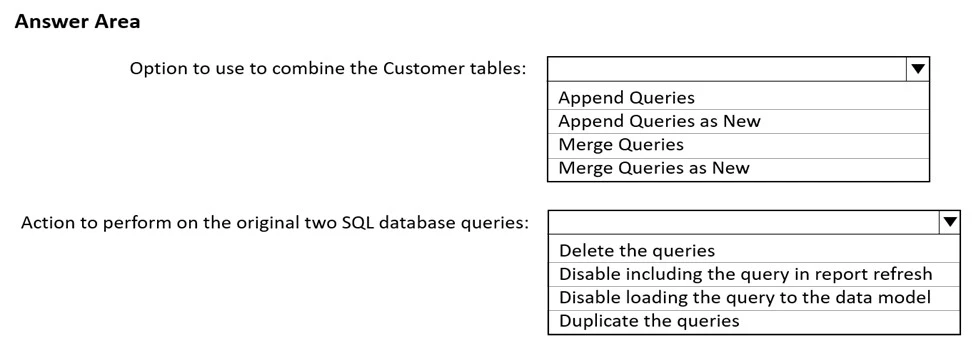
You need to combine the Customer tables into a single table. The solution must minimize the size of the data model and support scheduled refresh in powerbi.com.

What should you do? To answer, select the appropriate options in the answer area.

NOTE: Each correct selection is worth one point.

Hot Area:
Exam PL-300: Question 5 - Image 1
Answer

Suggested Answer

Box 1: Append Queries as New -
When you have additional rows of data that you'd like to add to an existing query, you append the query.
There are two append options:
* Append queries as new displays the Append dialog box to create a new query by appending multiple tables.
* Append queries displays the Append dialog box to add additional tables to the current query.
Incorrect: When you have one or more columns that you'd like to add to another query, you merge the queries.
Box 2: Disable loading the query to the data model
By default, all queries from Query Editor will be loaded into the memory of Power BI Model. You can disable the load for some queries, especially queries that used as intermediate transformation to produce the final query for the model.
Disabling Load doesn't mean the query won't be refreshed, it only means the query won't be loaded into the memory. When you click on Refresh model in Power
BI, or when a scheduled refresh happens even queries marked as Disable Load will be refreshed, but their data will be used as intermediate source for other queries instead of loading directly into the model. This is a very basic performance tuning tip, but very important when your Power BI model grows bigger and bigger.
Reference:
https://docs.microsoft.com/en-us/power-query/append-queries
https://radacad.com/performance-tip-for-power-bi-enable-load-sucks-memory-up Exam PL-300: Question 5 - Image 2

392 more questions await

Unlock the full Microsoft PL-300 question bank

5 of 397 completed1%

Choose your plan

Single payment · No subscription · No hidden fees

Standard

Quick preparation

$25

30 days access

30 day access to all questions
Instant free updates
Highest passing rate in industry
Printable PDF download
No money back guarantee
Best Value

Premium

Guaranteed success

$60$35

90 days access

PDF

Printable PDF download

New

Save every question as a PDF for offline study or printing.

90 day access to all questions
Instant free updates
Highest passing rate in industry
Pass guaranteed or money back

100% Money Back Guarantee

Don't pass? Full refund.

4.9/5

Based on 6,608+ reviews

Trusted by thousands of professionals

Join certified professionals who passed their exams with Examice

Examice helped me pass my AWS certification on the first try! The questions were incredibly similar to the real exam. Comments helped me understand answers I was struggling with.
S
Sarah C.
Cloud Engineer
Great results in a short prep time. Passed on my first attempt.
D
David K.
Network Engineer
I needed to pass an exam for work, and this website delivered. The quality for the price is outstanding, and the support is really good. I passed without issues.
M
Michael R.
Security Analyst
Skeptical at first, but impressed. Every question included clear, detailed explanations.
L
Lisa M.
Solutions Architect
The guarantee gave me confidence to invest in the premium package. Turns out I didn't need it. Passed comfortably. The explanations for each answer were incredibly detailed and helped me grasp security concepts that I'd been struggling with for months.
R
Robert H.
Cybersecurity Consultant
Used Examice for my PMP certification. The questions were well structured and covered all exam domains thoroughly.
J
James T.
IT Manager
After failing my first attempt with other study materials, I switched to Examice and passed confidently on my second attempt.
A
Anna W.
Data Engineer
The premium package was worth it. 90 days of access gave me the flexibility to study when it worked for me, without feeling rushed.
E
Emily J.
DevOps Engineer
Straightforward questions that matched the real exam perfectly. Studied for two weeks and passed with a great score.
K
Karen P.
Systems Administrator

Frequently Asked Questions

Everything you need to know. Contact us for more.

Our Microsoft PL-300 questions are based on real exam experiences and are continuously updated to match the current exam format. Most candidates who study with us report passing on their first attempt, based on a self reported post exam survey.

With our Premium package, you get a 100% money back guarantee. If you don't pass your exam after studying with our materials, simply contact us with your exam results and we'll refund your purchase. Terms and conditions apply, read our full refund policy to learn more.

Our question bank is updated regularly based on feedback from recent exam takers. We typically review and update our content every week with reports about new questions or changes to the exam format.

Yes. When your access is close to expiring, you can renew it for another 30 days directly from the exam page. If you need more time while you are still preparing, reach out and we will help.

This is a single payment with no recurring charges. Once you purchase, you get full access to all exam questions for the duration of your package (30 days for Standard, 90 days for Premium). No hidden fees or automatic renewals.

Pass on your first try

All 397questions · Detailed explanations · Printable PDF · 90 days access

Money back guaranteeSecure checkout
$35

single payment