Question 6 of 186

Note: This question is part of a series of questions that use the same or similar answer choices. An answer choice may be correct for more than one question in the series. Each question is independent of the other questions in this series. Information and details provided in a question apply only to that question.

You have a virtual machine (VM) in Microsoft Azure, which has a 2 terabyte (TB) database. Microsoft SQL Server backups are performed by using Backup to URL.You need to provision the storage account for the backups while minimizing costs.Which storage option should you use?
Answer

Suggested Answer

The suggested answer is G.

A URL specifies a Uniform Resource Identifier (URI) to a unique backup file. The URL is used to provide the location and name of the SQL Server backup file. The
URL must point to an actual blob, not just a container. If the blob does not exist, it is created. If an existing blob is specified, BACKUP fails, unless the "WITH
FORMAT" option is specified to overwrite the existing backup file in the blob.
LOCALLY REDUNDANT STORAGE (LRS) makes multiple synchronous copies of your data within a single datacenter.
Incorrect Answers:
F: Zone redundant blob storage would be me more expensive as it stores three copies of data across multiple datacenters within or across regions.
References:
https://msdn.microsoft.com/en-us/library/dn435916.aspx
https://azure.microsoft.com/en-us/pricing/details/storage/blobs/
Question 7 of 186

Note: This question is part of a series of questions that use the same or similar answer choices. An answer choice may be correct for more than one question in the series. Each question is independent of the other questions in this series. Information and details provided in a question apply only to that question.

You have deployed a GS-series virtual machine (VM) in Microsoft Azure. You plan to deploy Microsoft SQL Server.

You need to deploy a 30 megabyte (MB) database that requires 100 IOPS to be guaranteed while minimizing costs.

Which storage option should you use?

Answer

Suggested Answer

The suggested answer is A.

Premium Storage Disks Limits -
When you provision a disk against a Premium Storage account, how much input/output operations per second (IOPS) and throughput (bandwidth) it can get depends on the size of the disk. Currently, there are three types of Premium Storage disks: P10, P20, and P30. Each one has specific limits for IOPS and throughput as specified in the following table:
Exam 70-765: Question 7 - Image 1
References:
https://docs.microsoft.com/en-us/azure/storage/storage-premium-storage A
Question 8 of 186

Note: This question is part of a series of questions that use the same or similar answer choices. An answer choice may be correct for more than one question in the series. Each question is independent of the other questions in this series. Information and details provided in a question apply only to that question.

You have deployed several GS-series virtual machines (VMs) in Microsoft Azure. You plan to deploy Microsoft SQL Server in a development environment.

You need to provide storage to the environment that minimizes costs.

Which storage option should you use?

Answer

Suggested Answer

The suggested answer is D.

Question 9 of 186

HOTSPOT -

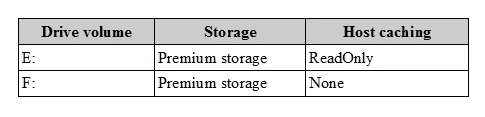
You use Resource Manager to deploy a new Microsoft SQL Server instance in a Microsoft Azure virtual machine (VM) that uses Premium storage. The combined initial size of the SQL Server user database files is expected to be over 200 gigabytes (GB). You must maximize performance for the database files and the log file.

You add the following additional drive volumes to the VM:

Exam 70-765: Question 9 - Image 1

You have the following requirements:

  • Maximize performance of the SQL Server instance.
  • Use Premium storage when possible.

You need to deploy the SQL instance.

In the table below, identify the drive where you must store each SQL Server file type.

NOTE: Make only one selection in each column. Each correct selection is worth one point.

Hot Area:

Answer

Suggested Answer

Enable read caching on the disk(s) hosting the data files and TempDB.
Do not enable caching on disk(s) hosting the log file. Host caching is not used for log files.
Incorrect Answers:
C, D: Avoid using operating system or temporary disks for database storage or logging.
References:
https://docs.microsoft.com/en-us/azure/virtual-machines/windows/sql/virtual-machines-windows-sql-performance Exam 70-765: Question 9 - Image 2
Question 10 of 186

DRAG DROP -

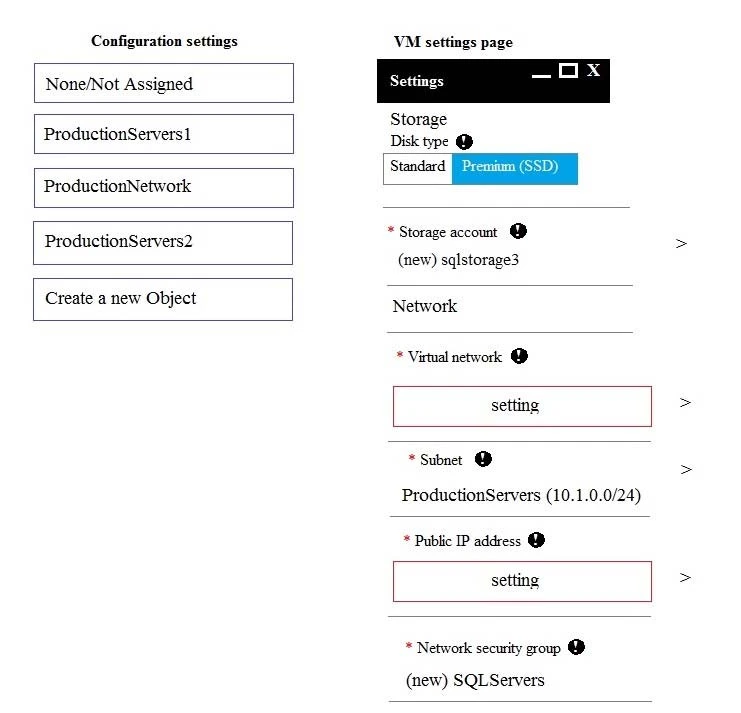
You are building a new Always On Availability Group in Microsoft Azure. The corporate domain controllers (DCs) are attached to a virtual network namedProductionNetwork. The DCs are part of an availability set named ProductionServers1.You create the first node of the availability group and add it to an availability set named ProductionServers2. The availability group node is a virtual machine (VM) that runs Microsoft SQL Server. You attach the node to ProductionNetwork.The servers in the availability group must be directly accessible only by other company VMs in Azure.You need to configure the second SQL Server VM for the availability group.How should you configure the VM? To answer, drag the appropriate configuration settings to the correct target locations. Each configuration setting may be used once, more than once, or not at all. You may need to drag the split bar between panes or scroll to view content.NOTE: Each correct selection is worth one point.Select and Place:

Exam 70-765: Question 10 - Image 1
Answer

Suggested Answer

Explanation;

Box 1: ProductionNetwork -
The virtual network is named ProductionNetwork.

Box 2: None /Not Assigned -
As the servers in the availability group must be directly accessible only by other company VMs in Azure, there should be no Public IP address.

Box 3: ProductionServer2 -
You create the first node of the availability group and add it to an availability set named ProductionServers2. The availability group node is a virtual machine (VM) that runs Microsoft SQL Server. Exam 70-765: Question 10 - Image 2