To ensure the Production VMs are always guaranteed the full allocation of memory in a vSphere cluster, the administrator should first create a parent resource pool for the Production VMs. This allows for the organization and prioritization of resources specifically for those VMs. Then, by assigning a memory reservation value to the resource pool containing the Production VMs, the administrator can ensure that a specific amount of memory is reserved exclusively for these VMs, preventing other VMs in the cluster from using it. These steps together guarantee the necessary memory allocation for the Production VMs.
VMware vSAN (B) is a hyper-converged, software-defined storage solution that aggregates local storage devices across multiple ESXi hosts to create a distributed storage pool. In vSAN, virtual machine components are stored as a set of objects, with each object representing a specific part of the virtual machine. vSphere Virtual Volumes (vVols) (D) is a storage virtualization technology that allows vSphere to manage storage at the VM level granularity. With vVols, VMs are stored as individual objects on the storage system, and each VM has its own set of objects, such as VMDK files, configuration files, and snapshots. Hence, both vSAN and vVols are the datastore types that store the components of a virtual machine as a set of objects.

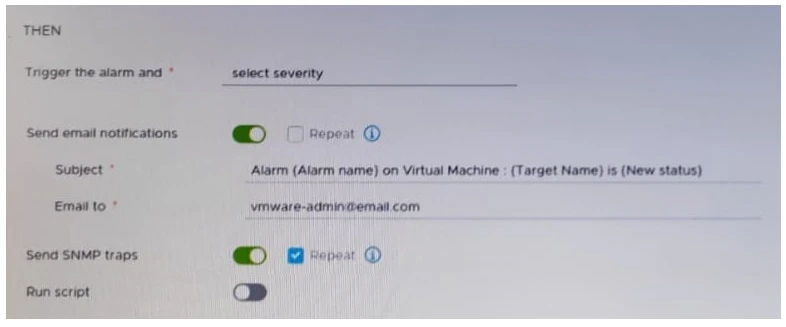
To ensure that email notifications are sent for alarms in VMware vCenter, the mail server settings must be configured in the vCenter settings in the vSphere Client. This is where the SMTP server details, such as server address, port, authentication details, and sender email address, are specified, enabling the vCenter server to send out email notifications when alarms are triggered.
To prepare a virtual machine for deployment to multiple users, it is crucial to create a virtual machine customization specification to ensure that each deployed VM has unique settings and identifiers, such as IP addresses, MAC addresses, and hostnames. Then, converting the virtual machine to a template is necessary because templates are used as a master copy to deploy multiple full clones rapidly and consistently. These steps align with the company policy of using full clones for server workloads.
To continue the staging of a patch on a vCenter Server Appliance after resolving an error, the administrator should use the Resume option. This option is available in the vCenter Management Interface specifically to allow the resumption of the staging process from the point at which it was interrupted. This ensures the process does not restart from the beginning, thus saving time and avoiding redundancy.