<apex:selectList value="{!selectedIndustry}">
<apex:selectOptions values="{!industries}"/>
</apex:selectList>
When a user changes the value in the industry select list, the table of Accounts should be automatically updated to show the Accounts associated with the selected industry.
What is the optimal way to implement this?
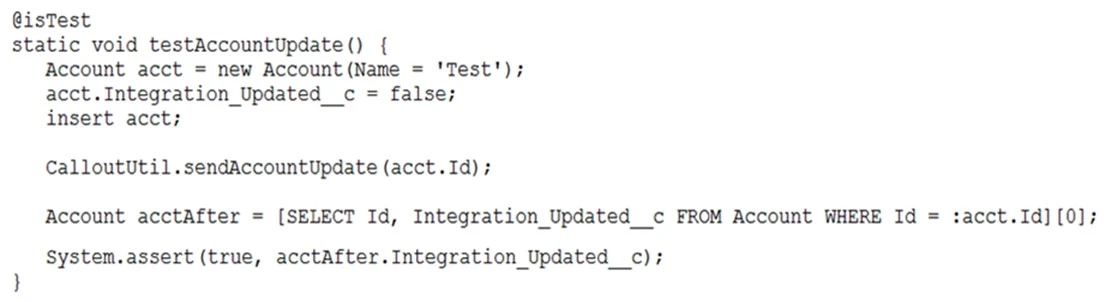
The test method above calls a web service that updates an external system with Account information and sets the Account's Integration_Updated__c checkbox to
True when it completes. The test fails to execute and exits with an error: "Methods defined as TestMethod do not support Web service callouts. "
What is the optimal way to fix this?
What should the developer ensure to correct these errors?
<lightning:layoutItem size="12">{!v.account.Name}
</lightning:layoutItem>
<lightning:layoutItem size="12">{!v.account.AccountNumber}
</lightning:layoutItem>
<lightning:layoutItem size="12">{!v.account.Industry}
</lightning:layoutItem>
</lightning:layout>
Refer to the component code above. The information displays as expected (in three rows) on a mobile device. However, the information is not displaying as desired (in a single row) on a desktop or tablet.
Which option has the correct component changes to display correctly on desktops and tablets?
What is the correct way to automate this using an Apex trigger?