Question 6 of 171

Which two methods will allow data to be saved in incident fields within a playbook? (Choose two.)
Answer

Suggested Answer

The suggested answer is A, C.

To save data in incident fields within a playbook, you can use the setFields method, which is designed specifically for assigning values to fields. Additionally, the setIncident method is also used to update values within an incident, making these two methods the correct options. Field mapping and layout inline editing are not methods for saving data in playbook incident fields.
Community Votes1 vote
BCMost voted
100%
Question 7 of 171

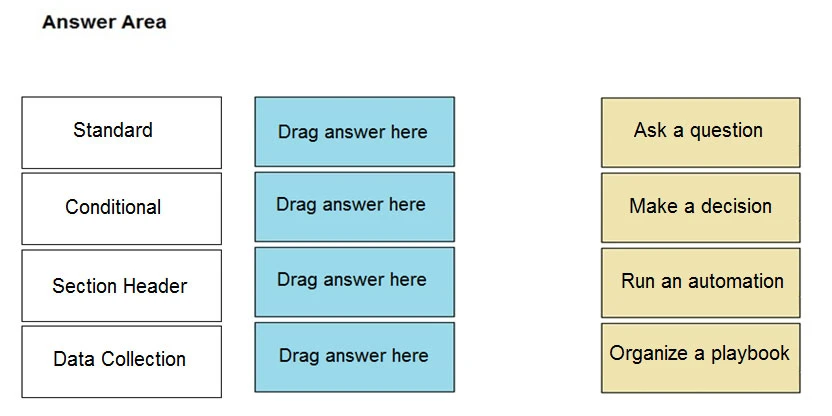
DRAG DROP -
Match the action with the most appropriate playbook task type.
Select and Place:
Exam PCSAE: Question 7 - Image 1
Answer

Suggested Answer

https://www.jaacostan.com/2021/02/palo-alto-cortex-xsoar-playbook-icons.html Exam PCSAE: Question 7 - Image 2
Question 8 of 171

Which built-in automation/command cab be used to change an incident's type?
Answer

Suggested Answer

The suggested answer is A.

Reference:
https://docs.paloaltonetworks.com/cortex/cortex-xsoar/5-5/cortex-xsoar-admin/incidents/incidents-management/incident-fields/field-trigger-scripts.html
Question 9 of 171

An engineer notices that playbooks only start once the user clicks the `˜investigate' button and he/she would like the playbook to start automatically.
How can this be implemented?
Answer

Suggested Answer

The suggested answer is B.

To make a playbook start automatically without needing to click the 'investigate' button, you need to select 'Run playbook automatically' in the incident type settings. This setting ensures that the playbook is triggered as soon as the incident is created, without any manual intervention.

Community Votes5 votes
BSuggested
100%
Question 10 of 171

Which two causes may be occurring if an integration test is working, but the integration is not fetching incidents? (Choose two.)
Answer

Suggested Answer

The suggested answer is A, B.

If the integration is not fetching incidents, one possible cause is that the 'Fetches Incidents' option may not have been enabled. Another possible cause is that there are no new events from the external service to fetch. These are two plausible reasons that align with common issues encountered in integration scenarios and cover both configuration and data availability aspects.

Community Votes6 votes
ABSuggested
100%