Question 6 of 197

Note: This question is part of a series of questions that present the same scenario. Each question in the series contains a unique solution that might meet the stated goals. Some question sets might have more than one correct solution, while others might not have a correct solution.
After you answer a question in this section, you will NOT be able to return to it. As a result, these questions will not appear in the review screen.
You have an Azure subscription named Subscription1. Subscription1 contains a resource group named RG1. RG1 contains resources that were deployed by using templates.
You need to view the date and time when the resources were created in RG1.
Solution: From the Subscriptions blade, you select the subscription, and then click Resource providers.
Does this meet the goal?
Answer

Suggested Answer

The suggested answer is B.

To view the date and time when resources were created in a resource group in Azure, you would typically look at the resource group activity logs or the individual resource properties. Selecting the subscription and then clicking on Resource providers will not provide the creation date and time of the resources. Therefore, this approach does not meet the goal.

Community Votes

No votes yet

Join the discussion to cast yours

Question 7 of 197

Note: This question is part of a series of questions that present the same scenario. Each question in the series contains a unique solution that might meet the stated goals. Some question sets might have more than one correct solution, while others might not have a correct solution.
After you answer a question in this section, you will NOT be able to return to it. As a result, these questions will not appear in the review screen.
You have an Azure subscription named Subscription1. Subscription1 contains a resource group named RG1. RG1 contains resources that were deployed by using templates.
You need to view the date and time when the resources were created in RG1.
Solution: From the RG1 blade, you click Automation script.
Does this meet the goal?
Answer

Suggested Answer

The suggested answer is B.

Community Votes

No votes yet

Join the discussion to cast yours

Question 8 of 197

Note: This question is part of a series of questions that present the same scenario. Each question in the series contains a unique solution that might meet the stated goals. Some question sets might have more than one correct solution, while others might not have a correct solution.
After you answer a question in this section, you will NOT be able to return to it. As a result, these questions will not appear in the review screen.
You have an Azure virtual machine named VM1. VM1 was deployed by using a custom Azure Resource Manager template named ARM1.json.
You receive a notification that VM1 will be affected by maintenance.
You need to move VM1 to a different host immediately.
Solution: From the Update management blade, you click Enable.
Does this meet the goal?
Answer

Suggested Answer

The suggested answer is B.

To move an Azure virtual machine to a different host immediately, you would need to redeploy the VM. Enabling Update management blade will not achieve the goal of moving the VM to a different host. Redeploying the VM moves it to a new Azure host, which addresses the maintenance notification.

Community Votes

No votes yet

Join the discussion to cast yours

Question 9 of 197

HOTSPOT -
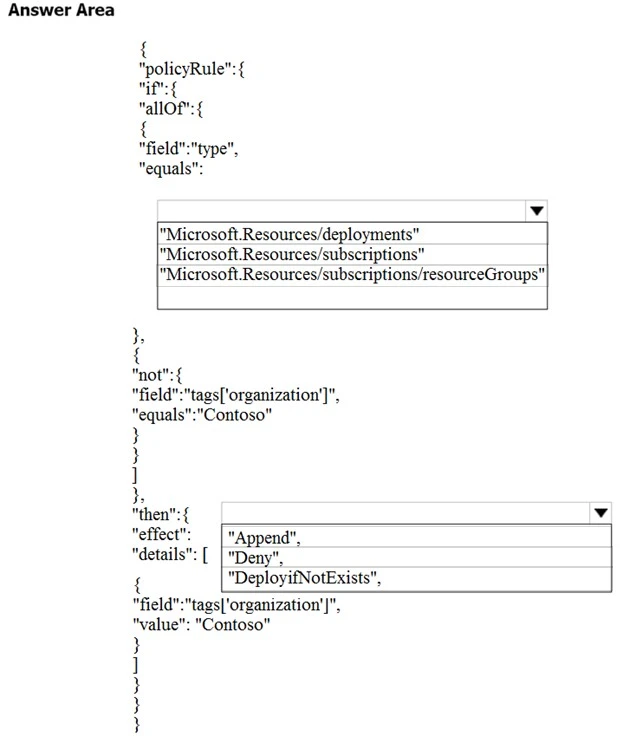
You have an Azure subscription. You need to implement a custom policy that meet the following requirements:
✑ Ensures that each new resource group in the subscription has a tag named organization set to a value of Contoso.
✑ Ensures that resource groups can be created from the Azure portal
Ensures that compliance reports in the Azure portal are accruable
Exam AZ-100: Question 9 - Image 1
How should you complete the policy? To answer, select the appropriate options in the answer area.
:

NOTE -
Each correct selection is worth one point.
Hot Area:
Exam AZ-100: Question 9 - Image 2
Answer

Suggested Answer

References:
https://docs.microsoft.com/en-us/azure/governance/policy/concepts/definition-structure Exam AZ-100: Question 9 - Image 3
Question 10 of 197

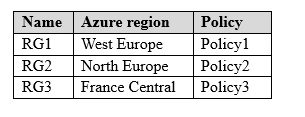
You have an Azure subscription named Subscription1. Subscription1 contains the resource groups in the following table.
Exam AZ-100: Question 10 - Image 1
RG1 has a web app named WebApp1. WebApp1 is located in West Europe.
You move WebApp1 to RG2.
What is the effect of the move?
Answer

Suggested Answer

The suggested answer is C.

The logical move of WebApp1 to another resource group (RG2) does not change the physical location of its App Service plan. Therefore, the App Service plan for WebApp1 remains in West Europe. However, the policies applied to WebApp1 will change according to the policies in the new resource group. Therefore, Policy2 will apply to WebApp1 after the move.

Community Votes

No votes yet

Join the discussion to cast yours