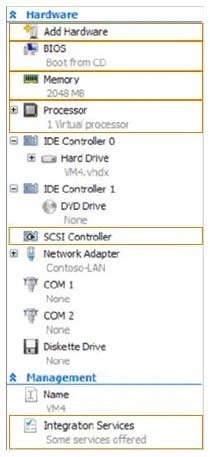
The suggested answer is B.
Ref: http://www.petri.co.il/choosing-hyper-v-storage-virtual-hard-disks-2.htm#
Virtual Disk Types -
There are considerations for using virtual disks, and what types of virtual disks are available:
FixedThe VHD image file is pre-allocated on the backing store for the maximum size requested.
ExpandableAlso known as "dynamic", "dynamically expandable", and "sparse", the VHD image file uses only as much space on the backing store as needed to store the actual data the virtual disk currently contains. When creating this type of virtual disk, the VHD API does not test for free space on the physical disk based on the maximum size requested, therefore it is possible to successfully create a dynamic virtual disk with a maximum size larger than the available physical disk free space.
Note The maximum size of a dynamic virtual disk is 2,040 GB.
DifferencingA parent virtual disk is used as the basis of this type, with any subsequent writes written to the virtual disk as differences to the new differencing
VHD image file, and the parent VHD image file is not modified. For example, if you have a clean-install system boot operating system virtual disk as a parent and designate the differencing virtual disk as the current virtual disk for the system to use. then the operating system on the parent virtual disk stays in its original state for quick recovery or for quickly creating more boot images based on additional differencing virtual disks.
Note The maximum size of a differencing virtual disk is 2,040 GB.
All virtual disk types have a minimum size of 3 MB.
With Pass-through disks, you lose all of the benefits of VHD files such as portability, snap-shotting and thin provisioning.
Performance is marginally better than that of VHD files.
Reference: http://clusteringformeremortals.com/2009/09/25/hyper-v-pass-through-disk-performance-vs-fixedsize-vhd-files-and-dynamic-vhd-files-in-windows- server-2008-r2/