Question 6 of 369

HOTSPOT -

You manage a Microsoft Azure RemoteApp deployment. The deployment consists of a cloud collection named CloudCollection1 and a hybrid collection named

HybridCollection1. Both collections reside in a subscription named Subscription1. Subscription1 contains two Active Directory instances named AzureAD1 and

AzureAD2. AzureAD1 is the associated directory of Subcsription1.

AzureAD1 is synchronized to an on-premises Active Directory forest named constoso.com. Passwords are synchronized between AzureAD1 and the on-premises

Active Directory.

You have the following user accounts:

Exam 70-697: Question 6 - Image 1

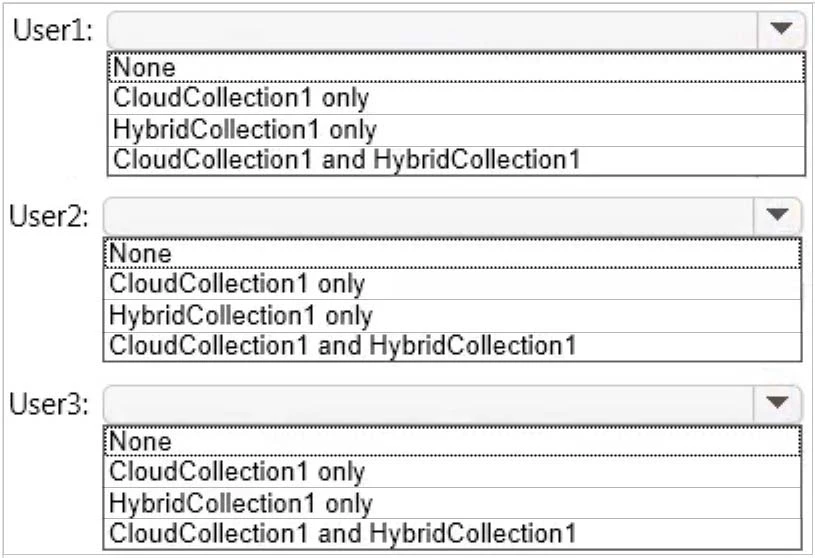
You need to identify to which collections each user can be assigned access.

What should you identify? To answer, select the appropriate options in the answer area.

Hot Area:
Exam 70-697: Question 6 - Image 2
Answer

Suggested Answer

A Microsoft account can only access a cloud collection.
An Azure Active Directory (Azure AD) account can access a cloud collection and it can access a hybrid collection if directory synchronization with password sync is deployed.
An on-premise domain account that does not exist in any Azure Active Directory cannot access Azure cloud resources.
References:
https://azure.microsoft.com/en-gb/documentation/articles/remoteapp-collections/ Exam 70-697: Question 6 - Image 3
Question 7 of 369

Your Windows 10 Enterprise work computer is a member of an Active Directory domain. You use your domain account to log on to the computer. You use your

Microsoft account to log on to a home laptop.

You want to access Windows 10 Enterprise apps from your work computer by using your Microsoft account.

You need to ensure that you are able to access the Windows 10 Enterprise apps on your work computer by logging on only once.

What should you do?

Answer

Suggested Answer

The suggested answer is C.

You can connect your Microsoft account to your domain account on your work computer. This will enable you to sign in to your work computer with your Microsoft account and access the same resources that you would access if you were logged in with your domain account.
When you connect your Microsoft account to your domain account, you can sync your settings and preferences between them. For example, if you use a domain account in the workplace, you can connect your Microsoft account to it and see the same desktop background, app settings, browser history and favorites, and other Microsoft account settings that you see on your home PC.
References:
http://windows.microsoft.com/en-gb/windows-8/connect-microsoft-domain-account
Question 8 of 369

You administer a Windows 10 Enterprise computer that runs Hyper-V. The computer hosts a virtual machine with multiple snapshots. The virtual machine uses one virtual CPU and 512 MB of RAM.

You discover that the virtual machine pauses automatically and displays the state as paused-critical.

You need to identify the component that is causing the error.

Which component should you identify?

Answer

Suggested Answer

The suggested answer is C.

In this question, the VM has "multiple snapshots" which would use up a lot of disk space. Virtual machines will go into the "Paused-Critical" state in Hyper-V if the free space on the drive that contains the snapshots goes below 200MB.
One thing that often trips people up is if they have their virtual hard disks configured on one drive but have left their snapshot files stored on the system drive.
Once a virtual machine snapshot has been taken the base virtual hard disk stops expanding and the snapshot file stores new data that is written to the disk so it is critical that there is enough space in the snapshot storage location.
References:
http://blogs.msdn.com/b/virtual_pc_guy/archive/2009/04/22/why-is-my-virtual-machine-paused-critical-hyper-v.aspx
Question 9 of 369

You have a Windows 10 Enterprise computer named Computer1 that has the Hyper-V feature installed. Computer1 hosts a virtual machine named VM1. VM1 runs

Windows 10 Enterprise. VM1 connects to a private virtual network switch.

From Computer1, you need to remotely execute Windows PowerShell cmdlets on VM1.

What should you do?

parameter.

parameter.

parameter.

parameter.

Answer

Suggested Answer

We can use Windows PowerShell Direct to run PowerShell cmdlets on a virtual machine from the Hyper-V host. Because Windows PowerShell Direct runs between the host and virtual machine, there is no need for a network connection or to enable remote management.
There are no network or firewall requirements or special configuration. It works regardless of your remote management configuration. To use it, you must run
Windows 10 or Windows Server Technical Preview on the host and the virtual machine guest operating system.
To create a PowerShell Direct session, use one of the following commands:
✑ Enter-PSSession -VMName VMName
✑ Invoke-Command -VMName VMName -ScriptBlock { commands }
References:
https://msdn.microsoft.com/en-us/virtualization/hyperv_on_windows/about/whats_new
Question 10 of 369

You deploy several tablet PCs that run Windows 10 Enterprise.

You need to minimize power usage when the user presses the sleep button.

What should you do?

Answer

Suggested Answer

The suggested answer is B.

We can minimize power usage on the tablet PCs by configuring them to use Hibernation mode. A computer in hibernation mode uses no power at all.
Hibernation is a power-saving state designed primarily for laptops. While sleep puts your work and settings in memory and draws a small amount of power, hibernation puts your open documents and programs on your hard disk, and then turns off your computer. Of all the power-saving states in Windows, hibernation uses the least amount of power. On a laptop, use hibernation when you know that you won't use your laptop for an extended period and won't have an opportunity to charge the battery during that time.
References:
http://windows.microsoft.com/en-gb/windows7/sleep-and-hibernation-frequently-asked-questions