Question 6 of 551

You have a computer that runs Windows 7. You open the Disk Management snap-in as shown in the exhibit. (Click the Exhibit button.)?
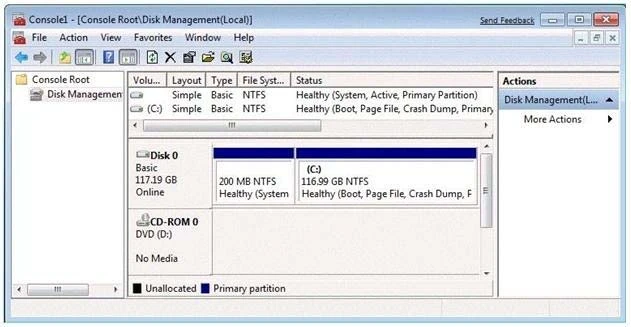
Exam 70-680: Question 6 - Image 1

You need to ensure that you can create a new partition on Disk 0.What should you do?

Answer

Suggested Answer

The suggested answer is A.

Needs to have sufficient space in order to create a new partition. Hence shrinking the C: partition will create additional space that can be used for a new partition.
Question 7 of 551

Your network consists of one Active Directory domain. You have two computers named Computer1 and Computer2 that run Windows 7. Both computers are members of the domain.

From Computer1, you can recover all Encrypting File System (EFS) encrypted files for users in the domain.

You need to ensure that you can recover all EFS encrypted files from Computer2.

What should you do?

Answer

Suggested Answer

The suggested answer is B.

You can import the recovery agent to another computer running Windows 7 if you want to recover files encrypted on the first computer. You can also recover files on another computer running Windows 7 if you have exported the EFS keys from the original computer and imported them on the new computer. You can use the
Certificates console to import and export EFS keys.
Question 8 of 551

You have a computer that runs Windows 7.

You need to configure the computer to meet the following requirements:

  • Generate a new security ID (SID) when the computer starts.
  • Ensure that the Welcome screen appears when the computer starts.

What should you do?

Answer

Suggested Answer

The suggested answer is A.

To prepare the reference computer for the user, you use the Sysprep utility with the /generalize option to remove hardware-specific information from the Windows installation and the /oobe option to configure the computer to boot to Windows Welcome upon the next restart. Open an elevated command prompt on the reference computer and run the following command: c:\windows\system32\sysprep\sysprep.exe /oobe /generalize /shutdown Sysprep prepares the image for capture by cleaning up various user-specific and computer-specific settings, as well as log files. The reference installation now is complete and ready to be imaged.
/generalize
Prepares the Windows installation to be imaged. If you specify this option, all unique system information is removed from the Windows installation. The SID is reset, system restore points are cleared, and event logs are deleted. The next time the computer starts, the specialize configuration pass runs. A new SID is created, and the clock for Windows activation resets (unless the clock has already been reset three times).
/oobe
Restarts the computer in Windows Welcome mode. Windows Welcome enables users to customize their Windows 7 operating system, create user accounts, and name the computer. Any settings in the oobe System configuration pass in an answer file are processed immediately before Windows Welcome starts.
Question 9 of 551

You have a computer that runs Windows 7.

You need to confirm that all device drivers installed on the computer are digitally signed.

What should you do?

Answer

Suggested Answer

The suggested answer is B.

Checking Digital Signatures with the File Signature Verification Tool
The Dxdiag tool identifies problems with DirectX hardware and tells you whether that hardware has passed the WHQL testing regimen and has been signed digitally. However, it does not test the device drivers that are not associated with DirectX devices. To scan your computer and identify any unsigned drivers, you should use the File Signature Verification (Sigverif) tool.
Question 10 of 551

You have a computer that runs Windows 7.

You need to modify the file extensions that are associated to Internet Explorer.

What should you do?

Answer

Suggested Answer

The suggested answer is B.