Question 6 of 64

A customer has built a VXLAN using an EVPN signaling infrastructure with remote facilities with VXLAN using EVPN signaling connected to the Internet. The customer notices that the network is completely stable with no protocol errors in the underlay or overlay. The customer, however, cannot pass any application data across the network.

Which statement would explain the intermittent loss?
Answer

Suggested Answer

The suggested answer is D.

Question 7 of 64

You have deployed a multicast server attached to a QFX5100 Series device serving as a VTEP.

Which two statements are correct in this scenario? (Choose two.)

Answer

Suggested Answer

The suggested answer is A, C.

Reference:
https://www.juniper.net/documentation/en_US/junos/topics/topic-map/sdn-vxlan.html#jd0e168
Question 8 of 64

Which protocol is used between VCF member devices to create a loop-free topology?

Answer

Suggested Answer

The suggested answer is D.

Reference:
http://www.juniper.net/documentation/en_US/release-independent/vcf/information-products/pathway-pages/vcf-best-practices-guide.pdf
Question 9 of 64

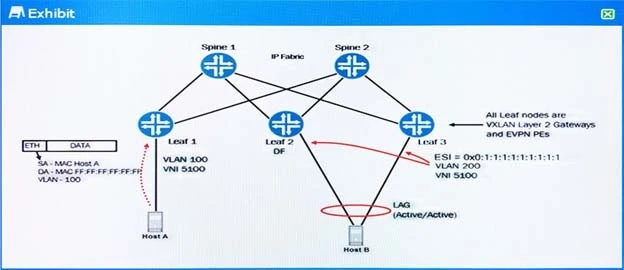
Exam JN0-680: Question 9 - Image 1

Referring to the exhibit, each leaf node is a QFX5100 acting as a VXLAN Layer 2 Gateway using EVPN signaling. Leaf 2 and Leaf 3 are both attached to the same

EVPN Ethernet segment. Leaf 2 has been elected the designated forwarder for VLAN 200 on that Ethernet segment.

In this scenario, which two actions will Leaf 1 perform with the broadcast Ethernet frame received from Host A? (Choose two.)

Answer

Suggested Answer

The suggested answer is A, D.

Reference:
https://www.juniper.net/documentation/en_US/junos/topics/topic-map/sdn-vxlan.html
Question 10 of 64

You have built a mixed-mode VCF consisting of two QFX5100-24Qs as spines, two QFX5100-48S as leaf nodes, and one EX4300 as a leaf node. The VCF is working for all devices, except the EX4300 40GbE fabric links will not join the VCF.

In this scenario, what MUST be corrected to solve the connectivity problem?

Answer

Suggested Answer

The suggested answer is A.

Reference:
https://www.juniper.net/documentation/en_US/junos/topics/task/configuration/vcf-adding-device.html
(Required only if you are adding a device that turns a non-mixed VCF into a mixed VCF) Log in to the VCF and set all devices in the VCF to mixed mode.
Configure all devices to reboot to complete this procedure.
request virtual-chassis mode mixed all-members reboot
user@device>
The VCF experiences downtime as part of the reboot step.