Question 6 of 74

Which one of the following correctly describes the content of the corresponding Worklight Application folder?

Answer

Suggested Answer

The suggested answer is C.

The bin folder contains project artifacts that are deployed to MobileFirst Server.
Incorrect:
Not D: externalServerLibraries: Contains the libraries to be placed in external service servers and used for access token validation (by the service).
References:
https://developer.ibm.com/mobilefirstplatform/documentation/getting-started-6-3/hello-world/creating-your-first-hybrid-application/
Question 7 of 74

Which characteristic(s) of an application map to the respective development approaches?

Characteristics of the Application

  1. The application is written for a specific platform and runs on that platform only.
  2. The application runs inside the browser of the mobile device, and uses standard technologies such as HTML5, CSS3, and JavaScript.
  3. The application runs inside a native container and uses the browser engine to display the application interface.
  4. The application is not distributed through an application store.

Development Approach (see exhibit)
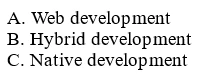
Exam C5050-408: Question 7 - Image 1
Answer

Suggested Answer

The suggested answer is D.

Question 8 of 74

What is the purpose of the Application Center?

The Application Center is:

Answer

Suggested Answer

The suggested answer is A.

IBM Worklight Application Center is an enterprise application store. It allows you to install, configure, and administer a repository of mobile applications for use by individuals and groups within your enterprise or organization. It is built on top of the IBM MobileFirst Platform and the IBM Worklight mobile application platform that enables you to develop, deploy, and manage mobile applications.
References:
http://www.redbooks.ibm.com/abstracts/redp5005.html?Open
Question 9 of 74

An application developer is developing an Android based Hybrid application but the application is returning an error on the startup process.

What are two valid initialization failure statuses that the application developer can identify on the startup process?

Answer

Suggested Answer

The suggested answer is D.

The initialization status can be:

FAILURE_INTERNAL -

FAILURE_UNZIP -

FAILURE_CHECKSUM -

FAILURE_NOT_ENOUGH_SPACE -
References:
http://www.ibm.com/support/knowledgecenter/SSZH4A_6.2.0/com.ibm.worklight.dev.doc/dev/c_start_hybrid_app_android_in_webview.html
Question 10 of 74

An application developer needs to update the web resources for a deployed application. The developer is exploring the use of Direct Update to deliver the updated web resources directly to the deployed application without uploading a new version of the application to the Apple App Store and Android Market.

The developer has located an explicit call to check for direct updates in the application code as follows:

WL.Client.login("wl_directUpdateRealm", {onSuccess:…, onFailure:…})

Which security realm configuration allows the application developer to use Direct Update to deliver the updated web resources, only when the explicit call to check for direct updates in the application code is executed?

The application is protected with a:

Answer

Suggested Answer

The suggested answer is C.

Check for Direct Update on demand
You can configure Direct Update so that the server checks for direct updates only when there is an explicit call to do so. To apply this setting, protect the application with a custom security test that does not contain a test with wl_directUpdateRealm. In the application code, use WL.Client.login
("wl_directUpdateRealm", {onSuccess:.., onFailure:...}), which causes the server to check for direct updates. This configuration does not work if the custom security test that protects the application contains wl_directUpdateRealm with mode="disabled".
References:
http://www.ibm.com/support/knowledgecenter/SSZH4A_6.2.0/com.ibm.worklight.dev.doc/admin/c_direct_update_as_security_realm.html