Question 6 of 154
Scenario:
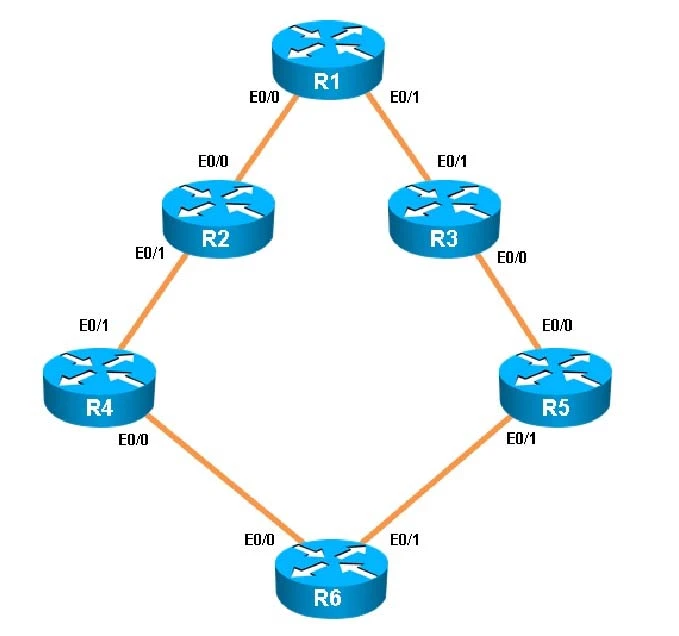
You have been brought in to troubleshoot an EIGRP network. You have resolved the initial issue between routers R2 and R4, but another issue remains. You are to locate the problem and suggest solution to resolve the issue.
The customer has disabled access to the show running-config command.
Exam 300-135: Question 6 - Image 1
Exam 300-135: Question 6 - Image 2
Exam 300-135: Question 6 - Image 3
Exam 300-135: Question 6 - Image 4
Exam 300-135: Question 6 - Image 5
Exam 300-135: Question 6 - Image 6
Exam 300-135: Question 6 - Image 7
The network segment between R2 and R4 has become disconnected from the remainder of the network. How should this issue be resolved?
Correct Answer:
When issuing the "show ip eigrp neighbor" command (which is about the only command that it lets you do in this question) you will see that all other routers are configured for EIGRP AS 1. However, the 192.16824.0 network between R2 and R4 is incorrectly configured for EIGRP AS 100:
Exam 300-135: Question 6 - Image 8
Exam 300-135: Question 6 - Image 9 Explanation
Question 7 of 154
Scenario:
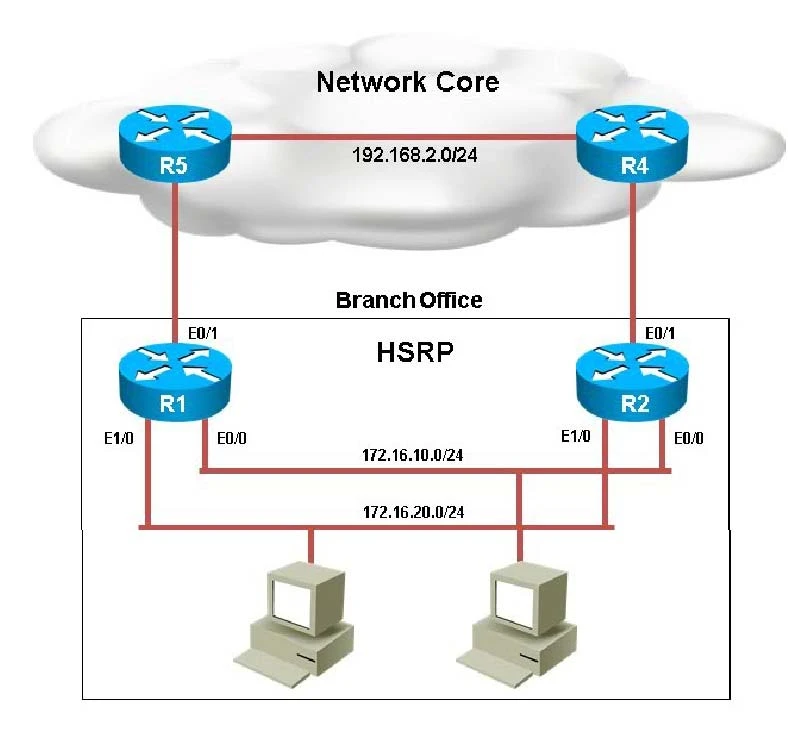
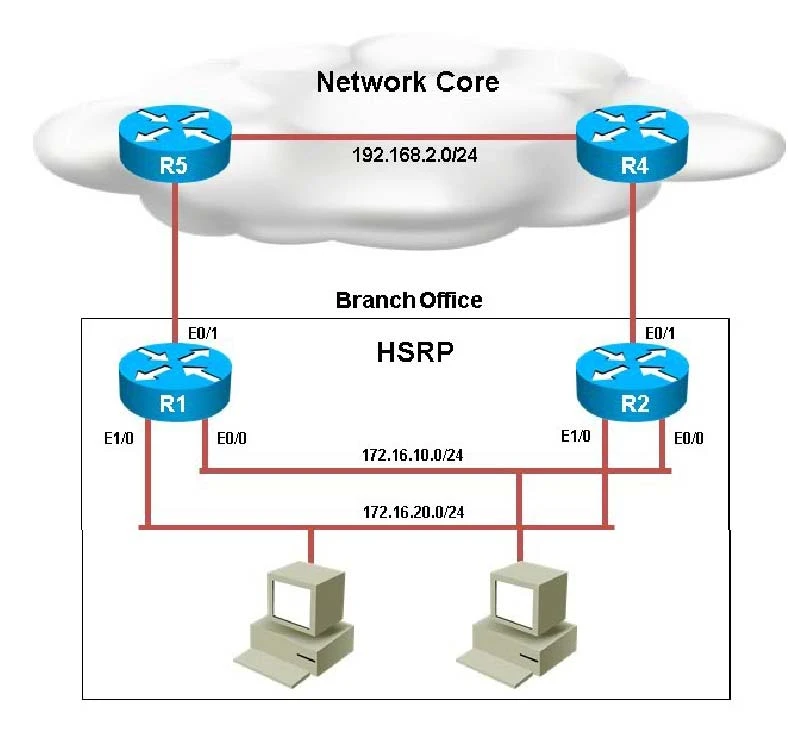
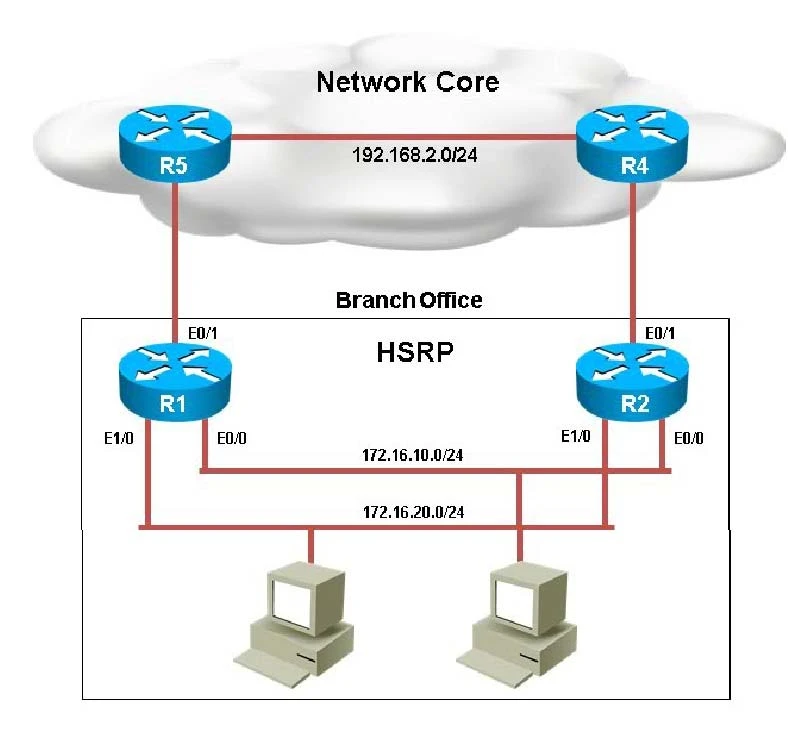
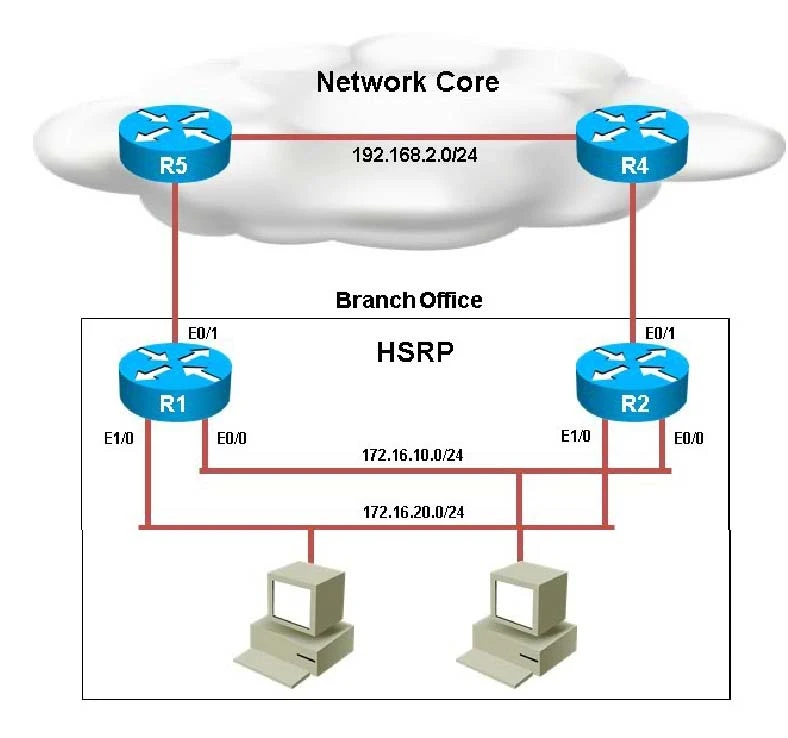
You have been asked by your customer to help resolve issues in their routed network. Their network engineer has deployed HSRP. On closer inspection HSRP doesn't appear to be operating properly and it appears there are other network problems as well. You are to provide solutions to all the network problems.
Exam 300-135: Question 7 - Image 1
Exam 300-135: Question 7 - Image 2
Exam 300-135: Question 7 - Image 3
Exam 300-135: Question 7 - Image 4
Exam 300-135: Question 7 - Image 5
You have received notification from network monitoring system that link between R1 and R5 is down and you noticed that the active router for HSRP group 1 has not failed over to the standby router for group 1. You are required to troubleshoot and identify the issue.
Correct Answer:
When looking at the HSRP configuration of R1, we see that tracking has been enabled, but that it is not tracking the link to R5, only the link to R2:
Exam 300-135: Question 7 - Image 6
R1 should be tracking the Eth 0/1 link, not 0/0 to achieve the desired affect/ Explanation
Question 8 of 154
Scenario:
You have been asked by your customer to help resolve issues in their routed network. Their network engineer has deployed HSRP. On closer inspection HSRP doesn't appear to be operating properly and it appears there are other network problems as well. You are to provide solutions to all the network problems.
Exam 300-135: Question 8 - Image 1
Exam 300-135: Question 8 - Image 2
Exam 300-135: Question 8 - Image 3
Exam 300-135: Question 8 - Image 4
Exam 300-135: Question 8 - Image 5
The following debug messages are noticed for HSRP group 2. But still neither R1 nor R2 has identified one of them as standby router. Identify the reason causing the issue.
Note: only show commands can be used to troubleshoot the ticket.
R1#
'Mar 26 11:17:39.234: HSRP: Et1/0 Grp 2 Hello out 172.16.20.2 Active pri 100 vIP
172.16.20.254
'Mar 26 11:17:40.034: HSRP: EtO/0 Grp 1 Hello out 172.16.10.2 Active prj 130 vIP
172.16.10.254
R1#
'Mar 26 11:17:40.364: HSRP: EtO/0 Grp 1 Hello in 172.16.10.1 Standby pri 100 vIP
172.16.10.254
R1#
'Mar 26 11:17:41.969: HSRP: Et1/0 Grp 2 Hello out 172.16.20.2 Active pri 100 vIP
172.16.20.254
'Mar 26 11:17:42.719: HSRP: EtO/0 Grp 1 Hello out 172.16.10.2 Active prj 130 vIP
172.16.10.254
'Mar 26 11:17:42.918: HSRP: EtO/0 Grp 1 Hello in 172.16.10.1 Standby pri 100 vIP
172.16.10.254
R1#
'Mar 26 11:17:44.869: HSRP: Et1/0 Grp 2 Hello out 172.16.20.2 Active pri 100 vIP
172.16.20.254
'Mar 26 11:17:45.485: HSRP: EtO/0 Grp 1 Hello out 172.16.10.2 Active prj 130 vIP
172.16.10.254
'Mar 26 11:17:45.718: HSRP: EtO/0 Grp 1 Hello in 172.16.10.1 Standby pri 100 vIP
172.16.10.254
R1#
'Mar 26 11:17:47.439: HSRP: Et1/0 Grp 2 Hello out 172.16.20.2 Active pri 100 vIP
172.16.20.254
'Mar 26 11:17:48.252: HSRP: EtO/0 Grp 1 Hello in 172.16.10.1 Standby pri 100 vIP
172.16.10.254
'Mar 26 11:17:48.322: HSRP: EtO/0 Grp 1 Hello out 172.16.10.2 Active prj 130 vIP
172.16.10.254
R1#
'Mar 26 11:17:50.389: HSRP: Et1/0 Grp 2 Hello out 172.16.20.2 Active pri 100 vIP
172.16.20.254
'Mar 26 11:17:50.735: HSRP: EtO/0 Grp 1 Hello in 172.16.10.1 Standby pri 100 vIP
172.16.10.254
'Mar 26 11:17:50.921: HSRP: EtO/0 Grp 1 Hello out 172.16.10.2 Active prj 130 vIP
172.16.10.254
R1#
'Mar 26 11:17:53.089: HSRP: Et1/0 Grp2 Hello out 172.16.20.2 Active pri 100 vIP
172.16.20.254
'Mar 26 11:17:53.338: HSRP: EtO/0 Grp 1 Hello out 172.16.10.2 Active pri130vlP
172.16.10.254
'Mar 26 11:17:53.633: HSRP: EtO/0 Grp 1 Hello in 172.16.10.1 Standby pri 100 vIP
172.16.10.254
Correct Answer: E
On R1 we see that access list 102 has been applied to the Ethernet 1/0 interface:
Exam 300-135: Question 8 - Image 6
Exam 300-135: Question 8 - Image 7
This access list is blocking all traffic to the 224.0.0.102 IP address, which is the multicast address used by HSRP. E
Question 9 of 154
Scenario:
You have been asked by your customer to help resolve issues in their routed network. Their network engineer has deployed HSRP. On closer inspection HSRP doesn't appear to be operating properly and it appears there are other network problems as well. You are to provide solutions to all the network problems.
Exam 300-135: Question 9 - Image 1
Exam 300-135: Question 9 - Image 2
Exam 300-135: Question 9 - Image 3
Exam 300-135: Question 9 - Image 4
Exam 300-135: Question 9 - Image 5
Examine the configuration on R4. The routing table shows no entries for 172.16.10.0/24 and 172.16.20.0/24. Identify which of the following is the issue preventing route entries being installed on R4 routing table?
Correct Answer:
If we look at the configuration on R4 we see that there is a distribute list applied to OSPF, which blocks the 172.16.20.0/24 and 172.16.10.0/24 networks.
Exam 300-135: Question 9 - Image 6 Explanation
Question 10 of 154
Scenario:
You have been asked by your customer to help resolve issues in their routed network. Their network engineer has deployed HSRP. On closer inspection HSRP doesn't appear to be operating properly and it appears there are other network problems as well. You are to provide solutions to all the network problems.
Exam 300-135: Question 10 - Image 1
Exam 300-135: Question 10 - Image 2
Exam 300-135: Question 10 - Image 3
Exam 300-135: Question 10 - Image 4
Exam 300-135: Question 10 - Image 5
You examine the configuration on R5 and discover that no routes are being learned from R4. Which issue prevents the route entries from being installed in the routing table?
Correct Answer: B
If we issue the "show ip route" and "show ip ospf neighbor" commands on R5, we see that there are no learned OSPF routes and he has no OSPF neighbors.
Exam 300-135: Question 10 - Image 6 B