Core Solutions of Microsoft Exchange Server 2013

Here you have the best Microsoft 70-341 practice exam questions

  • You have 183 total questions to study from
  • Each page has 5 questions, making a total of 37 pages
  • You can navigate through the pages using the buttons at the bottom
  • This questions were last updated on December 18, 2025
  • This site is not affiliated with or endorsed by Microsoft.
Question 1 of 183
You deploy a server that has the Exchange Server 2013 Mailbox server role and Client Access server role installed.
You need to configure anti-spam to meet the following requirements:
✑ Email messages sent from the Internet to a distribution list named Executives must be rejected.
✑ Email messages that contain the words casino and jackpot must be rejected, unless they were sent to legal@contoso.com.
Which three cmdlets should you run? (Each correct answer presents part of the solution. Choose three.)
Correct Answer: A, B, E

Question 2 of 183
Your company named Contoso, Ltd., has an Exchange Server 2013 organization named contoso.com.
The network contains an Active Directory domain. The domain contains an organizational unit (OU) named SalesOU. SalesOU contains two users named User1 and User2.
Contoso purchases a domain name adatum.com.
You need to change the primary SMTP address of all the users in SalesOU to use the SMTP suffix of adatum.com. The solution must not remove the contoso.com email address.
Which two actions should you perform? (Each correct answer presents part of the solution. Choose two.)
Correct Answer: A, D

Question 3 of 183
DRAG DROP -
You have an Exchange Server 2013 organization named Contoso. The organization is configured to apply a disclaimer to all email messages sent to external recipients.
Your company works with a partner company named ADatum Corporation. ADatum has an SMTP domain named adatum.com.
You need to ensure that email messages sent to adatum.com meet the following compliance requirements:
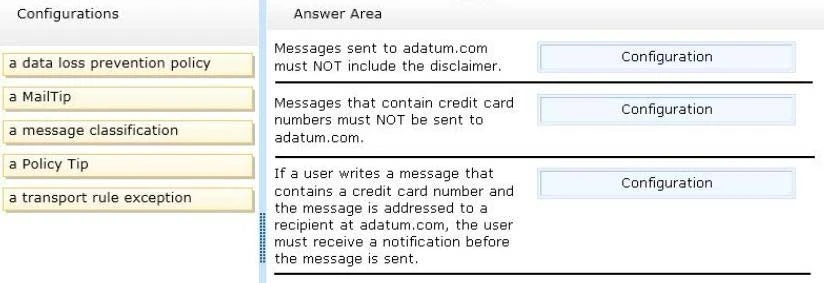
✑ Messages sent to adatum.com must NOT include the disclaimer.
✑ Messages that contain credit card numbers must NOT be sent to adatum.com.
✑ If a user writes a message that contains a credit card number and the message is addressed to a recipient at adatum.com, the user must receive a notification before the message is sent.
What should you configure for each requirement?
To answer, drag the appropriate configuration to the correct requirement in the answer area. Each configuration may be used once, more than once, or not at all.
Additionally, you may need to drag the split bar between panes or scroll to view content.
Select and Place:
Exam 70-341: Question 3 - Image 1
Correct Answer:
* Each transport rule can have exceptions that specify what to exclude from the condition. Exceptions typically determine a subset of criteria identified in the condition. If you use transport rules, you can specify what information you don't want to enter or leave the organization, which individuals or groups shouldn't be able to communicate with one another, how messages are handled based on how they are classified by the sender, and more.
* The Data loss prevention (DLP) feature in the new Exchange will help you identify, monitor, and protect sensitive information in your organization through deep content analysis. DLP is increasingly important for enterprise message systems because business critical email includes sensitive data that needs to be protected.
Its the financial information, personally identifiable information (PII) and intellectual property data that can be accidently sent to unauthorized users that keeps the
CSO up all night.
* Policy Tip notification messages are displayed to users in Outlook while they are composing an email message. Policy Tip notification messages only show up if something about the senders email message seems to violate a DLP policy that you have in place and that policy includes a rule to notify the sender when the conditions that you establish are met. Exam 70-341: Question 3 - Image 2
Question 4 of 183
DRAG DROP -
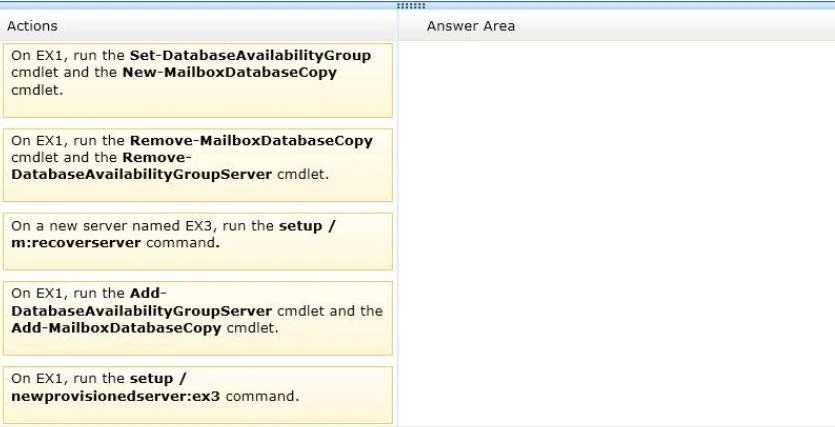
You have an Exchange Server 2013 organization that contains three servers named EX1, EX2, and EX3. The servers are members of a database availability group (DAG) named DAG1. A mailbox database named DB1 is replicated to all the members of DAG1.
EX3 experiences a complete hardware failure.
You need to restore EX3 on a new server.
You reset the computer account for EX3.
Which three actions should you perform next?
To answer, move the three appropriate actions from the list of actions to the answer area and arrange them in the correct order.
Select and Place:
Exam 70-341: Question 4 - Image 1
Correct Answer:
http://technet.microsoft.com/en-us/library/dd638206(v=exchg.150).aspx
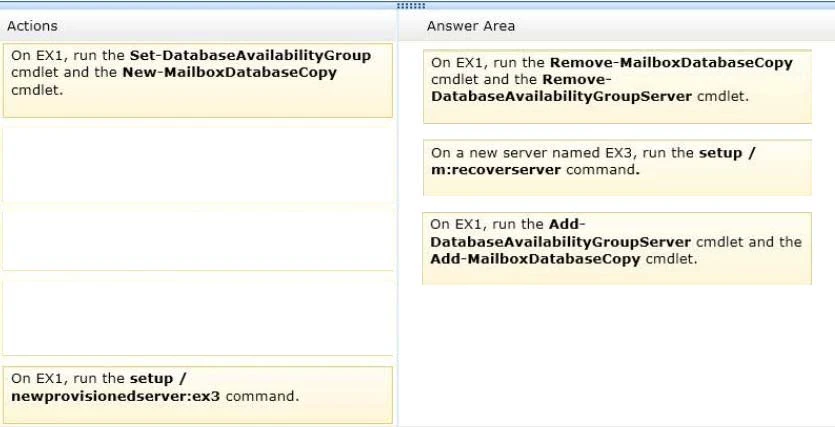
Use Setup /m:RecoverServer to recover a server
✑ Retrieve any replay lag or truncation lag settings for any mailbox database copies that exist on the server being recovered by using the Get-MailboxDatabase cmdlet.
✑ (Box 1) Remove any mailbox database copies that exist on the server being recovered by using the Remove-MailboxDatabaseCopy cmdlet.
✑ (Box 1) Remove the failed server's configuration from the DAG by using the Remove-DatabaseAvailabilityGroupServercmdlet.
✑ Reset the server's computer account in Active Directory. For detailed steps, see Reset a Computer Account.
✑ (Box 2) Open a Command Prompt window. Using the original Setup media, run the following command: Setup /m:RecoverServer
✑ (Box 3) When the Setup recovery process is complete, add the recovered server to the DAG by using the Add-DatabaseAvailabilityGroupServercmdlet.
✑ (Box 3) After the server has been added back to the DAG, you can reconfigure mailbox database copies by using the Add-MailboxDatabaseCopycmdlet.
* You can recover a lost server by using the Setup /m:RecoverServer switch in Microsoft Exchange Server 2013. Most of the settings for a computer running
Exchange 2013 are stored in Active Directory. The /m:RecoverServer switch rebuilds an Exchange server with the same name by using the settings and other information stored in Active Directory.
References:
Recover a Database Availability Group Member Server
Recover a Database Availability Group Member Server: Exchange 2013 Help Exam 70-341: Question 4 - Image 2
Question 5 of 183
DRAG DROP -
You have an Exchange Server 2013 organization that contains five servers.
Several employees plan to use Microsoft Outlook to collaborate on some projects.
You need to configure access to Outlook to meet the following requirements:
✑ Several employees must be able to open only the Inbox of a user named User1.
✑ Several employees must be able to copy email messages from any folder in the mailbox of a user named User2.
✑ Several employees must be able to create only contacts in the mailbox of a user named User3.
Which cmdlets should you use?
To answer, drag the appropriate cmdlet to the correct requirement in the answer area. Each cmdlet may be used once, more than once, or not at all. Additionally, you may need to drag the split bar between panes or scroll to view content.
Select and Place:
Correct Answer:
Add-MailboxFolderPermission -
Use the Add-MailboxFolderPermission cmdlet to manage folder-level permissions for all folders within a user's mailbox.

Set-Mailbox -
Use the Set-Mailbox cmdlet to modify the settings of an existing mailbox. You can use this cmdlet for one mailbox at a time. To perform bulk management, you can pipeline the output of various Get- cmdlets (for example, the Get-Mailbox or Get-User cmdlets) and configure several mailboxes in a single-line command.
You can also use the Set-Mailbox cmdlet in scripts.

STEPS -
1. Use the Add-MailboxFolderPermission cmdlet to manage folder-level permissions for all folders within a user's mailbox.
2. Use the Add-MailboxPermission cmdlet to add permissions to a mailbox.
3. Use the Add-MailboxFolderPermission cmdlet to manage folder-level permissions for all folders within a user's mailbox.
References:
Add-MailboxPermission: Exchange 2013 Help
Add-MailboxFolderPermission: Exchange 2013 Help Exam 70-341: Question 5 - Image 1