Question 6 of 96
What is a benefit of using resource pools?
Correct Answer: D
Resource pools help in organizing and simplifying the management of resources by allowing administrators to easily allocate and reserve resources for a specific set of Virtual Machines (VMs). This increased ease of reserving resources is particularly beneficial in environments where specific resource allocation and prioritization are necessary.
Question 7 of 96
This error is generated when a vSphere administrator takes a VM snapshot:
An error occurred while taking a snapshot: Failed to quiesce the virtual machine
What should the administrator investigate to determine the cause of the failure?
An error occurred while taking a snapshot: Failed to quiesce the virtual machine
What should the administrator investigate to determine the cause of the failure?
Correct Answer: C
The error message 'Failed to quiesce the virtual machine' indicates that the process of quiescing, which is typically performed by VMware Tools to prepare the virtual machine for snapshotting, has failed. Therefore, the most pertinent action is to check if VMware Tools is installed on the virtual machine, as this is a necessary component for the quiescing process during snapshot creation.
Question 8 of 96
A vSphere administrator is working in a high security environment. The administrator wants to ensure unencrypted VMs can be migrated securely.
What should the vSphere administrator use to meet this requirement?
What should the vSphere administrator use to meet this requirement?
Correct Answer: D
To ensure that unencrypted virtual machines (VMs) can be migrated securely in a high-security environment, the vSphere administrator should use encrypted vSphere vMotion. Encrypted vSphere vMotion ensures that the data transferred during the migration process is encrypted, protecting it from unauthorized access or interception. This method directly addresses the requirement of secure migration for unencrypted VMs.
Question 9 of 96
For security reasons the VMware vSphere Update Manager (VUM) has no Internet access.
What can be used to provide a central shared repository in a DMZ?
What can be used to provide a central shared repository in a DMZ?
Correct Answer: A
Question 10 of 96
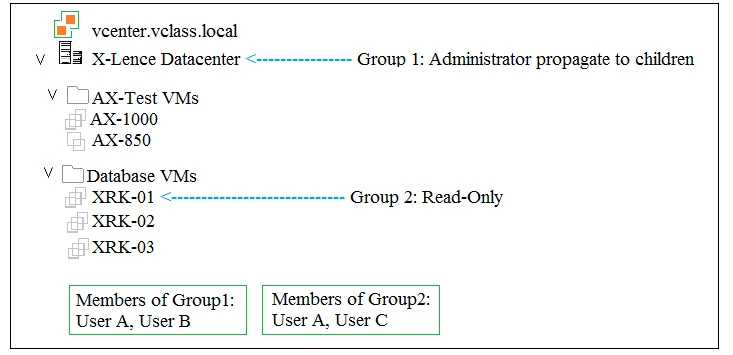
Which two tasks are allowed in the X-Lence data center? (Choose two.)
Correct Answer: B, D
In the given context, Group 1 has Administrator privileges with propagation to children, meaning full access to tasks such as deleting VMs. Group 2 has Read-Only privileges, which limits tasks to viewing only. User B from Group 1 can delete XRK-01, and User A from Group 1 can take snapshots of AX-1000. Therefore, the two tasks allowed are User B deleting XRK-01 and User A taking a snapshot on AX-1000.