Question 6 of 413
You have an Azure Active Directory (Azure AD) tenant named contoso.com.
You plan to bulk invite Azure AD business-to-business (B2B) collaboration users.
Which two parameters must you include when you create the bulk invite? Each correct answer presents part of the solution.
NOTE: Each correct selection is worth one point.
You plan to bulk invite Azure AD business-to-business (B2B) collaboration users.
Which two parameters must you include when you create the bulk invite? Each correct answer presents part of the solution.
NOTE: Each correct selection is worth one point.
Suggested Answer: A, B
When you create a bulk invite for Azure AD business-to-business (B2B) collaboration users, the two essential parameters that you must include are the email address and the redirection URL. The email address is necessary to identify the external users you want to invite, and the redirection URL specifies where the invited users will be taken once they accept the invitation. The other options such as username, shared key, and password are not required for the bulk invite process.
Community votes
No votes yet
Question 7 of 413
You have an Azure Active Directory (Azure AD) tenant that contains the objects shown in the following table.

Which objects can you add as members to Group3?
Which objects can you add as members to Group3?
Suggested Answer: E
Mail-enabled security groups (MESGs) in Azure Active Directory can only contain members that have a mailbox. This includes licensed users, shared mailbox identities, and other mail-enabled security groups. It does not include unlicensed users or groups that are not mail-enabled. In this case, only User2 has a Microsoft Office 365 Enterprise E5 license, which includes a mailbox, making User2 the only eligible member for Group3. Consequently, User2 is the only object that can be added as a member to the mail-enabled security group Group3.
Community votes
No votes yet
Question 8 of 413
DRAG DROP -
You have an on-premises Microsoft Exchange organization that uses an SMTP address space of contoso.com.
You discover that users use their email address for self-service sign-up to Microsoft 365 services.
You need to gain global administrator privileges to the Azure Active Directory (Azure AD) tenant that contains the self-signed users.
Which four actions should you perform in sequence? To answer, move the appropriate actions from the list of actions to the answer area and arrange them in the correct order.
Select and Place:
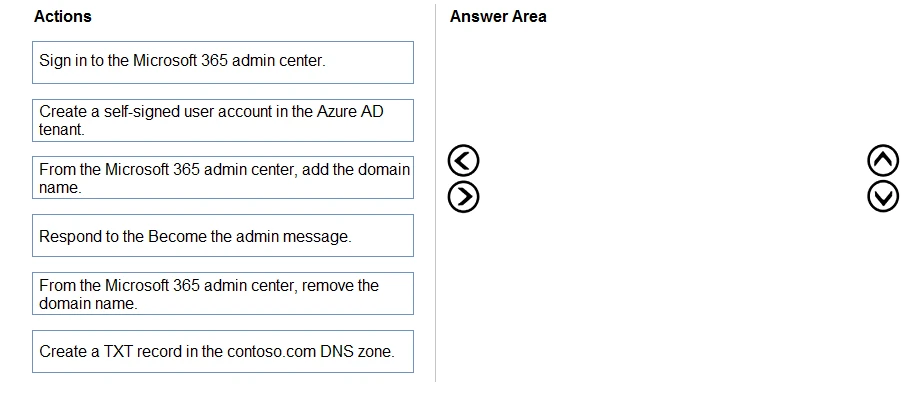
You have an on-premises Microsoft Exchange organization that uses an SMTP address space of contoso.com.
You discover that users use their email address for self-service sign-up to Microsoft 365 services.
You need to gain global administrator privileges to the Azure Active Directory (Azure AD) tenant that contains the self-signed users.
Which four actions should you perform in sequence? To answer, move the appropriate actions from the list of actions to the answer area and arrange them in the correct order.
Select and Place:
Suggested Answer:
Reference:
https://docs.microsoft.com/en-us/azure/active-directory/enterprise-users/domains-admin-takeover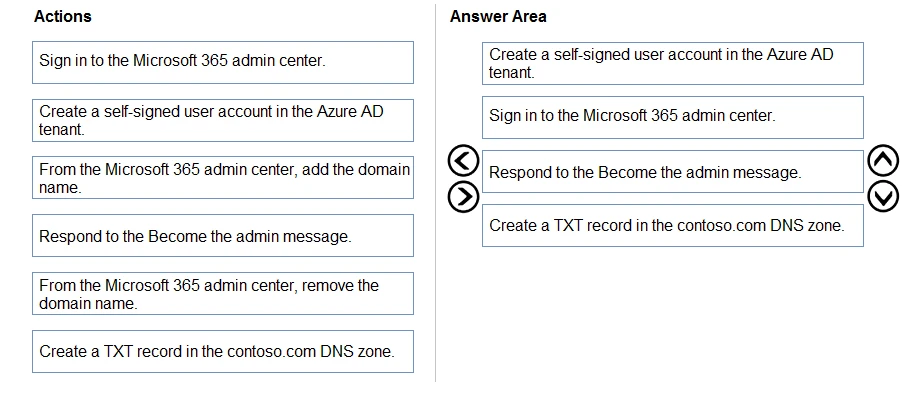
https://docs.microsoft.com/en-us/azure/active-directory/enterprise-users/domains-admin-takeover
Community votes
No votes yet
Question 9 of 413
HOTSPOT -
You have an Azure Active Directory (Azure AD) tenant that contains a user named User1 and the groups shown in the following table.
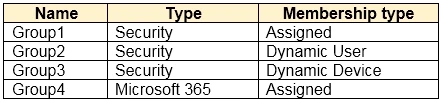
In the tenant, you create the groups shown in the following table.

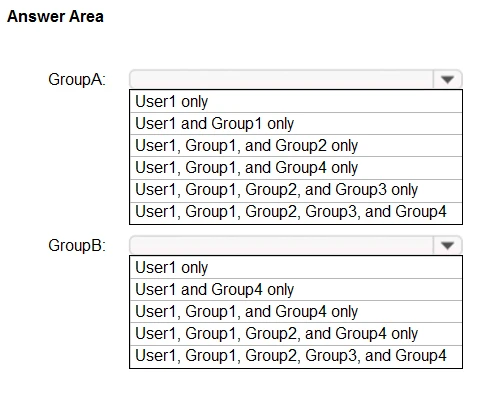
Which members can you add to GroupA and GroupB? To answer, select the appropriate options in the answer area.
NOTE: Each correct selection is worth one point.
Hot Area:
You have an Azure Active Directory (Azure AD) tenant that contains a user named User1 and the groups shown in the following table.
In the tenant, you create the groups shown in the following table.
Which members can you add to GroupA and GroupB? To answer, select the appropriate options in the answer area.
NOTE: Each correct selection is worth one point.
Hot Area:
Suggested Answer:
Reference:
https://bitsizedbytes.wordpress.com/2018/12/10/distribution-security-and-office-365-groups-nesting/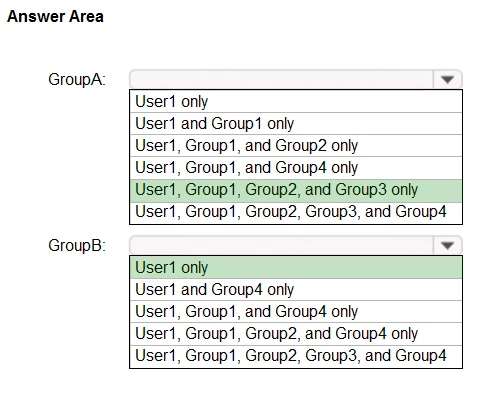
https://bitsizedbytes.wordpress.com/2018/12/10/distribution-security-and-office-365-groups-nesting/
Community votes
No votes yet
Question 10 of 413
Note: This question is part of a series of questions that present the same scenario. Each question in the series contains a unique solution that might meet the stated goals. Some question sets might have more than one correct solution, while others might not have a correct solution.
After you answer a question in this section, you will NOT be able to return to it. As a result, these questions will not appear in the review screen.
You have an Active Directory forest that syncs to an Azure Active Directory (Azure AD) tenant.
You discover that when a user account is disabled in Active Directory, the disabled user can still authenticate to Azure AD for up to 30 minutes.
You need to ensure that when a user account is disabled in Active Directory, the user account is immediately prevented from authenticating to Azure AD.
Solution: You configure password writeback.
Does this meet the goal?
After you answer a question in this section, you will NOT be able to return to it. As a result, these questions will not appear in the review screen.
You have an Active Directory forest that syncs to an Azure Active Directory (Azure AD) tenant.
You discover that when a user account is disabled in Active Directory, the disabled user can still authenticate to Azure AD for up to 30 minutes.
You need to ensure that when a user account is disabled in Active Directory, the user account is immediately prevented from authenticating to Azure AD.
Solution: You configure password writeback.
Does this meet the goal?
Suggested Answer: B
Configuring password writeback ensures that when a password is changed in Azure AD, the new password is written back to the on-premises Active Directory. However, this does not affect the immediacy of account disablement synchronization between Active Directory and Azure AD. To prevent a disabled user from authenticating to Azure AD immediately after the account is disabled in Active Directory, other measures such as configuring Azure AD Connect to use Pass-through Authentication (PTA) or implementing an immediate synchronization process would be necessary. Therefore, configuring password writeback does not meet the goal.
Community votes
No votes yet