You plan to migrate all users to Microsoft Teams Calling Plans.
You will decommission Skype for Business Server after the migration is complete.
You need to ensure that all the users retain their current phone number once the migration is complete. The solution must minimize the downtime of PSTN features for each user.
What should you do first?
You plan to deploy Direct Routing.
Which additional license should you assign to the users?
You assign a Microsoft 365 E3 license to the employee.
The employee must schedule meetings that will include customers in Lisbon. The customers will dial in to the meetings by using PSTN.
You need to ensure that the employee can send meeting invitations that include a dial-in conferencing bridge. The bridge must be set to a local number in Lisbon instead of the company's default dial-in conferencing bridge number.
Which two actions should you perform? Each correct answer presents part of the solution.
NOTE: Each correct selection is worth one point.
You have a Microsoft Teams Phone deployment.
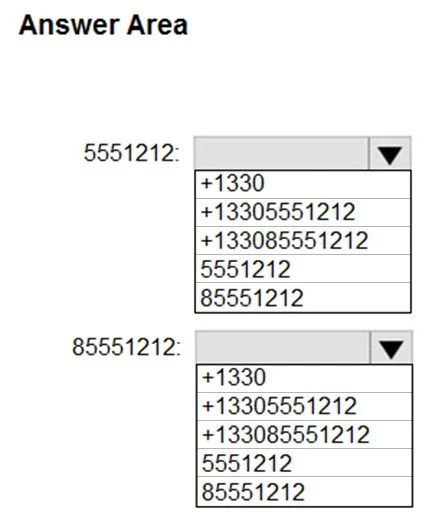
You have a dial plan that contains the following normalization rule:
✑ Pattern: ^8?(\d{7})$
Translation: +1330$1 -

How will the phone numbers be normalized? To answer, select the appropriate options in the answer area.
NOTE: Each correct selection is worth one point.
Hot Area:
What should you do?