Your company has three cost centers named Manufacturing, Sales, and Finance.
You need to associate each virtual machine to a specific cost center.
What should you do?
After you answer a question in this section, you will NOT be able to return to it. As a result, these questions will not appear in the review screen.
You have an Azure subscription named Subscription1. Subscription1 contains a resource group named RG1. RG1 contains resources that were deployed by using templates.
You need to view the date and time when the resources were created in RG1.
Solution: From the Subscriptions blade, you select the subscription, and then click Programmatic deployment.
Does this meet the goal?
After you answer a question in this section, you will NOT be able to return to it. As a result, these questions will not appear in the review screen.
You have an Azure subscription named Subscription1. Subscription1 contains a resource group named RG1. RG1 contains resources that were deployed by using templates.
You need to view the date and time when the resources were created in RG1.
Solution: From the Subscriptions blade, you select the subscription, and then click Resource providers.
Does this meet the goal?
After you answer a question in this section, you will NOT be able to return to it. As a result, these questions will not appear in the review screen.
You have an Azure subscription named Subscription1. Subscription1 contains a resource group named RG1. RG1 contains resources that were deployed by using templates.
You need to view the date and time when the resources were created in RG1.
Solution: From the RG1 blade, you click Automation script.
Does this meet the goal?
You have an Azure subscription.
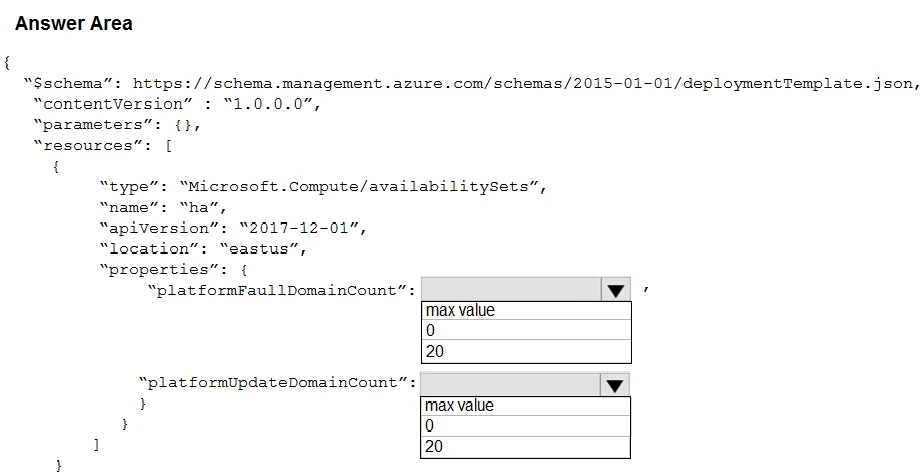
You plan to use Azure Resource Manager templates to deploy 50 Azure virtual machines that will be part of the same availability set.
You need to ensure that as many virtual machines as possible are available if the fabric fails or during servicing.
How should you configure the template? To answer, select the appropriate options in the answer area.
NOTE: Each correct selection is worth one point.
Hot Area: