Question 6 of 266
Your network contains an Active Directory forest. The forest contains two domains named litwarenc.com and contoso.com. The contoso.com domain contains two domains controllers named LON-DC01 and LON-DC02.
The domain controllers are located in a site named London that is associated to a subnet of 192.168.10.0/24
You discover that LON-DC02 is not a global catalog server. You need to configure LON-DC02 as a global catalog server.
What should you do?
The domain controllers are located in a site named London that is associated to a subnet of 192.168.10.0/24
You discover that LON-DC02 is not a global catalog server. You need to configure LON-DC02 as a global catalog server.
What should you do?
Suggested Answer: C
To configure a domain controller as a global catalog server, you need to modify the NTDS Settings object for that domain controller. In Active Directory Sites and Services, you can locate the domain controller and access its NTDS Settings. From there, you can enable the global catalog checkbox, effectively designating the domain controller as a global catalog server.
Community votes
No votes yet
Question 7 of 266
Your network contains an Active Directory domain named contoso.com. The domain functional level is Windows Server 2012 R2.
You need to secure several high-privilege user accounts to meet the following requirements:
✑ Prevent authentication by using NTLM.
✑ Use Kerberos to verify authentication requests to any resources.
✑ Prevent the users from signing in to a client computer if the computer is disconnected from the domain.
What should you do?
You need to secure several high-privilege user accounts to meet the following requirements:
✑ Prevent authentication by using NTLM.
✑ Use Kerberos to verify authentication requests to any resources.
✑ Prevent the users from signing in to a client computer if the computer is disconnected from the domain.
What should you do?
Suggested Answer: C
To meet the requirements of preventing authentication by using NTLM, using Kerberos to verify authentication requests, and preventing users from signing in to a client computer if it is disconnected from the domain, you should add the users to the Protected Users group. Members of this group can only use Kerberos for authentication and are restricted from using NTLM, Digest Authentication, or CredSSP. Additionally, they cannot log on if the computer is disconnected from the domain because user credentials cannot be cached locally.
Community votes
No votes yet
Question 8 of 266
HOTSPOT -
Your network contains an Active Directory domain named contoso.com.
Some user accounts in the domain have the P.O. Box attribute set.
You plan to remove the value of the P.O. Box attribute for all of the users by using Ldifde.
You have a user named User1 who is located in the Users container.
How should you configure the LDIF file to remove the value of the P.O. Box attribute for User1? To answer, select the appropriate options in the answer area.
Hot Area:
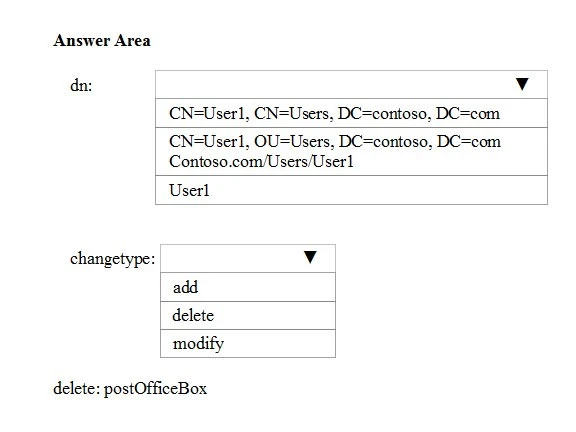
Your network contains an Active Directory domain named contoso.com.
Some user accounts in the domain have the P.O. Box attribute set.
You plan to remove the value of the P.O. Box attribute for all of the users by using Ldifde.
You have a user named User1 who is located in the Users container.
How should you configure the LDIF file to remove the value of the P.O. Box attribute for User1? To answer, select the appropriate options in the answer area.
Hot Area:
Suggested Answer: 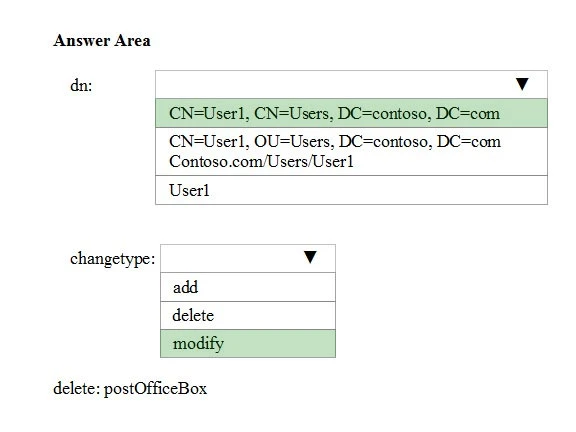
Community votes
No votes yet
Question 9 of 266
DRAG DROP -
Your company has multiple offices.
The network contains an Active Directory domain named contoso.com. An Active Directory site exists for each office. All of the sites connect to each other by using DEFAULTIPSITELINK.
The company plans to open a new office. The new office will have a domain controller and 100 client computers.
You install Windows Server 2016 on a member server in the new office. The new server will become a domain controller.
You need to deploy the domain controller to the new office. The solution must ensure that the client computers in the new office will authenticate by using the local domain controller.
Which three actions should you perform next in sequence? To answer, move the appropriate actions from the list of actions to the answer area and arrange them in the correct order.
Select and Place:
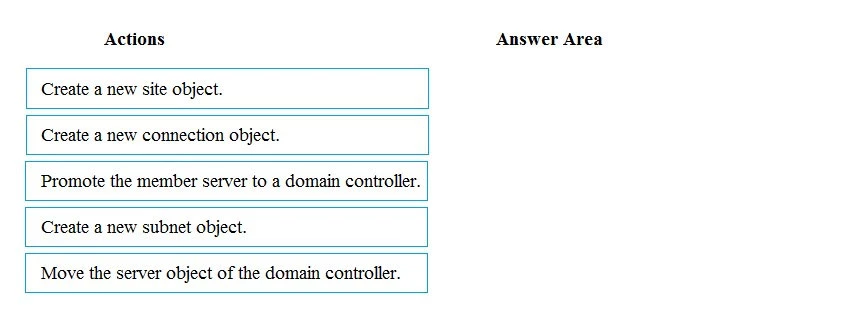
Your company has multiple offices.
The network contains an Active Directory domain named contoso.com. An Active Directory site exists for each office. All of the sites connect to each other by using DEFAULTIPSITELINK.
The company plans to open a new office. The new office will have a domain controller and 100 client computers.
You install Windows Server 2016 on a member server in the new office. The new server will become a domain controller.
You need to deploy the domain controller to the new office. The solution must ensure that the client computers in the new office will authenticate by using the local domain controller.
Which three actions should you perform next in sequence? To answer, move the appropriate actions from the list of actions to the answer area and arrange them in the correct order.
Select and Place:
Suggested Answer: 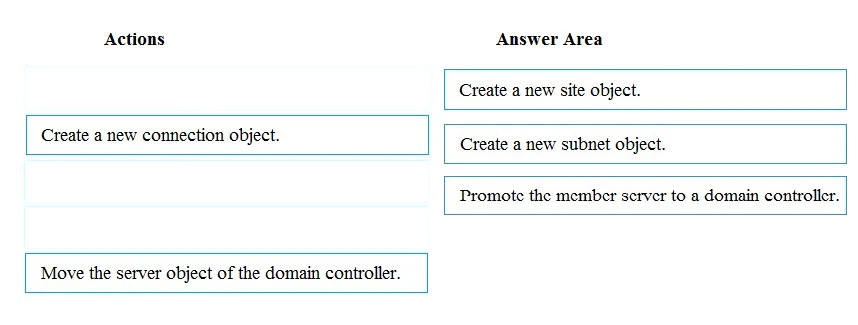
Community votes
No votes yet
Question 10 of 266
Your network contains an Active Directory forest named contoso.com. Users frequently access the website of an external partner company. The URL of the website is http://partners.adatum.com.
The partner company informs you that it will perform maintenance on its Web server and that the IP addresses of the Web server will change.
After the change is complete, the users on your internal network report that they fail to access the website. However, some users who work from home report that they can access the website.
You need to ensure that your DNS servers can resolve partners.adatum.com to the correct IP address immediately.
What should you do?
The partner company informs you that it will perform maintenance on its Web server and that the IP addresses of the Web server will change.
After the change is complete, the users on your internal network report that they fail to access the website. However, some users who work from home report that they can access the website.
You need to ensure that your DNS servers can resolve partners.adatum.com to the correct IP address immediately.
What should you do?
Suggested Answer: D
Running Set-DnsServerCache is the correct approach. When users can access the external website from home but not from within the internal network, it indicates that the issue is likely due to outdated DNS cache entries in the internal DNS server. The Set-DnsServerCache cmdlet can be used to clear the DNS server cache, ensuring that the DNS servers resolve the URL to the updated IP address immediately. This directly addresses the problem of the internal DNS server holding onto stale records. Options involving dnscmd, Set-DnsServerGlobalQueryBlockList, or ipconfig commands do not directly address clearing the DNS cache in this context.
Community votes
No votes yet