Question 6 of 48
HOTSPOT -
A company uses SharePoint to manage a large number of documents.
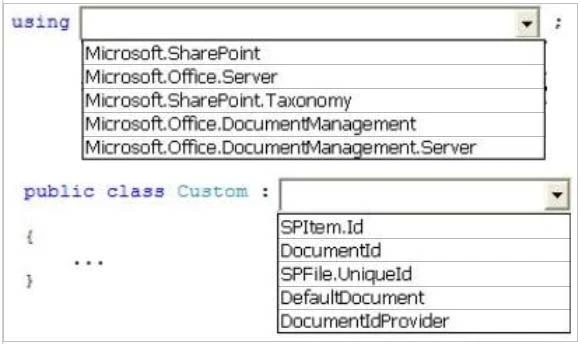
The Document ID Service feature is enabled. You need to create a custom class that generates a unique ID for each document.
How should you complete the class definition? (To answer, select the appropriate code segment from each drop-down list in the answer area.).
Hot Area:
Exam 70-489: Question 6 - Image 1
Correct Answer:
Exam 70-489: Question 6 - Image 2
Question 7 of 48
HOTSPOT -
You implement eDiscovery in SharePoint to access Exchange Online mailbox data.
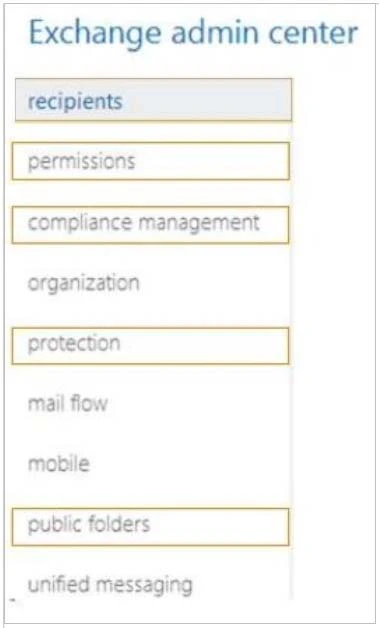
You need to ensure that users continue to have access to Exchange Online mailbox data after an In-Place Hold is applied.
On the Exchange admin center page, which option should you select? (To answer, select the appropriate option in the answer area.)
Hot Area:
Exam 70-489: Question 7 - Image 1
Correct Answer:
Exam 70-489: Question 7 - Image 2
Question 8 of 48
You use Visual Studio to design a SharePoint solution for a company that provides computer support services to customers around the world.
The solution must list the customer service representatives that resolve the highest number of support requests. The solution also must allow filtering of customer service representatives by region.
You need to configure the solution to meet the requirements.
Which steps should you take? (Each correct answer presents part of the solution. Choose all that apply.)
Correct Answer: C, D

Question 9 of 48
DRAG DROP -
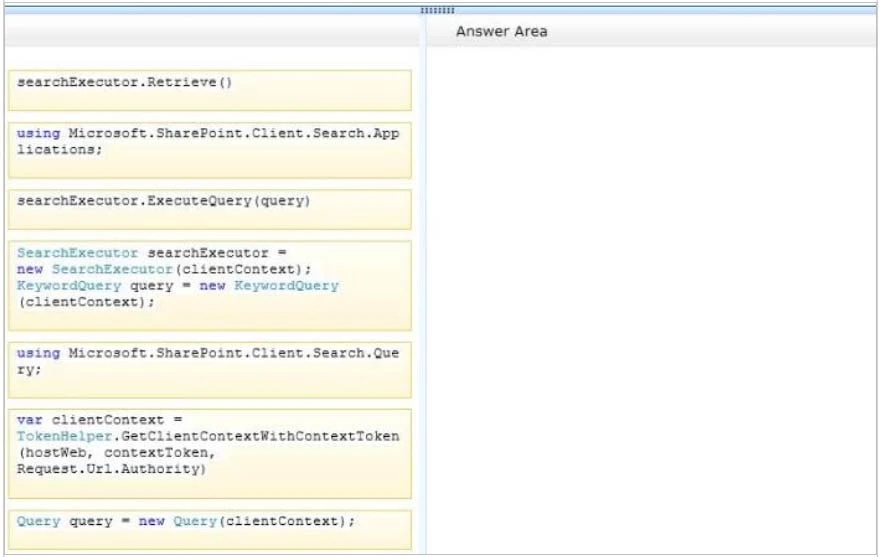
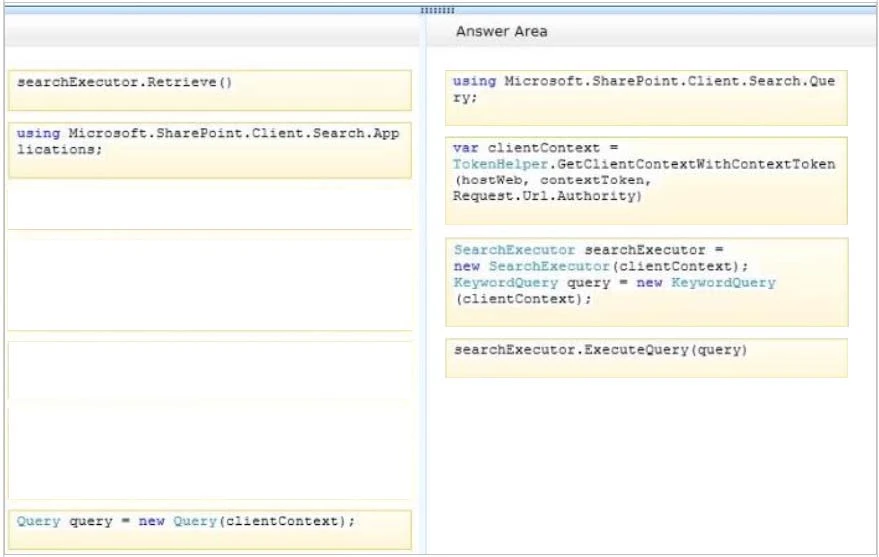
You develop a SharePoint app that uses the client-side object model (CSOM) to retrieve items from the search index.
You need to implement the client-side query code.
Which four code segments should you use in sequence? (To answer, move the appropriate actions from the list of actions to the answer area and arrange them in the correct order.)
Select and Place:
Exam 70-489: Question 9 - Image 1
Correct Answer:
Note:
Reference:
* Step 1:
First we need to add the necessary references such as.
usingMicrosoft.SharePoint.Client;
usingMicrosoft.SharePoint.Client.Search;
usingMicrosoft.SharePoint.Client.Search.Query;
Step 2:
Start by creating aClientContextobject and pass in the URL to a site. Put this in a using block.
Using(ClientContextclientContext =newClientContext("http://servername"))
We then need to create aKeywordQueryclass to describe the query. This class is similar to the server sideKeywordQueryclass but there are some differences.
We pass the ClientContext into the constructor.
KeywordQuerykeywordQuery =newKeywordQuery(clientContext);
* Step 3:
Unlike the server object model, with the Client OM we have to use another class,SearchExecutor, to send the queries to the search engine. We pass a
ClientContext to it as well:
SearchExecutorsearchExecutor =newSearchExecutor(clientContext)
Step 4:
on the ClientContext object. If you have done a lot of Client OM work before, you might first but it is not required. clientContext.ExecuteQuery();
Reference: How to: Query Search with the SharePoint 2013 Client Object Model Exam 70-489: Question 9 - Image 2
Question 10 of 48
You develop a SharePoint app for a toy company that uses the Representational State Transfer (REST) API for search. The site collections in the app have been crawled recently and use the default search schema.
The app includes the following code segment: (Line numbers are included for reference only.)
Exam 70-489: Question 10 - Image 1
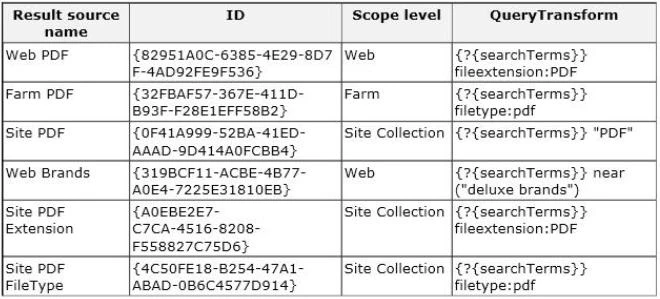
You create the following result sources.
Exam 70-489: Question 10 - Image 2
You need to ensure that the app only displays PDF documents.
Which code segment should you insert at line 03?
Correct Answer: