Skip to content

Microsoft 70-475

Designing and Implementing Big Data Analytics Solutions

Verified practice questions with detailed answers, clear explanations, and community discussion.

  • 42

    questions

  • 4 days ago

    last updated

  • 4.8/5

    overall rating

Question 1 of 42

Overview:

Relecloud is a social media company that processes hundreds of millions of social media posts per day and sells advertisements to several hundred companies.

Relecloud has a Microsoft SQL Server database named DB1 that stores information about the advertisers. DB1 is hosted on a Microsoft Azure virtual machine.

Relecloud has two main offices. The offices are located in San Francisco and New York City.

The offices connect to each other by using a site-to-site VPN. Each office connects directly to the Internet.

Relecloud modifies the pricing of its advertisements based on trending topics. Topics are considered to be trending if they generate many mentions in a specific country during a 15-minute time frame. The highest trending topics generate the highest advertising revenue.

Relecloud wants to deliver reports to the advertisers by using Microsoft Power BI. The reports will provide real-time data on trending topics, current advertising rates, and advertising costs for a given month.

Relecloud will analyze the trending topics data, and then store the data in a new data warehouse for ad-hoc analysis. The data warehouse is expected to grow at a rate of 1 GB per hour or 8.7 terabytes (TB) per year. The data will be retained for five years for the purpose of long-term trending.

Requirements:

  • Management at Relecloud must be able to view which topics are trending to adjust advertising rates in near real-time.
  • Relecloud plans to implement a new streaming analytics platform that will report on trending topics.
  • Relecloud plans to implement a data warehouse named DB2.

Relecloud identifies the following technical requirements:

  • Social media data must be analyzed to identify trending topics in real-time.
  • The use of Infrastructure as a Service (IaaS) platforms must minimized, whenever possible.
  • The real-time solution used to analyze the social media data must support scaling up and down without service interruption.

Relecloud identifies the following technical requirements for the advertisers:

  • The advertisers must be able to see only their own data in the Power BI reports.
  • The advertisers must authenticate to Power BI by using Azure Active Directory (Azure AD) credentials.
  • The advertisers must be able to leverage existing Transact-SQL language knowledge when developing the real-time streaming solution.
  • Members of the internal advertising sales team at Relecloud must be able to see only the sales date of the advertisers to which they are assigned.
  • The internal Relecloud advertising sales team must be prevented from inserting, updating, and deleting rows for the advertisers to which they are not assigned.
  • The internal Relecloud advertising sales team must be able to use a text file to update the list of advertisers, and then to upload the file to Azure Blob storage.

Relecloud identifies the following requirements for DB1:

  • Data generated by the streaming analytics platform must be stored in DB1.
Exam 70-475: Question 1 - Image 1
  • The user names of the advertisers must be mapped to CustomerID in a table named Table2.
  • The advertisers in DB1 must be stored in a table named Table1 and must be refreshed nightly.
  • The user names of the employees at Relecloud must be mapped to EmployeeID in a table named Table3.

Relecloud identifies the following requirements for DB2:

  • DB2 must have minimal storage costs.
  • DB2 must run load processes in parallel.
  • DB2 must support massive parallel processing.
  • DB2 must be able to store more than 40 TB of data.
  • DB2 must support scaling up and down, as required.
  • Data from DB1 must be archived in DB2 for long-term storage.
  • All of the reports that are executed from DB2 must use aggregation.
  • Users must be able to pause DB2 when the data warehouse is not in use.
  • Users must be able to view previous versions of the data in DB2 by using aggregates.

Relecloud identifies the following requirements for extract, transformation, and load (ETL):

  • Data movement between DB1 and DB2 must occur each hour.
  • An email alert must be generated when a failure of any type occurs during ETL processing.

Sample code and data:

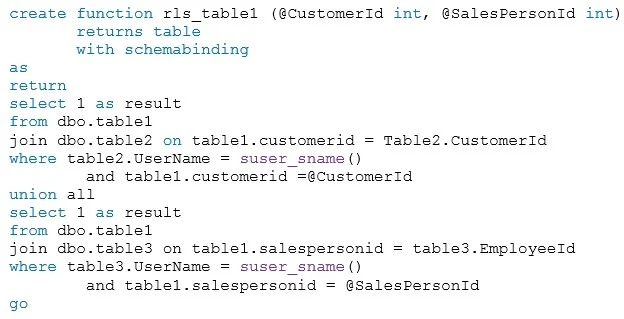
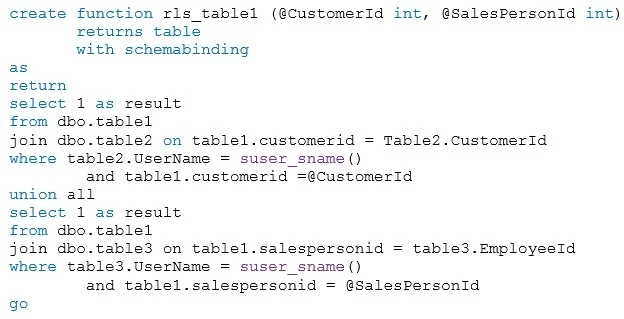
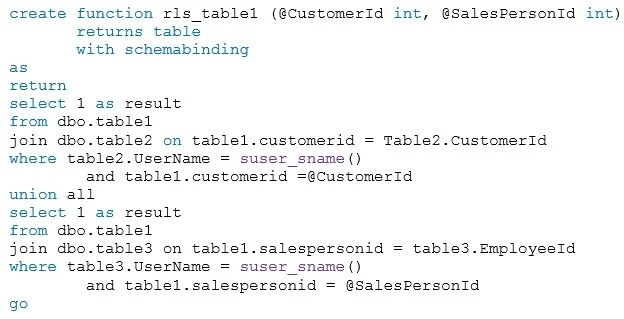
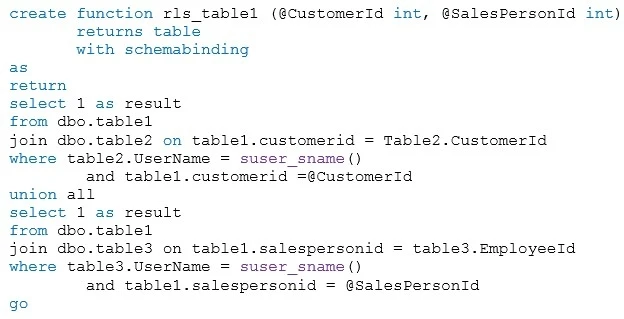
You execute the following code for a table named rls_table1.

Exam 70-475: Question 1 - Image 2

You use the following code to create Table1.

create table table1
(customerid int,
salespersonid int
...
)

Go -

The following is a sample of the streaming data.

Exam 70-475: Question 1 - Image 3

Which technology should you recommend to meet the technical requirement for analyzing the social media data?

Answer choices
Show answer

Correct answer: A

Azure Stream Analytics is a fully managed event-processing engine that lets you set up real-time analytic computations on streaming data.

Scalability -
Stream Analytics can handle up to 1 GB of incoming data per second. Integration with Azure Event Hubs and Azure IoT Hub allows jobs to ingest millions of events per second coming from connected devices, clickstreams, and log files, to name a few. Using the partition feature of event hubs, you can partition computations into logical steps, each with the ability to be further partitioned to increase scalability.
From scenario: Relecloud identifies the following technical requirements:
✑ Social media data must be analyzed to identify trending topics in real-time.
✑ The use of Infrastructure as a Service (IaaS) platforms must minimized, whenever possible.
✑ The real-time solution used to analyze the social media data must support scaling up and down without service interruption.
Reference: https://docs.microsoft.com/en-us/azure/stream-analytics/stream-analytics-introduction

Question 2 of 42

DRAG DROP -

Overview:

Relecloud is a social media company that processes hundreds of millions of social media posts per day and sells advertisements to several hundred companies.

Relecloud has a Microsoft SQL Server database named DB1 that stores information about the advertisers. DB1 is hosted on a Microsoft Azure virtual machine.

Relecloud has two main offices. The offices are located in San Francisco and New York City.

The offices connect to each other by using a site-to-site VPN. Each office connects directly to the Internet.

Relecloud modifies the pricing of its advertisements based on trending topics. Topics are considered to be trending if they generate many mentions in a specific country during a 15-minute time frame. The highest trending topics generate the highest advertising revenue.

Relecloud wants to deliver reports to the advertisers by using Microsoft Power BI. The reports will provide real-time data on trending topics, current advertising rates, and advertising costs for a given month.

Relecloud will analyze the trending topics data, and then store the data in a new data warehouse for ad-hoc analysis. The data warehouse is expected to grow at a rate of 1 GB per hour or 8.7 terabytes (TB) per year. The data will be retained for five years for the purpose of long-term trending.

Requirements:

Management at Relecloud must be able to view which topics are trending to adjust advertising rates in near real-time.

Relecloud plans to implement a new streaming analytics platform that will report on trending topics.

Relecloud plans to implement a data warehouse named DB2.

Relecloud identifies the following technical requirements:

  • Social media data must be analyzed to identify trending topics in real-time.
  • The use of Infrastructure as a Service (IaaS) platforms must minimized, whenever possible.
  • The real-time solution used to analyze the social media data must support scaling up and down without service interruption.

Relecloud identifies the following technical requirements for the advertisers:

  • The advertisers must be able to see only their own data in the Power BI reports.
  • The advertisers must authenticate to Power BI by using Azure Active Directory (Azure AD) credentials.
  • The advertisers must be able to leverage existing Transact-SQL language knowledge when developing the real-time streaming solution.
  • Members of the internal advertising sales team at Relecloud must be able to see only the sales date of the advertisers to which they are assigned.
  • The internal Relecloud advertising sales team must be prevented from inserting, updating, and deleting rows for the advertisers to which they are not assigned.
  • The internal Relecloud advertising sales team must be able to use a text file to update the list of advertisers, and then to upload the file to Azure Blob storage.

Relecloud identifies the following requirements for DB1:

  • Data generated by the streaming analytics platform must be stored in DB1.
  • The user names of the advertisers must be mapped to CustomerID in a table named Table2.
  • The advertisers in DB1 must be stored in a table named Table1 and must be refreshed nightly.
  • The user names of the employees at Relecloud must be mapped to EmployeeID in a table named Table3.

Relecloud identifies the following requirements for DB2:

  • DB2 must have minimal storage costs.
  • DB2 must run load processes in parallel.
  • DB2 must support massive parallel processing.
  • DB2 must be able to store more than 40 TB of data.
  • DB2 must support scaling up and down, as required.
  • Data from DB1 must be archived in DB2 for long-term storage.

All of the reports that are executed from DB2 must use aggregation.

Exam 70-475: Question 2 - Image 1
  • Users must be able to pause DB2 when the data warehouse is not in use.
  • Users must be able to view previous versions of the data in DB2 by using aggregates.

Relecloud identifies the following requirements for extract, transformation, and load (ETL):

  • Data movement between DB1 and DB2 must occur each hour.
  • An email alert must be generated when a failure of any type occurs during ETL processing.

Sample code and data:

You execute the following code for a table named rls_table1.
Exam 70-475: Question 2 - Image 2

You use the following code to create Table1.

create table table1
(customerid int,
salespersonid int
...)

Go -

The following is a sample of the streaming data.

Exam 70-475: Question 2 - Image 3

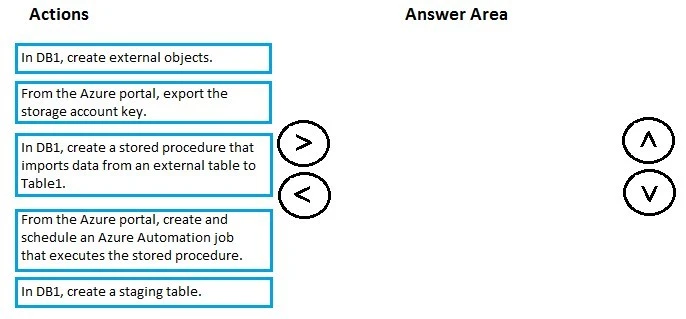
You need to implement a solution that meets the data refresh requirement for DB1.

Which three actions should you perform in sequence? To answer, move the appropriate actions from the list of actions to the answer area and arrange them in the correct order.

Select and Place:
Exam 70-475: Question 2 - Image 4
Show answer

Suggested answer

Azure Data Factory can be used to orchestrate the execution of stored procedures. This allows more complex pipelines to be created and extends Azure Data
Factory's ability to leverage the computational power of SQL Data Warehouse.
From scenario:
Relecloud has a Microsoft SQL Server database named DB1 that stores information about the advertisers. DB1 is hosted on a Microsoft Azure virtual machine.
Relecloud identifies the following requirements for DB1:
✑ Data generated by the streaming analytics platform must be stored in DB1.
✑ The advertisers in DB1 must be stored in a table named Table1 and must be refreshed nightly.
Reference: https://docs.microsoft.com/en-us/azure/machine-learning/machine-learning-data-science-move-sql-server-virtual-machine Exam 70-475: Question 2 - Image 5

Question 3 of 42

DRAG DROP -

Overview:

Relecloud is a social media company that processes hundreds of millions of social media posts per day and sells advertisements to several hundred companies.

Relecloud has a Microsoft SQL Server database named DB1 that stores information about the advertisers. DB1 is hosted on a Microsoft Azure virtual machine.

Relecloud has two main offices. The offices are located in San Francisco and New York City.

The offices connect to each other by using a site-to-site VPN. Each office connects directly to the Internet.

Relecloud modifies the pricing of its advertisements based on trending topics. Topics are considered to be trending if they generate many mentions in a specific country during a 15-minute time frame. The highest trending topics generate the highest advertising revenue.

Relecloud wants to deliver reports to the advertisers by using Microsoft Power BI. The reports will provide real-time data on trending topics, current advertising rates, and advertising costs for a given month.

Relecloud will analyze the trending topics data, and then store the data in a new data warehouse for ad-hoc analysis. The data warehouse is expected to grow at a rate of 1 GB per hour or 8.7 terabytes (TB) per year. The data will be retained for five years for the purpose of long-term trending.

Requirements:

  • Management at Relecloud must be able to view which topics are trending to adjust advertising rates in near real-time.
  • Relecloud plans to implement a new streaming analytics platform that will report on trending topics.
  • Relecloud plans to implement a data warehouse named DB2.

Relecloud identifies the following technical requirements:

  • Social media data must be analyzed to identify trending topics in real-time.
  • The use of Infrastructure as a Service (IaaS) platforms must minimized, whenever possible.
  • The real-time solution used to analyze the social media data must support scaling up and down without service interruption.

Relecloud identifies the following technical requirements for the advertisers:

  • The advertisers must be able to see only their own data in the Power BI reports.
  • The advertisers must authenticate to Power BI by using Azure Active Directory (Azure AD) credentials.
  • The advertisers must be able to leverage existing Transact-SQL language knowledge when developing the real-time streaming solution.
  • Members of the internal advertising sales team at Relecloud must be able to see only the sales date of the advertisers to which they are assigned.
  • The internal Relecloud advertising sales team must be prevented from inserting, updating, and deleting rows for the advertisers to which they are not assigned.
  • The internal Relecloud advertising sales team must be able to use a text file to update the list of advertisers, and then to upload the file to Azure Blob storage.

Relecloud identifies the following requirements for DB1:

  • Data generated by the streaming analytics platform must be stored in DB1.
  • The user names of the advertisers must be mapped to CustomerID in a table named Table2.
  • The advertisers in DB1 must be stored in a table named Table1 and must be refreshed nightly.
Exam 70-475: Question 3 - Image 1
  • The user names of the employees at Relecloud must be mapped to EmployeeID in a table named Table3.

Relecloud identifies the following requirements for DB2:

  • DB2 must have minimal storage costs.
  • DB2 must run load processes in parallel.
  • DB2 must support massive parallel processing.
  • DB2 must be able to store more than 40 TB of data.
  • DB2 must support scaling up and down, as required.
  • Data from DB1 must be archived in DB2 for long-term storage.
  • All of the reports that are executed from DB2 must use aggregation.
  • Users must be able to pause DB2 when the data warehouse is not in use.
  • Users must be able to view previous versions of the data in DB2 by using aggregates.

Relecloud identifies the following requirements for extract, transformation, and load (ETL):

  • Data movement between DB1 and DB2 must occur each hour.
  • An email alert must be generated when a failure of any type occurs during ETL processing.

Sample code and data:

You execute the following code for a table named rls_table1.

Exam 70-475: Question 3 - Image 2

You use the following code to create Table1.

create table table1
(customerid int,
salespersonid int
...
)

Go -

The following is a sample of the streaming data.

Exam 70-475: Question 3 - Image 3

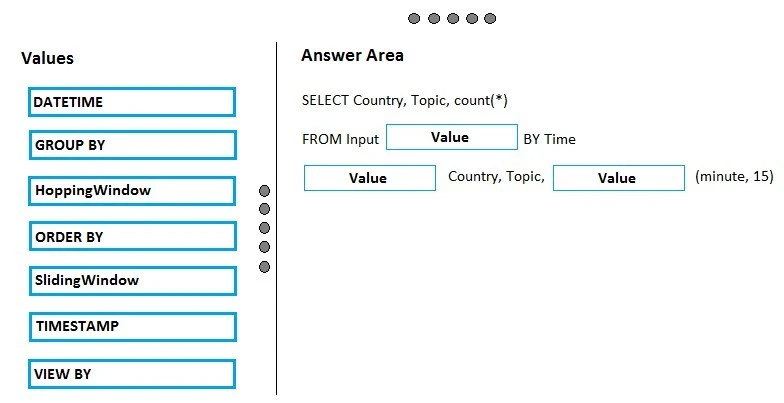
You need to create a query that identifies the trending topics.

How should you complete the query? To answer, drag the appropriate values to the correct targets. Each value may be used once, more than once, or not at all.

You may need to drag the split bar between panes or scroll to view content.

NOTE: Each correct selection is worth one point.

Select and Place:

Exam 70-475: Question 3 - Image 4
Show answer

Suggested answer

From scenario: Topics are considered to be trending if they generate many mentions in a specific country during a 15-minute time frame.

Box 1: TimeStamp -
Azure Stream Analytics (ASA) is a cloud service that enables real-time processing over streams of data flowing in from devices, sensors, websites and other live systems. The stream-processing logic in ASA is expressed in a SQL-like query language with some added extensions such as windowing for performing temporal calculations.
ASA is a temporal system, so every event that flows through it has a timestamp. A timestamp is assigned automatically based on the event's arrival time to the input source but you can also access a timestamp in your event payload explicitly using TIMESTAMP BY:
SELECT * FROM SensorReadings TIMESTAMP BY time

Box 2: GROUP BY -
Example: Generate an output event if the temperature is above 75 for a total of 5 seconds
SELECT sensorId, MIN(temp) as temp

FROM SensorReadings -

TIMESTAMP BY time -
GROUP BY sensorId, SlidingWindow(second, 5)

HAVING MIN(temp) > 75 -

Box 3: SlidingWindow -
Windowing is a core requirement for stream processing applications to perform set-based operations like counts or aggregations over events that arrive within a specified period of time. ASA supports three types of windows: Tumbling, Hopping, and Sliding.
With a Sliding Window, the system is asked to logically consider all possible windows of a given length and output events for cases when the content of the window actually changes that is, when an event entered or existed the window.
Reference: https://blogs.technet.microsoft.com/machinelearning/2015/06/01/the-azure-stream-analytics-query-language/ Exam 70-475: Question 3 - Image 5

Question 4 of 42

HOTSPOT -

Overview:

Relecloud is a social media company that processes hundreds of millions of social media posts per day and sells advertisements to several hundred companies.

Relecloud has a Microsoft SQL Server database named DB1 that stores information about the advertisers. DB1 is hosted on a Microsoft Azure virtual machine.

Relecloud has two main offices. The offices are located in San Francisco and New York City.

The offices connect to each other by using a site-to-site VPN. Each office connects directly to the Internet.

Relecloud modifies the pricing of its advertisements based on trending topics. Topics are considered to be trending if they generate many mentions in a specific country during a 15-minute time frame. The highest trending topics generate the highest advertising revenue.

Relecloud wants to deliver reports to the advertisers by using Microsoft Power BI. The reports will provide real-time data on trending topics, current advertising rates, and advertising costs for a given month.

Relecloud will analyze the trending topics data, and then store the data in a new data warehouse for ad-hoc analysis. The data warehouse is expected to grow at a rate of 1 GB per hour or 8.7 terabytes (TB) per year. The data will be retained for five years for the purpose of long-term trending.

Requirements:

  • Management at Relecloud must be able to view which topics are trending to adjust advertising rates in near real-time.
  • Relecloud plans to implement a new streaming analytics platform that will report on trending topics.
  • Relecloud plans to implement a data warehouse named DB2.
  • Relecloud identifies the following technical requirements:
    • Social media data must be analyzed to identify trending topics in real-time.
    • The use of Infrastructure as a Service (IaaS) platforms must minimized, whenever possible.
    • The real-time solution used to analyze the social media data must support scaling up and down without service interruption.
  • Relecloud identifies the following technical requirements for the advertisers:
    • The advertisers must be able to see only their own data in the Power BI reports.
    • The advertisers must authenticate to Power BI by using Azure Active Directory (Azure AD) credentials.
    • The advertisers must be able to leverage existing Transact-SQL language knowledge when developing the real-time streaming solution.
    • Members of the internal advertising sales team at Relecloud must be able to see only the sales date of the advertisers to which they are assigned.
    • The internal Relecloud advertising sales team must be prevented from inserting, updating, and deleting rows for the advertisers to which they are not assigned.
    • The internal Relecloud advertising sales team must be able to use a text file to update the list of advertisers, and then to upload the file to Azure Blob storage.
  • Relecloud identifies the following requirements for DB1:
    • Data generated by the streaming analytics platform must be stored in DB1.
    • The user names of the advertisers must be mapped to CustomerID in a table named Table2.
    • The advertisers in DB1 must be stored in a table named Table1 and must be refreshed nightly.
    • The user names of the employees at Relecloud must be mapped to EmployeeID in a table named Table3.
  • Relecloud identifies the following requirements for DB2:
    • DB2 must have minimal storage costs.
    • DB2 must run load processes in parallel.
    • DB2 must support massive parallel processing.
    • DB2 must be able to store more than 40 TB of data.
    • DB2 must support scaling up and down, as required.
    • Data from DB1 must be archived in DB2 for long-term storage.
    • All of the reports that are executed from DB2 must use aggregation.
    • Users must be able to pause DB2 when the data warehouse is not in use.
    • Users must be able to view previous versions of the data in DB2 by using aggregates.
  • Relecloud identifies the following requirements for extract, transformation, and load (ETL):
    • Data movement between DB1 and DB2 must occur each hour.
    • An email alert must be generated when a failure of any type occurs during ETL processing.

Sample code and data:

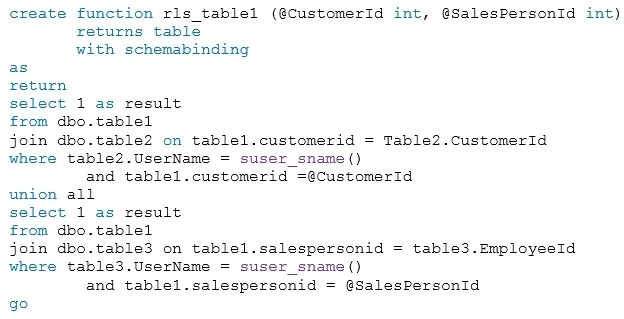
You execute the following code for a table named rls_table1.

Exam 70-475: Question 4 - Image 1

You use the following code to create Table1.

create table table1
(customerid int,
salespersonid int
...
)

Go -

The following is a sample of the streaming data.

Exam 70-475: Question 4 - Image 2

You implement DB2.

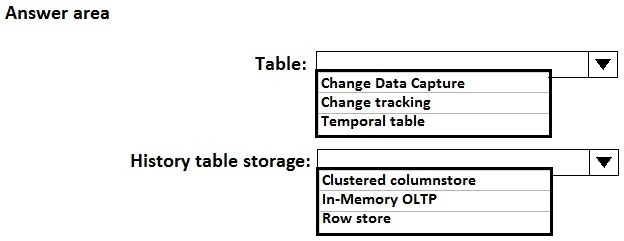
You need to configure the tables in DB2 to host the data from DB1. The solution must meet the requirements for DB2.

Which type of table and history table storage should you use for the tables? To answer, select the appropriate options in the answer area.

NOTE: Each correct selection is worth one point.

Hot Area:

Exam 70-475: Question 4 - Image 3
Show answer

Suggested answer

From Scenario: Relecloud plans to implement a data warehouse named DB2.

Box 1: Temporal table -
From Scenario:
Relecloud identifies the following requirements for DB2:
Users must be able to view previous versions of the data in DB2 by using aggregates.
DB2 must be able to store more than 40 TB of data.
A system-versioned temporal table is a new type of user table in SQL Server 2017, designed to keep a full history of data changes and allow easy point in time analysis. A temporal table also contains a reference to another table with a mirrored schema. The system uses this table to automatically store the previous version of the row each time a row in the temporal table gets updated or deleted. This additional table is referred to as the history table, while the main table that stores current (actual) row versions is referred to as the current table or simply as the temporal table.
Reference: https://docs.microsoft.com/en-us/sql/relational-databases/tables/temporal-tables

Box 2: Clustered Columnstore -
From Scenario:
The data warehouse is expected to grow at a rate of 1 GB per hour or 8.7 terabytes (TB) per year. The data will be retained for five years for the purpose of long- term trending.
Relecloud identifies the following requirements for DB2:
Data from DB1 must be archived in DB2 for long-term storage.
How SQL Database deletes aged rows?
The cleanup process depends on the index layout of the history table. It is important to notice that only history tables with a clustered index (B-tree or columnstore) can have finite retention policy configured.
Reference: https://docs.microsoft.com/en-us/sql/relational-databases/tables/manage-retention-of-historical-data-in-system-versioned-temporal-tables Exam 70-475: Question 4 - Image 4

Question 5 of 42

DRAG DROP -

Overview:

Relecloud is a social media company that processes hundreds of millions of social media posts per day and sells advertisements to several hundred companies.

Relecloud has a Microsoft SQL Server database named DB1 that stores information about the advertisers. DB1 is hosted on a Microsoft Azure virtual machine.

Relecloud has two main offices. The offices are located in San Francisco and New York City.

The offices connect to each other by using a site-to-site VPN. Each office connects directly to the Internet.

Relecloud modifies the pricing of its advertisements based on trending topics. Topics are considered to be trending if they generate many mentions in a specific country during a 15-minute time frame. The highest trending topics generate the highest advertising revenue.

Relecloud wants to deliver reports to the advertisers by using Microsoft Power BI. The reports will provide real-time data on trending topics, current advertising rates, and advertising costs for a given month.

Relecloud will analyze the trending topics data, and then store the data in a new data warehouse for ad-hoc analysis. The data warehouse is expected to grow at a rate of 1 GB per hour or 8.7 terabytes (TB) per year. The data will be retained for five years for the purpose of long-term trending.

Requirements:

  • Management at Relecloud must be able to view which topics are trending to adjust advertising rates in near real-time.
  • Relecloud plans to implement a new streaming analytics platform that will report on trending topics.
  • Relecloud plans to implement a data warehouse named DB2.
  • Relecloud identifies the following technical requirements:
  • Social media data must be analyzed to identify trending topics in real-time.
  • The use of Infrastructure as a Service (IaaS) platforms must minimized, whenever possible.
  • The real-time solution used to analyze the social media data must support scaling up and down without service interruption.

Relecloud identifies the following technical requirements for the advertisers:

  • The advertisers must be able to see only their own data in the Power BI reports.
  • The advertisers must authenticate to Power BI by using Azure Active Directory (Azure AD) credentials.
  • The advertisers must be able to leverage existing Transact-SQL language knowledge when developing the real-time streaming solution.
  • Members of the internal advertising sales team at Relecloud must be able to see only the sales date of the advertisers to which they are assigned.
  • The internal Relecloud advertising sales team must be prevented from inserting, updating, and deleting rows for the advertisers to which they are not assigned.
  • The internal Relecloud advertising sales team must be able to use a text file to update the list of advertisers, and then to upload the file to Azure Blob storage.

Relecloud identifies the following requirements for DB1:

  • Data generated by the streaming analytics platform must be stored in DB1.
  • The user names of the advertisers must be mapped to CustomerID in a table named Table2.
  • The advertisers in DB1 must be stored in a table named Table1 and must be refreshed nightly.
  • The user names of the employees at Relecloud must be mapped to EmployeeID in a table named Table3.

Relecloud identifies the following requirements for DB2:

  • DB2 must have minimal storage costs.
  • DB2 must run load processes in parallel.
  • DB2 must support massive parallel processing.
  • DB2 must be able to store more than 40 TB of data.
  • DB2 must support scaling up and down, as required.
  • Data from DB1 must be archived in DB2 for long-term storage.
  • All of the reports that are executed from DB2 must use aggregation.
  • Users must be able to pause DB2 when the data warehouse is not in use.
  • Users must be able to view previous versions of the data in DB2 by using aggregates.

Relecloud identifies the following requirements for extract, transformation, and load (ETL):

  • Data movement between DB1 and DB2 must occur each hour.
  • An email alert must be generated when a failure of any type occurs during ETL processing.

Sample code and data:

You execute the following code for a table named rls_table1.

Exam 70-475: Question 5 - Image 1

You use the following code to create Table1.

create table table1
(customerid int,
salespersonid int
...
)

Go -

The following is a sample of the streaming data.

Exam 70-475: Question 5 - Image 2

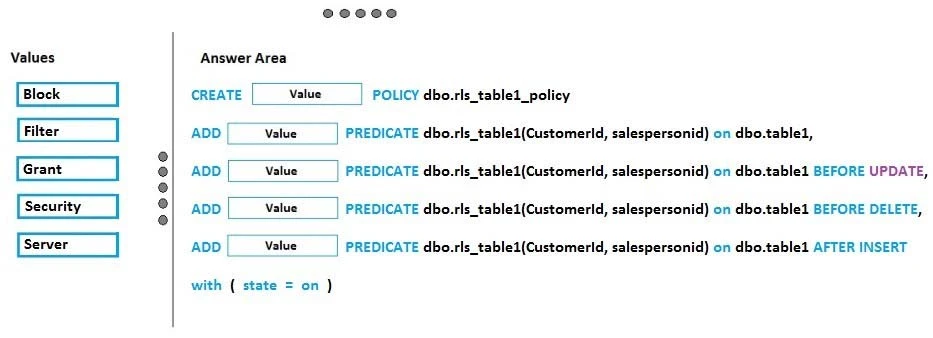
You need to implement rls_table1.

Which code should you execute? To answer, drag the appropriate values to the correct targets. Each value may be used once, more than once, or not at all. You may need to drag the split bar between panes or scroll to view content.

NOTE: Each correct selection is worth one point.

Select and Place:

Exam 70-475: Question 5 - Image 3
Show answer

Suggested answer

Box 1: Security -

Security Policy -
Example: After we have created Predicate function, we have to bind it to the table, using Security Policy. We will be using CREATE SECURITY POLICY command to set the security policy in place.
CREATE SECURITY POLICY DepartmentSecurityPolicy
ADD FILTER PREDICATE dbo.DepartmentPredicateFunction(UserDepartment) ON dbo.Department
WITH(STATE = ON)

Box 2: Filter -
[ FILTER | BLOCK ]
The type of security predicate for the function being bound to the target table. FILTER predicates silently filter the rows that are available to read operations.
BLOCK predicates explicitly block write operations that violate the predicate function.

Box 3: Block -

Box 4: Block -

Box 5: Filter -
Reference:
https://social.technet.microsoft.com/wiki/contents/articles/37813.sql-server-2016-implement-row-level-security-using-predicate-function-and-security-policy.aspx https://docs.microsoft.com/en-us/sql/t-sql/statements/create-security-policy-transact-sql Exam 70-475: Question 5 - Image 4

37 questions still locked

Your preview covered the first 5 questions. Unlock the rest to see every explanation and discussion thread, updated weekly

View plans

Choose your plan

Single payment · No subscription · No hidden fees

Standard

For a focused sprint before your exam date

$25USD

30 days of access, single payment

  • All 42 questions unlocked
  • Detailed answer explanations
  • Community discussions and votes
  • Weekly question updates
  • Printable PDF download
  • 100% refund if you do not pass

Premium

Extra runway, the PDF, and the refund guarantee

$35$60USD

90 days of access, single payment

Printable PDF download

Save every question as a PDF for offline study or printing.

  • All 42 questions unlocked
  • Detailed answer explanations
  • Community discussions and votes
  • Weekly question updates

Full refund if you do not pass

Send us your exam result and we refund the purchase.

Stories from the certified

Charles Sirois
Canada
As this was my first certification exam, I was understandably nervous about what to expect. These study materials made the preparation process much easier, and many of the questions closely reflected those on the actual exam.
Lance Chambers
United States
Wasted about a month going through the free dump sites scattered all over reddit, half the answers were wrong and the other half were for a version of the exam that doesn't even exist anymore. Eventually gave in and paid the small fee here, and the difference was night and day.
Alisha Kelly
Italy
Honestly, I had already gone through the official documentation quite thoroughly, but still didn't feel fully confident going in. This helped things finally click for me. I realized I knew the material, but just hadn't connected all the pieces yet.
Casper Claassen
Netherlands
Used this along with Microsoft Learn and the combo worked really well. The practice questions made the stuff I'd read actually stick. Passed first attempt, no complaints from me.
Gabriele Ghesla
Italy
The content is accurate and clearly presented, and it's more affordable than competitors. The team has been incredibly responsive whenever I've had an issue, and they've been open to small changes that improve the platform.
Charles Sirois
Canada
As this was my first certification exam, I was understandably nervous about what to expect. These study materials made the preparation process much easier, and many of the questions closely reflected those on the actual exam.
Lance Chambers
United States
Wasted about a month going through the free dump sites scattered all over reddit, half the answers were wrong and the other half were for a version of the exam that doesn't even exist anymore. Eventually gave in and paid the small fee here, and the difference was night and day.
Alisha Kelly
Italy
Honestly, I had already gone through the official documentation quite thoroughly, but still didn't feel fully confident going in. This helped things finally click for me. I realized I knew the material, but just hadn't connected all the pieces yet.
Casper Claassen
Netherlands
Used this along with Microsoft Learn and the combo worked really well. The practice questions made the stuff I'd read actually stick. Passed first attempt, no complaints from me.
Gabriele Ghesla
Italy
The content is accurate and clearly presented, and it's more affordable than competitors. The team has been incredibly responsive whenever I've had an issue, and they've been open to small changes that improve the platform.
Morgan Farmer
United Kingdom
I don't usually leave reviews, but this one felt worth sharing. The questions were quite close to what actually appeared on the exam, more than I expected. I spent about a week going through the material before my test, and it helped me feel more prepared.
Remi Nuyts
United States
Passed ITIL 4 Foundation with 87%. Material was enough by itself.
Archie Hopkins
United States
I had a smooth experience from start to finish. Access was available right away, no technical issues, which made it easy to get started. The content felt relevant and aligned well with what I was looking for.
Nancy Mcbride
United States
Does what it says it does. Content felt solid, nothing confusing to navigate and I didn't run into any weird issues. I been putting off scheduling the exam for a while and going through this gave me enough confidence to finally book it and pass.
Neil Savage
United States
A very quick response was received via email when a link issue occurred. The study materials provided were high quality and extremely helpful. I was able to complete the test successfully. Many thanks for the excellent support.
Morgan Farmer
United Kingdom
I don't usually leave reviews, but this one felt worth sharing. The questions were quite close to what actually appeared on the exam, more than I expected. I spent about a week going through the material before my test, and it helped me feel more prepared.
Remi Nuyts
United States
Passed ITIL 4 Foundation with 87%. Material was enough by itself.
Archie Hopkins
United States
I had a smooth experience from start to finish. Access was available right away, no technical issues, which made it easy to get started. The content felt relevant and aligned well with what I was looking for.
Nancy Mcbride
United States
Does what it says it does. Content felt solid, nothing confusing to navigate and I didn't run into any weird issues. I been putting off scheduling the exam for a while and going through this gave me enough confidence to finally book it and pass.
Neil Savage
United States
A very quick response was received via email when a link issue occurred. The study materials provided were high quality and extremely helpful. I was able to complete the test successfully. Many thanks for the excellent support.

Before you buy

Answers about access, updates, payments, and the refund policy.

01Are these real exam questions?

Our Microsoft 70-475 questions are based on real exam experiences and are continuously updated to match the current exam format. Most candidates who study with us report passing on their first attempt, based on a self reported post exam survey.

02What happens if I don't pass the exam?

With our Premium package, you get a 100% money back guarantee. If you don't pass your exam after studying with our materials, simply contact us with your exam results and we'll refund your purchase. Terms and conditions apply, read our full refund policy to learn more.

03How often are the questions updated?

Our question bank is updated regularly based on feedback from recent exam takers. We typically review and update our content every week with reports about new questions or changes to the exam format.

04Can I extend my access period?

Yes. When your access is close to expiring, you can renew it for another 30 days directly from the exam page. If you need more time while you are still preparing, reach out and we will help.

05Is this a single payment or a subscription?

This is a single payment with no recurring charges. Once you purchase, you get full access to all exam questions for the duration of your package (30 days for Standard, 90 days for Premium). No hidden fees or automatic renewals.

06How many questions are included?

You get access to all 42 questions in our database for the Microsoft 70-475 exam. This includes detailed explanations and answer justifications to help you understand the concepts thoroughly.

07Do you offer technical support?

Yes. Email us at hello@examice.com for help with access, billing, or the platform. We read every message and typically reply within 24 hours on business days.

08Is my payment secure?

Absolutely! We use industry standard SSL encryption and process all payments through Stripe, a trusted payment processor used by millions of businesses worldwide. Your payment and personal information are completely secure.

Ready to unlock the rest

All 42 questions from $25, single payment, instant access.

Back to plans