Question 6 of 190
You are developing a SQL Server Analysis Services (SSAS) tabular project that will be used by the finance, sales, and marketing teams.
The sales team reports that the model is too complex and difficult to use. The sales team does not need any information other than sales-related resources in the tabular model. The finance and marketing teams need to see all the resources in the tabular model.
You need to implement a solution that meets the needs of the sales team while minimizing development and administrative effort.
What should you do?
Correct Answer: C

Question 7 of 190
You are developing a SQL Server Analysis Services (SSAS) tabular project.
You need to grant the minimum permissions necessary to enable users to query data in a data model.
Which role permission should you use?
Correct Answer: F

Question 8 of 190
You are developing a SQL Server Analysis Services (SSAS) tabular project.
In the data warehouse, a table named Sales Persons and Territories defines a relationship between a salesperson's name, logon ID, and assigned sales territory.
You need to ensure that each salesperson has access to data from only the sales territory assigned to that salesperson. You need to use the least amount of development effort to achieve this goal.
What should you do? (More than one answer choice may achieve the goal. Select the BEST answer.)
Correct Answer: B

Question 9 of 190
You are troubleshooting query performance for a SQL Server Analysis Services (SSAS) cube.
A user reports that a Multidimensional Expressions (MDX) query is very slow.
You need to identify the MDX query statement in a trace by using SQL Server Profiler.
Which event class should you use?
Correct Answer: C

Question 10 of 190
DRAG DROP -
You install a SQL Server Analysis Services (SSAS) instance in tabular mode on a server.
While processing a very large tabular model, you receive an out-of-memory error. You identify that the amount of physical memory in the server is insufficient.
Additional physical memory cannot be installed in the server.
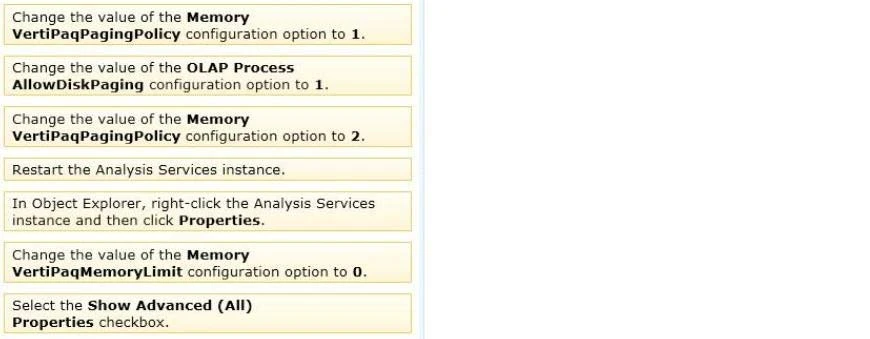
You need to configure the server to allow paging to disk by using the operating system page file (pagefile.sys).
Which four actions should you perform in sequence? (To answer, move the appropriate actions from the list of actions to the answer area and arrange them in the correct order.)
Select and Place:
Exam 70-466: Question 10 - Image 1
Correct Answer:
Note:
* View or set configuration properties in Management Studio
1. In SQL Server Management Studio, connect to an Analysis Services instance.
2. In Object Explorer, right-click the Analysis Services instance, and then clickProperties. The General page appears, displaying the more commonly used properties.
3. To view additional properties, click theShow Advanced (All) Propertiescheckbox at the bottom of the page.
Modifying server properties is supported only for tabular mode and multidimensional mode servers. If you installed PowerPivot for SharePoint, always use the default values unless you are directed otherwise by a Microsoft product support engineer.
* VertiPaqPagingPolicy
Specifies the paging behavior in the event the server runs low on memory. Valid values are as follows:
Zero (0) is the default. No paging is allowed. If memory is insufficient, processing fails with an out-of-memory error.
1 enables paging to disk using the operating system page file (pagefile.sys).
When VertiPaqPagingPolicy is set to 1, processing is less likely to fail due to memory constraints because the server will try to page to disk using the method that you specified. Setting the VertiPaqPagingPolicy property does not guarantee that memory errors will never happen. Out of memory errors can still occur under the following conditions:
There is not enough memory for all dictionaries. During processing, Analysis Services locks the dictionaries for each column in memory, and all of these together cannot be more than the value specified for VertiPaqMemoryLimit.
There is insufficient virtual address space to accommodate the process.
To resolve persistent out of memory errors, you can either try to redesign the model to reduce the amount of data that needs processing, or you can add more physical memory to the computer.
Applies to tabular server mode only
* Incorrect Answers: VertiPaqMemoryLimit
If paging to disk is allowed, this property specifies the level of memory consumption (as a percentage of total memory) at which paging starts. The default is 60. If memory consumption is less than 60 percent, the server will not page to disk.
This property depends on the VertiPaqPagingPolicyProperty, which must be set to 1 in order for paging to occur.
Applies to tabular server mode only.
Reference: Memory Properties; Configure Server Properties in Analysis Services Exam 70-466: Question 10 - Image 2