Question 6 of 550
Your network contains an Active Directory domain named contoso.com. The domain contains a server named Server1. Server1 runs Windows Server 2012 R2 and has the Hyper-V server role installed.
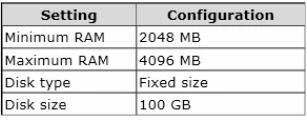
On Server1, you create and start a virtual machine named VM1. VM1 is configured as shown in the following table.
Exam 70-410: Question 6 - Image 1
You need to recommend a solution to minimize the amount of disk space used for the checkpoint of VM1.
What should you do before you create the checkpoint?
Correct Answer: C

Question 7 of 550
HOTSPOT -
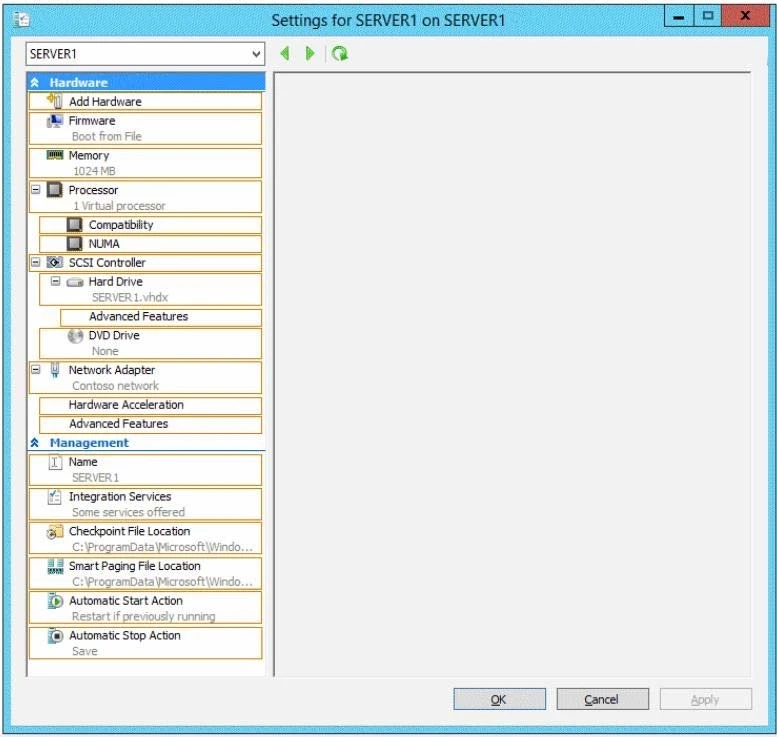
You have a Hyper-V host named Hyperv1 that runs Windows Server 2012 R2. Hyperv1 hosts a virtual machine named Server1. Server1 uses a disk named
Server1.vhdx that is stored locally on Hyperv1.
You stop Server1, and then you move Server1.vhdx to an iSCSI target that is located on another server.
You need to configure Server1 to meet the following requirements:
✑ Ensure that Server1 can start by using Server1.vhdx.
✑ Prevent Server1.vhdx from consuming more than 500 IOPS on the iSCSI target.
Which two objects should you configure? To answer, select the appropriate two objects in the answer area.
Hot Area:
Exam 70-410: Question 7 - Image 1
Correct Answer:
Exam 70-410: Question 7 - Image 2
Question 8 of 550
You have a print server named Server1 that runs Windows Server 2012 R2.
You discover that when there are many pending print jobs, the system drive occasionally runs out of free space.
You add a new hard disk to Server1.You create a new NTFS volume.
You need to prevent the print jobs from consuming disk space on the system volume.
What should you modify?
Correct Answer: C

Question 9 of 550
HOTSPOT -
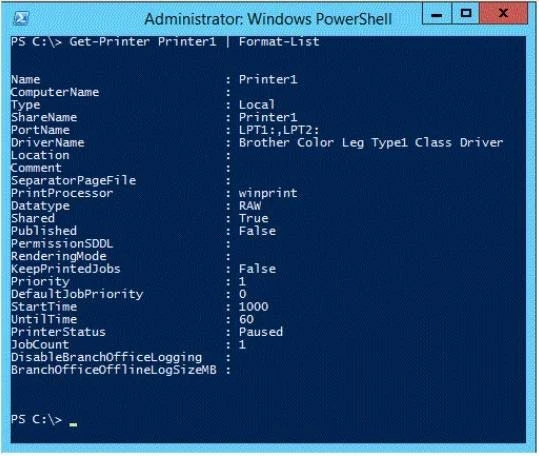
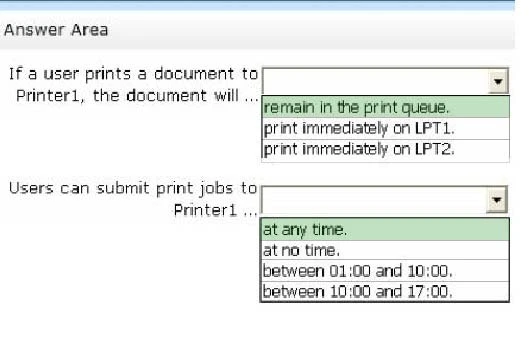
A printer named Printer1 is configured as shown in the exhibit. (Click the Exhibit button.)
Exam 70-410: Question 9 - Image 1
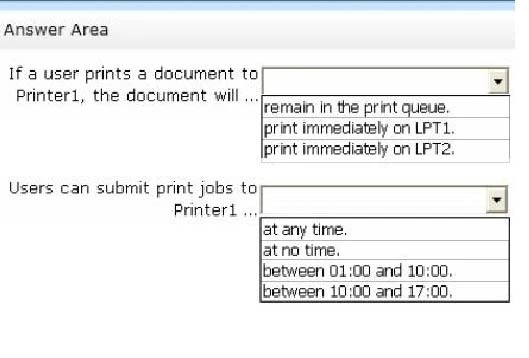
To answer, complete each statement according to the information presented in the exhibit. Each correct selection is worth one point.
Hot Area:
Exam 70-410: Question 9 - Image 2
Correct Answer:
* The printer is paused.
* Jobs can always be permitted (even if the printer is paused, or printer not started).
Note:

StartTime -
Date and time that a printer can start to print a job if the printer is limited to print at specific times. This value is expressed as the time elapsed since 12:00 AM
GMT (Greenwich Mean Time).
This is sort of a trick question. As it stands, when the PowerShell script was executed, the printer is in "Paused" status, so any submitted job will go to the queue and remain there until the status is "Available". As for the ability to submit a job, a user can SUBMIT the job at any time. If it is outside of the printer's availability range, it will simply remain in the queue until the printer's start time is reached. Exam 70-410: Question 9 - Image 3
Question 10 of 550
HOTSPOT -
Your network contains an Active Directory domain named contoso.com. The domain contains a print server named Server1 that runs Windows Server 2012 R2.
You share several printers on Server1.
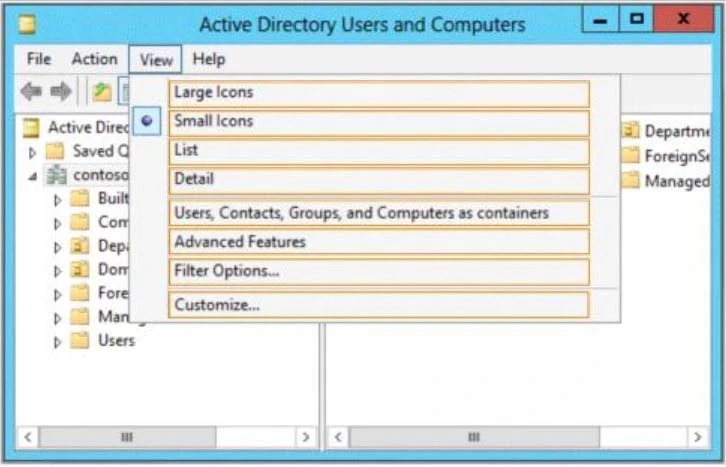
You need to ensure that you can view the printer objects associated to Server1 in Active Directory Users and Computers.
Which option should you select?
To answer, select the appropriate option in the answer area.
Hot Area:
Exam 70-410: Question 10 - Image 1
Correct Answer:
You can view printer objects in Active Directory by clicking Users, Groups, and Computers as containers from the View menu in the Active Directory Users and
Computers snap-in. By default, printer objects are created under the machine object in which they are shared. After you turn on the Users, Groups, and
Computers as containers option, you can see printers by expanding the printer's host computer.
Reference: http://support.microsoft.com/kb/235925 Exam 70-410: Question 10 - Image 2