Question 6 of 127
DRAG DROP -
A company plans to upgrade from a SharePoint Server 2010 farm to a SharePoint Server 2013 farm.
You plan to install components that are required on the new farm before upgrading.
You need to identify the customizations that must be installed on the new farm.
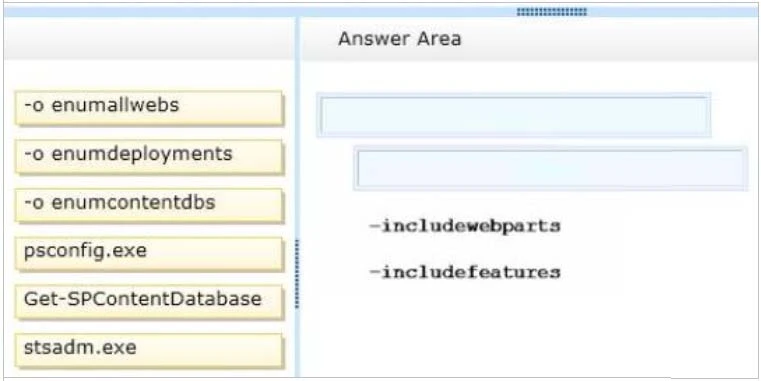
Which command should you run? (To answer, drag the appropriate command and switch to the correct locations in the answer area.)
Select and Place:
Exam 70-332: Question 6 - Image 1
Correct Answer:
Note:
Identify all server-side customizations and install them before you upgrade
One common error during upgrade is missing server-side files either files that were installed with SharePoint 2010 Products or customized files. When you prepared for upgrade, you should have created an inventory of the server-side customizations (such as site definitions, templates, features, Web Parts, assemblies) that your sites required. Check this inventory to make sure that all the files that are needed for your customizations are installed in your new environment.
You can use the enumallwebs operation in Stsadm.exe to identify server-side customizations that are being used. Exam 70-332: Question 6 - Image 2
Question 7 of 127
DRAG DROP -
An organization migrates a SharePoint environment from SharePoint 2010 to SharePoint 2013. The organization has a web application at http:// intranet.contoso.com.
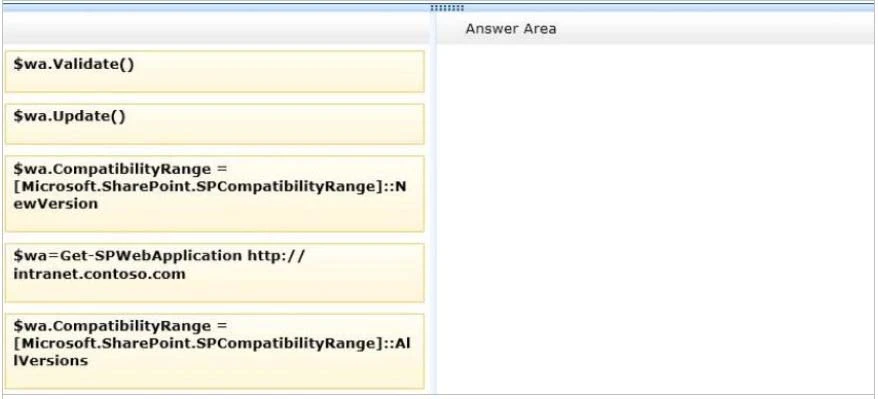
A corporate governance policy states that users of the web application must be able to create sites only with a compatibility level of SharePoint 2013.
You need to implement the governance policy.
Which three Windows PowerShell cmdlets should you run in sequence? (To answer, move the appropriate cmdlets from the list of cmdlets to the answer area and arrange them in the correct order.)
Select and Place:
Exam 70-332: Question 7 - Image 1
Correct Answer:
Note:
* RangeNameis one of the following values:OldVersions,NewVersion,AllVersions.
Here we must NewVerssion as " the web application must be able to create sites only with a compatibility level of SharePoint 2013".
* The last step is to validate.
* At the Windows PowerShell command prompt, type the following command to change the compatibility range settings to a specific range:
$wa=Get-SPWebApplication<URL>
# Stores the web application at that URL as a variable
$wa.CompatibilityRange = [Microsoft.SharePoint.SPCompatibilityRange]::<RangeName>
# Specifies which range to use
$wa.Update()
# Updates the CompatibilityRange setting to use only the range you specified
$wa.CompatibilityRange
# Returns the new CompatibilityRange for the web application
Where:
<URL> is URL for the web application that you want to change.
RangeName is one of the following values: OldVersions, NewVersion, AllVersions.
Reference: To change compatibility range for site creation modes for a web application by using Windows PowerShell Exam 70-332: Question 7 - Image 2
Question 8 of 127
A SharePoint 2010 environment contains a Microsoft SQL Server 2008 R2 database instance named SP-SQL that hosts the databases for the farm.
You are upgrading the farm to SharePoint 2013.
You need to ensure that users can access the unmodified farm contents during the upgrade process.
What should you do?
Correct Answer: B

Question 9 of 127
DRAG DROP -
You are preparing to upgrade from a SharePoint 2010 environment to a SharePoint 2013 environment.
The SharePoint 2010 environment includes a large number of content databases. You restore backups of the content databases to the Microsoft SQL Server instance in the SharePoint 2013 environment.
You need to upgrade all content databases and minimize monitoring requirements.
What should you do? (To answer, drag the appropriate terms to the correct location or locations in the answer area. Each term may be used once, more than once, or not at all. You may need to drag the split bar between panes or scroll to view content.)
Select and Place:
Correct Answer:
Note:
* To attach a content database to a web application by using Windows PowerShell
Start the SharePoint 2013 Management Shell.
At the Windows PowerShell command prompt, type the following command and then press ENTER:
Mount-SPContentDatabase -Name DatabaseName -DatabaseServerServerName -WebApplication URL
* Attach the remaining databases (no need to wait until first command finishes and use new instance)
After you restore the first content database and verify success, you can continue to restore and upgrade other databases. You can perform parallel database attach upgrades to upgrade more than one database at a time. Use separate Command Prompt windows (i.e new instance) to run multiple upgrades. It is recommended that you separate the start time for each new database upgrade session by several minutes to prevent issues with temporary locks set for the web application during attachment. Otherwise you might receive an error on the upgrade session. The wait time to clear temporary locks varies depending on the number of site collections, or the speed of the database server hardware.
Reference: Upgrade content databases to SharePoint Exam 70-332: Question 9 - Image 1
Question 10 of 127
DRAG DROP -
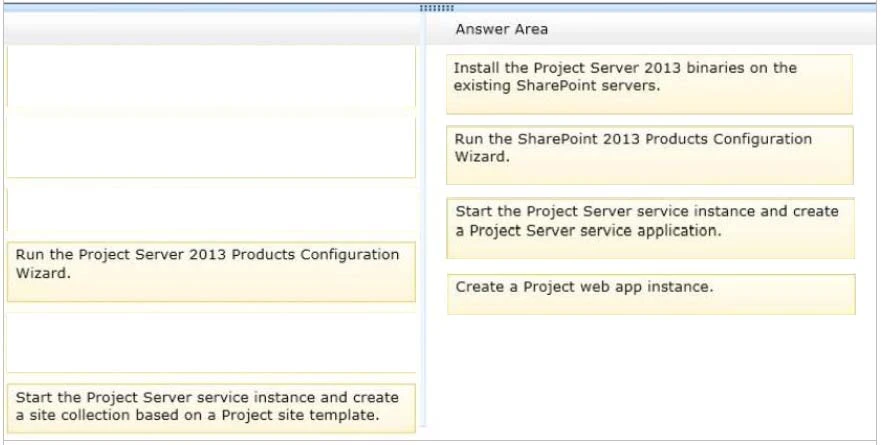
An organization plans to deploy Microsoft Project Server 2013.
You need to install and configure Project Server in an existing SharePoint farm.
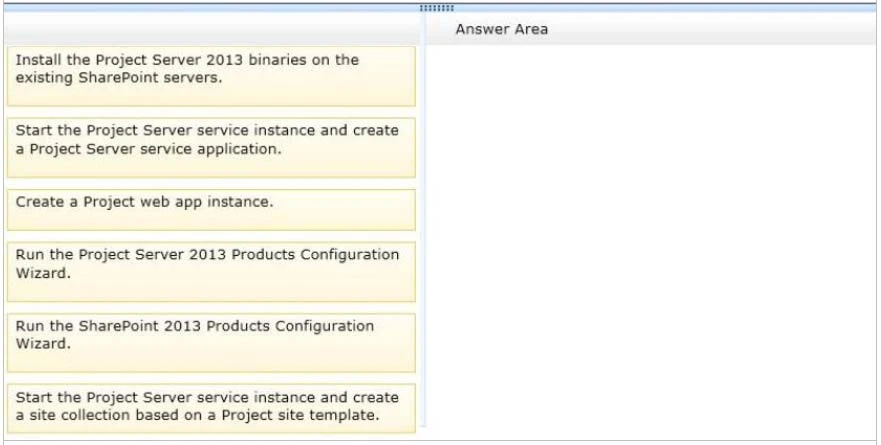
Which four actions should you perform in sequence? (To answer, move the appropriate actions from the list of actions to the answer area and arrange them in the correct order.)
Select and Place:
Exam 70-332: Question 10 - Image 1
Correct Answer:
Note:
* (step 1) If you already installed and configuredSharePoint Server 2013 and you would like to try out Project Server 2013features theres no need to install another SharePoint server. You can simply integrate between Project Server 2013and SharePoint Server 2013using an existing site collection.
Project Server 2013runs as a service application underSharePoint Server 2013. In order to integrate between those products,Project Server 2013must be installed on each application server in your SharePoint farm.
Reference: Add an application server to a farm in Project Server 2013
* (step 2) First thing that has to be done after installing Project Server 2013 is to run the SharePoint Products Configuration Wizard. The wizard has to run onall application servers in your farmbefore you can start using Project Server.
* (step 3) Start the Project Server Application Service.
Create a Project Server service application. Open SharePoint 2013 Central Administration ->Application Management ->Manage service applications -
>New ->Project Server Service Application.
Specify anamefor the service applicationand choose an application pool.
* (step 4)
Create a Project Web App database. Open the SharePoint 2013 Management Shell and
Use the following PowerShell cmdlet: New-SPProjectDatabase –Name DatabaseName -ServiceApplication "ServiceApplicationName" -
DatabaseServerSQLServerInstance -Tag String.
For example: New-SPProjectDatabase –Name ProjectWebApp1 -ServiceApplication "ProjectServiceApp " -DatabaseServer sp2013srv -Tag
"ProjectWebApp1DB"
Reference: How to integrate Project Server 2013 with SharePoint Server 2013 Exam 70-332: Question 10 - Image 2