
You are using the Quick Install option to install configuration changes on the managed FortiGate.
Which two statements correctly describe the result? (Choose two.)
Using the Quick Install option in FortiManager installs device-level changes on the FortiGate device without launching the Install Wizard, ensuring rapid deployment. Additionally, it applies provisioning templates changes directly on the FortiGate device, as these templates consist of settings at the device level.
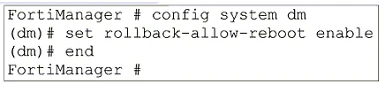
The command set rollback-allow-reboot enable allows the FortiGate to reboot and recover the previous configuration from its configuration file. This command is useful in scenarios where a configuration change causes issues, such as the FGFM tunnel going down, ensuring the device can revert to a known good state automatically to maintain connectivity and functionality.
To review, approve, or reject firewall policy changes on FortiManager, the workspace mode should be set to workflow mode and use the ADOM (Administrative Domain) locking feature. Workflow mode allows the creation, configuration, and installation of policies to be controlled through an approval process, ensuring that changes are reviewed before implementation.
ADOM revisions are used to save the current state of the entire ADOM. This includes all policy packages, objects, and settings within the ADOM. The purpose is to create a complete snapshot of the ADOM, ensuring that all aspects of the ADOM's configuration are captured at a specific point in time, not just individual components such as policy packages or objects.
The configuration of a new OSPF route on FortiManager that has not yet been pushed to the managed FortiGate device would be saved in the device-level database. This is where the configurations specific to individual devices are stored and managed before being deployed to the respective devices.